As the workplace becomes increasingly digital due to the current state of this pandemic, new ways of communication and collaboration are emerging every day. Let’s learn about what exactly is a digital workplace and why it really matters. Read on…
What is the workplace? We often associate workplaces with an office, because, well, we do most of our work there.
It is our “place of work” after all. However, technology, like everything else, has disrupted the typical workplace by helping employees work remotely. Now, thanks to technology, your workplace is wherever you sit down.
At the coffee house, at a bar, in the comfort of your home, or at a co-working space. The place where people work has essentially become non-stationary.
Today’s technology, tools, and apps have given birth to this always connected, instant access environment. Our tools have significantly blurred the lines between the physical office and the place where work actually happens.
The days of sitting in your office cubicle eight hours a day are slowly disappearing. So are the gaps between personal and professional life through remote working.
As the workplace becomes digital, new ways of workplace communication and collaboration are emerging every day. This digitization of our work is fundamentally changing how we handle work, relationships, and everything in between.
Thus, it becomes imperative that we learn more about this cultural change. We have to try to find ways to make the best to use it before the changes get too big to handle. Let’s first start with the basics!
What is a digital workplace?
A digital workplace is a broad term. As the phrase has grown in popularity over the last decade, so are the interpretations of its definition.
A digital workplace can be defined as a virtual space where employees carry out their work in today’s day and age.
It’s an always-connected work environment that provides instant access to every resource employees need to get work done from anywhere.
According to Deloitte, “The digital workplace encompasses all the technologies people use to get work done in today’s workplace–both the ones in operation and the ones yet to be implemented. It ranges from your HR applications and core business applications to e-mail, instant messaging and enterprise social media tools and virtual meeting tools.”
Digital workplaces aim to improve communication, collaboration, content management, document management and information flow across the organization and lead to increased productivity and employee efficiency.
Apart from work apps, the cloud is also a part of the digital workplace as it ensures that companies can function beyond geographical boundaries,work timings or via remoting wo
Read more: What is Workplace Collaboration And How To Do It Right
Why is the digital workplace important?
A digital workplace is essentially a fundamental shift in the working mindset of an organization. Organizations are slowly coming to terms with the fact that work is no longer a place we go to.
In fact, it’s a virtual modern counterpart to the traditional office space where work comes to us, courtesy of technological advancements!
There are many reasons why a digital workplace is absolutely necessary to carry out business in today’s day and age. Some of these include:
1. Improved Internal Communication and Collaboration
A digital workplace opens up an amazing number of opportunities to keep in touch with your peers at all times.
In this fast-paced world, people can’t afford to wait for an email reply, or worse, let it get lost in your inbox wasteland.
People prefer newer, faster communication tools specifically instant messaging and real-time collaboration tools to get work done quickly. This, in turn, increases transparency amongst employees and helps develop better interdepartmental relationships.
2. The Culture of Telecommuting
According to a Survey, telecommuting has risen 79 percent between 2005 and 2012 and now makes up 2.6 percent of the American workforce, or 3.2 million workers.
The shift towards remote working is an obvious one:
- It helps minimize office finances like rent, stationery, utilities, etc.
- It helps saves commute time for employees, which results in higher productivity.
- It reduces the need for unnecessary office meetings, water-cooler talks, and office politics.
This rise in telecommuting has been possible due to the increased acceptance of a digital working environment that allows employees to work from anywhere they want.
- More than 77% of people working remote report greater productivity and 52% are less likely to take time off
- According to a survey of American remote workers, about 91 percent of people who work from home feel that they’re more productive than when they’re in an office.
- A ConnectSolutions study also found that 77 percent of remote workers get more done in fewer hours thanks to fewer distractions like meetings, conversations, and noisy coworkers.
Since remote workers tend to be more productive, businesses end up enjoying better returns.
Read more: 9 Must-have Saas Tools For Remote Teams
3. Reduce the Reliance on Paper
If your company still uses paper documents, switching to a digital workplace can help reduce the reliance on paper and save additional costs for printing, storing, maintenance, filing, etc.
According to hubshare.com, companies with annual revenues between $500k and $1 million can save as much as $40k per year by switching to digital document management.
Laserfiche estimates a 20% time savings based on filing and retrieval efficiencies, eliminating misfiling and workflow efficiencies. Increased efficiency, as well as greater staff productivity, can save up to 6,000 hours annually, or 2.4 full-time staff positions.
Going paper-free also helps you reduce a huge amount of paper waste from the environment, helping you reduce thousands of paper sheets each month.
This not only helps you make sustainable and ethically correct choices, but also provides you with a social mission of which both clients, employees, governments, and your customers, want to be a part of.
4. Improve Overall Office Efficiency
The digital workplace helps improve overall office efficiency. Since you don’t have to go to an office every day to do your job, you save on crucial commute time which can be spent on doing productive work.
Moreover, having digital solutions in place allows you to quickly find the file, information and content you are looking for while working remotely, rather than shoulder tap other employees and disturb everyone’s workflow.
Thus, a digital workplace helps save you crucial time and allows you to channel it into more productive work.
Read more: The Ultimate Guide To Document Management Workflow
5. Knowledge Sharing
According to data, Fortune 500 companies lose roughly $31.5 billion a year by failing to share knowledge. As baby boomers continue to retire, they are taking away their wealth of knowledge and experience with them.
This knowledge is extremely useful in teaching new hires the do’s and don’ts of the organization and quickly lay the foundation of a much more efficient workforce.
Digital workplace tools like knowledge management systems allow organizations to document the know-how and experience of senior managers so that the knowledge of the organization does not leave when the employee leaves.
With a knowledge management system in place, your current or future employees can easily access this information and continue doing their work with ease.
6. Information Access
We bet you have no idea how much productive time your employees are leaving on the table just because they couldn’t find the desired information or content they were looking for.
Since all your important work documents are scattered over Google Drive, OneDrive, email attachments, PC folders, and USB sticks, how can you count on yourself to find the exact piece of information you need at the time you need it!
- According to a McKinsey report, employees spend 1.8 hours every day—9.3 hours per week, on average—searching and gathering information.
- Almost 20 percent of the business time – the equivalent of one day per working week – is wasted by employees searching for information to do their job effectively.
- IDC data shows that “the knowledge worker spends about 2.5 hours per day, or roughly 30% of the workday, searching for information.
A major advantage of having a digital workplace structure in place is the ease of access to information.
A digital workplace provides a central location for all files, documents, weblinks, and other rich media. This makes it extremely easy for team members, irrespective of their location to access information from any device quickly.
Employees no longer need to save files to their hard drives or on those forgettable USB sticks. Just log in to your digital workplace and you’re good to go!
7. Provides a Competitive Advantage
The companies using a digital workplace clearly possess a competitive edge on those who are yet to embrace this shift into remote working. There are many advantages to a company going digital have over those who aren’t:
- They are saving supply and storage cost
- They are saving money on new hires to manage paper documents
- Digital documents tend to be more accurate
- Employees can get access to information quickly and easily, saving them time and effort
- Employees can provide better service to customers and offer better turnaround times
Since employees are saving a lot of time, they can focus on the things that really matter and contribute to the business’s success more effectively.
Read more: 9 Best Digital Workspace Software for Collaboration!
Top Digital Workspace Solutions
Digital workspaces have emerged as a key part of the modern distributed workforce. Let’s dive into the top 5 digital workspace solutions you need to know, starting with a tool that is revolutionizing the digital workspace.
1. Bit.ai
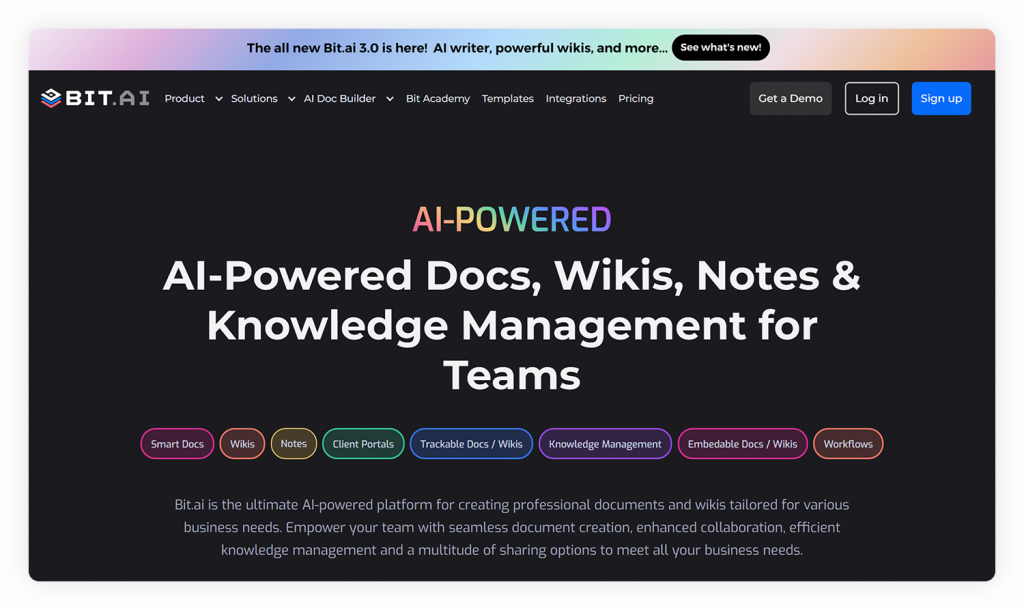
Bit.ai is an AI-powered docs, wikis, and knowledge management platform designed to help teams create, share, and manage all their documents, wikis, and knowledge in one organized digital workspace. Unlike traditional docs, Bit.ai turns every piece of content into a dynamic, living hub. With real-time collaboration, smart integrations, and powerful AI features, your documents stay fresh, interactive, and always up to date.
Whether you’re a small startup or a global enterprise, Bit.ai makes it easy to capture ideas, share knowledge, and keep everyone aligned—all from one seamless workspace.
Key Features:
Smart Wiki and Smart Documents
Bit.ai transforms your documents into living, interactive content hubs. Easily add rich media like videos, charts, and live widgets. Turn any document into a structured wiki with clean subpages and consistent formatting across all your workspaces, creating a truly organized knowledge base.
Smart Workspaces
Create smart workspaces for different projects, teams, or clients to keep everything structured and accessible only to authorized members.
Collaboration in real time, @mentions, Comments, and Activity Tracking
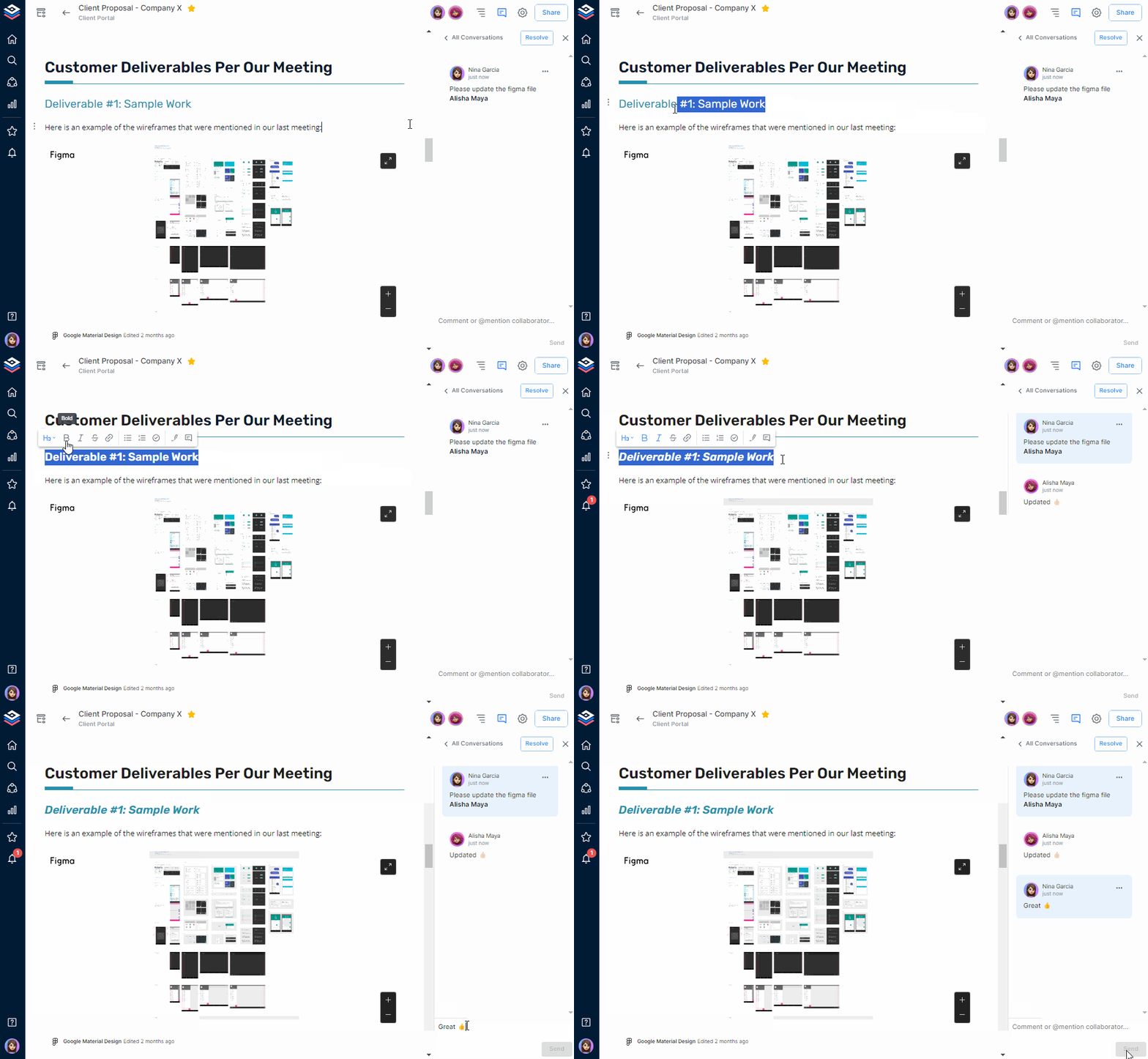
Collaborate effortlessly with real-time editing where multiple users work on the same document simultaneously. Leave inline comments, tag teammates with @mentions to get their attention, and track all document changes with full version history to see who edited what and when. You can even roll back changes if needed.
100+ Rich Media Integrations
Easily add the content from more than 100+ applications of the most popular tools, such as Figma, Google Drive, GitHub, Tableau, Vimeo, and Scribd, to drop the content directly into your documents.
Multiple Sharing Methods & Access Control
Easily share your documents and wikis with guests or clients by assigning read-only or comment-only permissions, ensuring complete control over who can view or edit your content. You can also protect your docs with password protection to add an extra layer of security.
AI Genius Writer and AI Doc Builder
Bit.ai’s AI Genius Writer helps in refining content, brainstorming, and language translation, which makes document drafting faster and easier. Its AI Doc Builder takes this further ahead by automatically formatting and organizing your content into polished, professional documents just by answering a few questions, saving time while ensuring consistency and quality.
Pricing: Free Plan & Paid Plans Starting at ~$8/user/month
2. Google Workspace
 Google Workspace is Google’s all-in-one productivity and collaboration suite. Formerly G Suite, Google Workspace provides an integrated selection of tools: Gmail, Drive, Docs, Sheets, Meet, and Calendar, so teams can work together. From real-time editing to cloud-native infrastructure, Google Workspace is a dependable tool for companies big and small.
Key Features
- Real-time collaboration: Work together on Google Docs, Google Slides, and Google Sheets at the same time without version confusion.
- Built-in video meetings: Google Meet is integrated with Gmail and Calendar, making it easy to schedule and join calls.
- Cloud-based storage: Google Drive stores your files in the cloud, so teams can access and share them from anywhere.
- Simple sharing and access: Files and folders are easy to share with team members or external collaborators.
- Admin controls and security: Manage user access, document permissions, and company-wide data privacy settings from one place.
Pricing: Free Plan & Paid Plans Starting at ~$7/user/month
3. Microsoft Teams
 Microsoft Teams is not just a chat tool; it’s a one-stop work collaboration tool that brings together messaging, video meetings, file sharing, and real-time collaboration. Microsoft Teams was developed to be the ultimate teamwork hub that integrates well with the Microsoft 365 platform and other applications like Word, Excel, PowerPoint, and SharePoint to promote teamwork and reduce workflow interruptions by limiting the number of tool switches. Microsoft Teams has features such as channels, guest access, secure meetings, and shift scheduling to support everything from normal working life, such as team meetings and check-ins, to projects that require multiple members to be involved. It supports remote work and in-person teamwork.
Key Features:
- Channel-based messaging: Keep conversations organized by topic, project, or team so nothing gets lost in the mix.
- Built-in Office editing: Open and co-edit Word, Excel, and PowerPoint files right inside Teams without switching apps.
- Instant connection: Start high-quality video or audio calls with your team anytime, no extra setup needed.
- File sharing with storage: Shared files are automatically saved in Teams, so they’re easy to find later.
- Security and compliance: Comes with built-in tools to protect your data and meet your company’s security standards.
Pricing: Free Plan & Paid Plans Starting at ~$4/user/month
4. Miro
 Miro allows teams to realize and execute their visions by translating thoughts and ideas into something that can be shared and built on together. It can be extremely powerful when there is a need for rapid collaboration among participants who are in distinct locations. Whether you are leading a strategy session, gathering perspectives from a range of stakeholders, or simply trying to ensure everyone is focused on the same ideas, Miro provides the visual representation that allows your team to work through ideas collectively. It is more than sticky notes and whiteboards; it is a space where you can create clarity, alignment, and momentum in the middle of the creative maelstrom.
Key Features
- Visual collaboration space: Miro gives you a giant, flexible canvas for brainstorming, mapping ideas, and planning workflows together in real time.
- Supports design thinking: Great for things like user journeys, mind maps, and sprint planning, where input from everyone can be captured on the fly.
- Packed with tools: Use sticky notes, templates, voting, timers, and even built-in video chat to keep collaboration flowing.
- Strong integrations: Connects with tools like Jira, Slack, and Google Drive to fit into your existing workflow.
- Great for remote teams: This is especially useful for creative teams or product managers who need to stay aligned and move quickly, even if they are in multiple locations.
Pricing: Free Plan & Paid Plans Starting at ~$8/user/month
5. Slack
 Slack is an excellent communication tool created to help teams stay connected, organized, and productive. The foundation of Slack is channels (dedicated spaces) where conversations, files, and tools are centralized by topic, project, or team. This structure gives communication a focus and organizes it in a manner that makes it searchable, so no information gets lost in transit. Whether your team is fully remote, hybrid, or in the office together, Slack is able to put everyone together in the same virtual room.
Key Features
- Threaded messaging: Keep side conversations organized without disrupting the main discussion. Everything stays connected and easy to follow.
- Instant voice huddles: Jump into quick audio chats when something’s urgent—no need to schedule a full meeting.
- No-code automation: Workflow Builder lets you automate repetitive tasks and clarify processes without writing a single line of code.
- Thousands of integrations: Connect Slack to over 2,400 tools like Google Drive, Salesforce, GitHub, and Zoom to create a central work hub.
- Enterprise-level security: With DLP, encryption, and compliance controls, Slack gives your IT team the tools to keep collaboration secure and trackable.
Pricing: Free Plan & Paid Plans Starting at ~$7.25/user/month
As you have learned about these best digital workplaces, now you have to select a solution that suits your team in terms of its size, objectives, and mode of work. All these tools have their own strong points, whether this is document collaboration and video conferencing or visual planning and messaging, so they match well with your team culture and needs.
Conclusion
As people around the world find ways to keep social distancing, digital workplace is completely revolutionizing the way we interact, engage and carry out our business in this pandemic.
Though there are many advantages to this always connected, instant access, fast and efficient work environment, the sheer number of tools we use to get work done ends up nullifying all the upside.
We thus, often end up with the perception of being productive while we struggle to find that important file a co-worker emailed a week ago.
An ideal digital workplace is the one that allows the work to come to you, not the other way around.
A workplace to work remotely where you can gather all your co-workers – no matter where you are in the world- brainstorm ideas, communicate, collaborate, store files and knowledge, and get work done without having to jump between tens of hundreds of apps.
Bit provides a one-stop-solution to this problem and is a step in the right direction. Would you like to join us in our quest for a truly digital workplace?
Further reads :