Running a business means making sure essential tasks don’t depend on just one person. Because when your best employee takes a week off, suddenly nobody knows how to send an invoice, handle a refund, or fix the weekly report. Someone has to message them on vacation to ask, “Hey, how do you do this again?”
And all this happens when a process lives in one person’s head and nobody wrote down the right way to do it. As a result, employees follow different approaches to the same task, and small mistakes keep repeating.
Process documentation fixes this. It is a written or visual record of how a task gets done: who does it, which steps they follow, which tools they use, and what the expected outcome looks like.
In this guide, you will learn what process documentation is, the main types, and how to create one for your team. You will also get a ready-to-use template and best practices to help document your first business process!
What Is Process Documentation?
Process documentation is a written or visual record of how a task, operation, or workflow is performed. It lists the steps of the process in order, names who is responsible for each one, notes the tools needed, and describes what an outcome looks like. This gives employees a clear set of instructions to follow so they can complete tasks consistently without relying on verbal guidance or another team member’s memory.
A process can be small, like resetting a customer’s password, or large, like launching a new product. If any task repeats and it involves more than one person, it is worth documenting.
A complete process document usually answers six questions:
- Why does this process exist?
- Who owns it, and who takes part?
- When does it start, and what triggers it?
- What are the steps, in order?
- Which tools, files, or systems are needed?
- What does a correct result look like?
Types of Process Documentation
Process documentation comes in different formats, depending on how a team needs to use the information. A manager may need a visual overview of an entire workflow, while a new hire may need step-by-step instructions to complete a specific task. Here are the most common types of process documentation and when to use them.
| Type | Best for | Format | Example |
| Process narrative | Explaining the big picture of a workflow | Written paragraphs | How a lead moves from first contact to signed contract |
| Step-by-step procedure (SOP) | Tasks that must be done the same way every time | Numbered list | Steps to onboard a new vendor |
| Flowchart / process map | Workflows with decisions and handoffs | Diagram | How a support ticket is routed and escalated |
| Checklist | Quick tasks where missing a step causes problems | Tick-box list | Pre-launch checklist for a website |
| RACI matrix | Clarifying who does what | Table | Roles for a product release |
| Policy or playbook | Rules, standards, and guidance for decisions | Written document | Refund policy, sales playbook |
| Video walkthrough | Software tasks and hands-on skills | Screen recording | How to set up a campaign in your ad platform |
| Knowledge base article / runbook | Technical tasks and troubleshooting | Searchable article | What to do when a server goes down |
Let’s now go through each type of process documentation in detail.
1. Process narratives
A process narrative describes a workflow in plain paragraphs, like a short story with a beginning, middle, and end. It explains why the process exists, what triggers it, and how work moves from one person or team to the next.
When to use process narratives: Use process narratives when readers need to understand the purpose and context of a process before learning the individual steps. It works well for managers, auditors, and new hires who want the big picture.
2. Step-by-step procedures (SOPs)
A standard operating procedure is a numbered, step-by-step set of instructions for completing a specific task or business process. Each step focuses on one action and explains what needs to be done, in what order, and which tools or resources may be required.
When to use SOPs: Use SOPs for repeatable tasks where mistakes are costly, such as processing payroll, handling customer data, or running safety checks.

Already documenting repeatable tasks?
3. Flowcharts and process maps
A flowchart uses boxes, arrows, and decision points (yes/no questions) to show how a process flows. Readers can see the whole workflow at a glance, including who passes work to whom.
When to use flowcharts and process maps: Use flowcharts when a business process involves multiple stages, decision points, or possible outcomes.
For example, an invoice approval workflow may require one approval for invoices under $1,000 and two approvals for higher amounts. A flowchart makes these different paths easy to understand and helps teams identify delays, unnecessary steps, and workflow gaps.
4. Checklists
A checklist is a short list of items to tick off. It does not explain how to do each task. It makes sure nothing in your to-do list gets skipped.
When to use checklists: Use checklists for tasks that people already know how to do but sometimes forget parts of, like a monthly report review or an employee’s first-day setup.
5. RACI matrices and role documentation
A RACI matrix is a table that shows who is Responsible (does the work), Accountable (owns the result), Consulted (gives input), and Informed (is kept updated) for each task in a process.
When to use RACI matrices: Use it when confusion about ownership slows work down. If two teams each assume that the other team is handling any task, a RACI matrix settles it.
6. Policy documents and playbooks
A policy document defines the rules, requirements, and boundaries employees must follow. A playbook, on the other hand, offers practical guidance for handling specific situations, including those that require judgment or a flexible approach.
When to use policy documents and playbooks: Use policies for rules that people must have to follow with no exceptions, and playbooks for situations where the right answer depends on context and situation.
7. Video and screen-recording walkthroughs
A video walkthrough records someone doing the task on screen while explaining each step out loud.
When to use video and screen-recording walkthroughs: Use it for software-based tasks, where seeing the clicks is faster than reading about them. Pair the video with a short written summary, because people cannot search inside a video the way they can search text.
8. Knowledge base and runbooks
A knowledge base documents answer one specific query or explains one task, such as “How to reset a customer’s two-factor authentication.” A runbook, on the other hand, is a detailed operational guides that outline the exact steps technical teams need to do when a specific problem occurs, such as a failed deployment.
When to use knowledge base and runbooks: Use them when people need to find answers quickly on their own, without asking a teammate. Good titles and a working search function matter more here than anywhere else.
Looking for a better way to organize company procedures, troubleshooting guides, and internal resources?
Benefits of Process Documentation
When it comes down to creating new processes or refining existing ones, there’s no better way to do it than to document the processes. The following are primary benefits that an organization seeks to achieve by documenting its processes:
1. Improving Business Processes and Workflow Efficiency
Most companies use repeatable business processes to get work done. People often downplay writing down steps of a process and rely on their “memory” or “guesswork” to perform tasks.
The bigger problem is that you cannot improve a process if you don’t have a clear understanding of how it currently works. Before identifying areas for improvement, you need to know:
- Which business processes are currently being followed
- What the role of each step is in a process
- What the role of your co-workers is in the process cycle
- How the process impacts the overall bottom line of the business
To know what to do, you must know where to start.
Process documentation, thus, provides the eagle-eye view to a process and helps businesses figure out new strategies and tactics to create efficiencies in the workplace.
2. Simplifying Employee Training and Onboarding
Process documentation also acts as an essential training guide for new employees. Documentation acts as a structured learning guide for new hires, helping them understand their responsibilities and get up to speed with their new roles.
This saves a significant amount of time for managers who would otherwise need to explain detailed processes to new hires.
It accelerates the learning curve exponentially and provides all the resources needed to understand the workflow in one place. It helps them understand their role and how it fits into the overall organization.
3. Clarifying Roles and Responsibilities
Another key reason for documenting processes is to remove any sort of ambiguity of role and responsibility in the workplace. Business process documents clearly state:
- Tasks required to complete a process
- Individual roles and responsibilities
- The person assigned to do the task
- How to perform the task
This documented methodology reduces a lot of confusion in the workplace.
Anyone can access the process document anytime as it acts as a central repository for knowledge and information for the whole organization. This type of transparency stops any sort of tension from building within teams.
Want to give employees one reliable place to find company procedures, policies, and team resources?
Discover how a corporate wiki can bring organizational information together →
4. Preserving Organizational Knowledge
One often overlooked benefit of process documentation is its ability to preserve vital information and knowledge.
By making a note of each and every step, everyone in the team knows how a particular process is carried out. So when a “high profile” or a critical employee leave, he/she doesn’t take the process knowledge with them.
Want to make sure valuable employee knowledge doesn’t disappear when someone leaves?
5. Supporting Process Analysis and Continuous Improvement
Process documentation makes it easier for management teams to analyze and compare previous versions of a process with new ones and calculate efficiency, reduced costs, and analyze other important metrics.
It helps management find whether their efforts are reaping the results they hoped for or should they try a different approach.
The learnings from process documentation can also be replicated to other processes, which can save a lot of time and money.
Who Is Responsible for Process Documentation?
The process owner is responsible for process documentation. This is the person who manages the process and is accountable for its performance and outcomes. While they do not have to write every detail themselves, they ensure the documentation is accurate, complete, approved, and regularly updated.
However, documentation works best as a team effort. One person rarely knows every step, exception, and workaround, so several roles share the work.
| Role | What they do |
| Process owner | Decides the scope, approves the final document, and makes sure it gets reviewed on schedule |
| Subject matter experts (SMEs) | The people who do the work every day. They explain the real steps, shortcuts, and exceptions |
| Team lead or manager | Makes time for documentation, assigns tasks, and makes sure the team follows the finished process |
| Writer or documentation lead | Turns rough notes into clear, consistent documents and keeps formatting the same across teams |
| Operations or QA | Checks that the document matches how work happens and that it can be measured |
| Compliance or legal | Reviews documents tied to regulations, such as data handling, finance, or safety |
| End users | Test the document by following it and report anything that is unclear or wrong |
Once everyone understands their roles and responsibilities, the next step is to put that knowledge into practice. But where do you start, and how do you turn an everyday workflow into clear, easy-to-follow documentation? Let’s walk through the steps to document a business process effectively.
How To Create Process Documentation?
Process documentation’s complexity depends upon the scale of the process being documented. If its a shorter process, its relatively easier to document a process as it involves a smaller number of people, stakeholders and the overall number of steps.
However, if it’s a broad-scope process, involving internal as well as external stakeholders from different departments and specialties, process documentation can turn out to be fairly complex.
Therefore, we need to have certain guidelines or roadmap in place to make sure that process documentation is carried out effectively, irrespective of process size and scope.
The following are the key steps your team should incorporate while preparing for a business process documentation.
Step 1: Define the purpose, scope, and audience
Start by writing three short answers:
- Purpose: Why does this process exist? Example: “To make sure every customer refund is approved and paid within 3 business days.”
- Scope: Where does it start and where does it end? Example: “Starts when a customer submits a refund request. Ends when the money reaches their account.”
- Audience: Who will read this?
All of these are necessary things to write down before starting any other information.
Step 2: Identify the process owner and stakeholders
Name one person who owns the process. Then list everyone who takes part in it or depends on its results, such as the people who do the work, the teams that receive the output, and any reviewers from compliance or finance.
Tell these people to document the process and schedule 30–60 minutes to gather their input. Explain why you’re documenting the process, what information you need from them, and how the final document will make their work easier. When people understand the purpose behind the exercise, they are more likely to share accurate details and actively contribute.
Step 3: Map the current process
Write down how the work happens today, not how it should happen. To get an accurate picture of the process, use the following methods together:
- Interview the people who do the work.
- Shadow them while they work. People often forget small steps when they describe a task from memory.
- Collect existing material, such as old emails, screenshots, spreadsheets, and training notes.
This gives you an accurate starting point for documenting the process and identifying areas that may need improvement.
Step 4: Capture every step, input, output, and decision point
Now, break down the process into individual steps and document each activity in the order it takes place. Make sure to capture the actions involved, the people responsible, the resources required, and the expected outcome at each stage.
For every step, record the following details:
- Action: Describe what needs to be done
- Owner: who does it
- Input: what they need before they start (a ticket number, a form, a login)
- Tool: the software or system they use
- Output: what exists when the step is done
- Decision points: any yes/no question that changes the next step
Keep each action separate and avoid combining multiple tasks into a single step. Also record exceptions, such as what to do when the customer has no order number, or the payment system is down.
Step 5: Choose the right format of documentation
Pick the format based on what the reader needs to do:
- Use a numbered list for tasks with a fixed order.
- Use a flowchart when the process has several paths or handoffs.
- Use a checklist when people know the task but forget steps.
- Use a screen recording for software tasks, with a short written summary beside it.
You can even combine formats when needed, like a flowchart gives the big picture of a process and a numbered list gives the exact steps.
Step 6: Use a Shared Workspace to Organize Process Documentation
Teams often keep process documents in a mix of Google Docs, wikis, and shared drives, and then struggle to find the latest version. Bit.ai is one tool built to solve that. It brings documents, wikis, and team knowledge into a single workspace, so it suits teams that want their process documents in one place.
What Bit.ai offers for process documentation:
- Workspaces for each team or process area: You can create as many workspaces as you like, which helps if you manage several projects and teams. For example, you could keep one workspace for HR processes and another for finance.
- Templates to keep documents consistent: The platform has built-in templates across categories such as customer service, HR, IT, management, marketing, and sales. You can use these templates as a starting point for your process documents without creating everything from scratch.
- AI writing assistance: Bit.ai’s AI Genius Writer offers ready-made prompts for creating different types of business documents. You can also use it to draft content, summarize lengthy process documents, rewrite sections, and improve existing instructions for better clarity.
Watch this video to learn more.
- Embeds that make steps clearer: Bit documents can include rich embeds from over 100 integrations, such as Google Sheets and YouTube. You can place a screen recording or a live spreadsheet right beside the step that uses it.
- Real-time collaboration: Teammates can work with @mentions, real-time notifications, shared workspaces, permissions, and guest access.
- Search across everything: Its search covers workspaces, folders, documents, and the content inside documents, which supports the goal of making documents easy to find.
- Document tracking: Bit.ai offers analytics on how viewers engage with shared links. For a process document, this can show you whether people are actually opening it.
Start small by moving one process, such as employee onboarding, into a Bit.ai workspace, and you’ll notice how much easier it is to find, edit, and share compared to your old setup.
Documenting processes is only one part of managing organizational knowledge.
Step 7: Review, test, and validate
Ask someone who has never done the task to follow your document without any help. Watch where they get stuck, hesitate, or ask a question. Each of those moments shows a missing detail or an unclear sentence in your documentation.
Then ask the process owner and the people who do the work to confirm that every step matches reality. Fix the document, and test again if you made big changes.
That’s it! Your process documentation is ready. To make things even easier, you can use a ready-made process documentation template to organize steps, assign responsibilities, and capture important details without starting from scratch.
Process Documentation Template to make life easy!
To make this procedure as easy as a breeze, we have got a well-equipped template for you! With this process documentation template, you do not have to worry about any of the do’s and don’ts, just a few simple clicks and Boom! it’s ready.
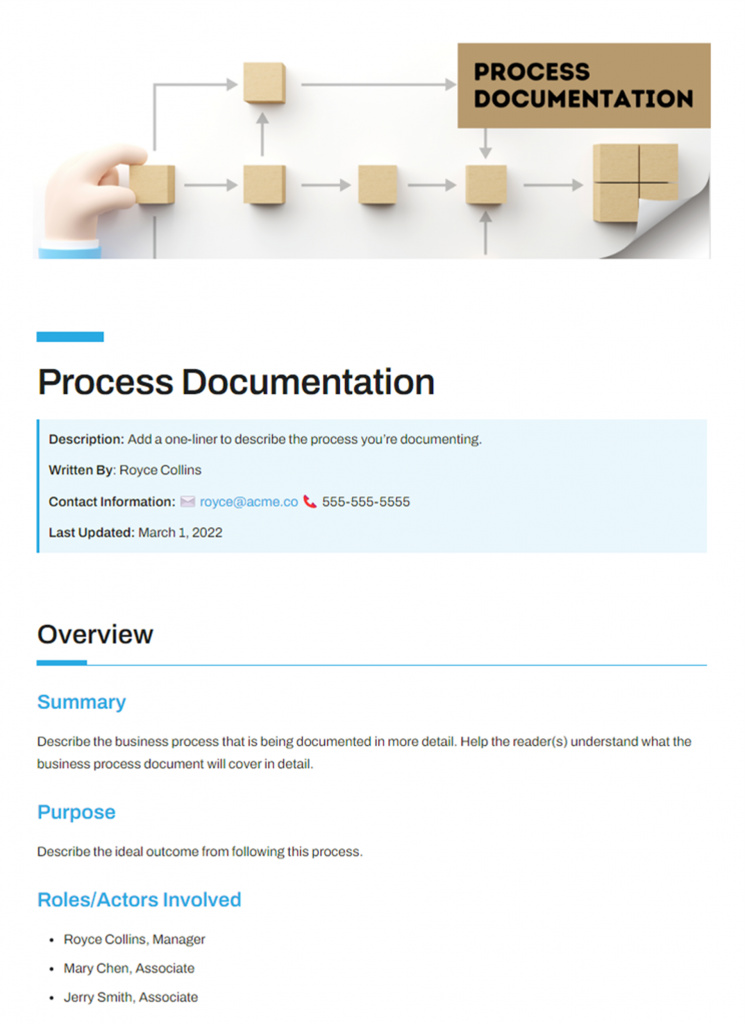
FREE TEMPLATE
The Process Documentation Template Teams Actually Use
Includes workflows, roles, responsibilities, procedures, inputs, & outputs.
✔ Pre-filled sections
✔ Standardize processes across teams
✔ Operations, HR, IT, Product & Project Teams
Takes under 1 minute • Trusted by teams at startups & enterprises
Process Documentation Best Practices
Here are some of the best practices to keep in mind while creating and distributing process documentation-
- The process document should be stored in a central location.
- It should be easily accessible by anyone in the organization.
- It should be written in a clear and concise manner with proper formatting.
- It should be regularly updated with changes made to the processes.
- Feedback plays a crucial role in improving the process. Make sure there is no barrier to giving feedback and suggestions to improve a process. Feedback should be reviewed after a set period of time (i.e. once every six months) to make sure that other people’s opinions are being heard.
- Create individual documents for different processes to make it easy to understand and digest rather than one single document.
- Always make use of flowcharts to explain the steps taking place in a process. You can also add screenshots, graphs, charts, tables, and other graphics to make it as easy to understand as possible.
- Only make the latest document available to the public.
Following these best practices will help you keep process documentation accurate, consistent, and easy for everyone on your team to follow and maintain.

Want to document business processes without starting from a blank page? These ready-to-use templates will help you standardize workflows, create clear instructions, and keep essential operational knowledge organized.
Conclusion
In today’s fast-paced digital world, productivity is the norm. Everybody wants to get ahead of the curve by doing work quickly, efficiently, with reduced costs. They want to make use of minimum resources and at the same time, maintain top-notch quality.
Process documentation thus becomes a key factor in the success of any department or an organization as a whole.
- It helps preserve process knowledge and makes sure information is not lost when a key employee leaves.
- Documentation also aids new employees in understanding their role and place in the value chain.
- Reduces ambiguity of operations.
- It provides a roadmap for project teams to make changes to a process, locate faults and shortcomings, and determine better ways to get work done.
And that’s it, folks! What are your thoughts on process documentation? Do you consider it an essential part of a business process? Let us know in the comments below!
FAQs About Process Documentation
Q. What is process documentation in simple terms?
Process documentation is a step-by-step record of how a specific task or business process is completed. It lists the steps in order, who does each one, which tools they use, and what a correct result looks like. Anyone on the team can follow these documents and can perform the task to get the same result.
Q. What is the difference between process documentation and an SOP?
Process documentation is a broad term that covers all records explaining how business processes work, including workflows, process maps, policies, and instructions.
Standard Operating Procedures (SOPs) are a specific type of process documentation that provides detailed instructions for completing recurring tasks in a standardized manner.
Q. How does process documentation support employee onboarding?
Process documentation gives new employees access to standardized instructions, workflows, and company procedures. It helps them understand their responsibilities, learn recurring tasks, and become productive faster without depending entirely on continuous guidance from experienced team members.
Q. How often should process documentation be updated?
Review your documents every three to six months, and update right away after any change to a tool, role, rule, or step. Put the owner’s name, the last update date, and the next review date at the top of each document so nobody follows outdated instructions.
Q. What are the best tools for process documentation?
The best process documentation tool depends on your team’s requirements, workflow complexity, and documentation needs.
Wiki and knowledge base tools such as Bit.ai, Notion, and Confluence suit written procedures. Diagramming tools suit flowcharts, and screen recorders suit software tasks. So, choose a tool that offers easy editing, efficient search, version control, and seamless integration with your team’s existing tools.
About the Author
Nisha Balyan is a writer at Bit.ai who enjoys bringing ideas to life through words. From writing and polishing content to keeping Bit.ai’s social media buzzing, she loves finding creative ways to make stories more engaging and relatable. She’s always on the lookout for fresh ideas and new ways to tell a good story.
Why Trust This Article?
This article is reviewed to ensure its information is accurate, practical, and up to date. Our content is based on reputable and authoritative sources. To learn more about our editorial standards, content review process, and official social media profiles, visit our Editorial Team page.
Still figuring out how to document, organize, and manage your team’s business processes?
Book a demo to see how Bit.ai can help bring your team’s documentation and knowledge together →