Let’s be honest, how many meetings in your week actually feel useful?
Most of the time, we walk in hoping for clarity and walk out wondering why this meeting took so long to get nowhere.
The truth is, meetings aren’t the problem. A messy or missing agenda is.
When no one knows why any meeting is organized, what needs to be discussed, or who’s supposed to lead the conversation, things naturally drift. People arrive late, topics pile up, decisions get postponed, and everyone leaves frustrated.
But a simple, clear agenda can completely change the energy in the room. It helps people prepare, keeps discussions focused, and makes sure you walk out with real decisions, not just “we’ll discuss this later.”
In this blog, you’ll learn how to plan meetings that actually work… and yes, there’s a free Meeting Agenda Template waiting for you at the end to make things even easier.
Let’s get started and explore what exactly a meeting agenda is.
What is a Meeting Agenda? (Definition)
We’ve all been to meetings that were poorly planned, poorly organized, and timed. These meetings do no good for the organization and end up wasting everybody’s crucial time.
In order to conduct an organized and effective meeting, you need a well-written meeting agenda. A meeting agenda is essentially the list of things the participants hope to achieve at a meeting.
A meeting agenda document describes what the meeting is about, what’s the purpose of having it, lists down resources (if any) that people need to get educated on before the meeting, sets downtime slots for each meeting activity, describes the meeting process, and provides an overall structure to the whole meeting process.
A meeting agenda sets clear expectations for the meeting and helps your team members prepare for it ahead of time.
It helps keep the meeting on track, gives attendees ample time to allocate time for the meeting, gets people on board on the same topics quickly, and makes sure that meetings are executed in a timely fashion.
Now that you know why a solid agenda matters, let’s look at the best practices for creating meeting agendas that actually deliver results.
Best Practices For Meeting Agendas
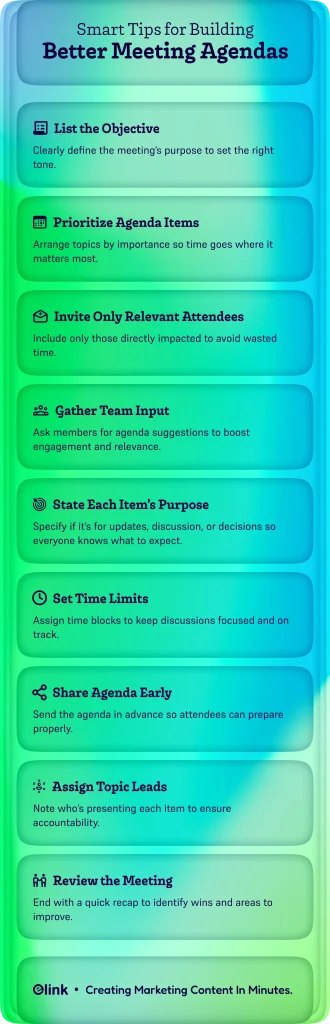
Below are some tips for designing an effective meeting agenda:
1. List the Objective
One of the first things you should tackle is to determine the objective of the meeting. Do you want to set down a marketing budget for this quarter? Are you planning on introducing new software? Or you just want to share some information with your team.
Whatever the objective is, write it down. The objective can be thought of as a very brief summary of what will be discussed in the meeting and sets the tone of the meeting.
2. List and Prioritize Meeting Agenda Items
Once you are down with the objective, list the things to be discussed in the meeting. Add the items to the meeting agenda in order of importance. This way, you know which tasks to assign more time to and which can be tackled quickly.
3. The Topic Should Affect All Attendees
If you schedule a one-hour meeting with 10 attendees, it’s not really a one-hour meeting. That’s actually a ten-hour meeting, considering how all the attendees have dedicated one hour of their time to this meeting.
You thus have to put thought into deciding who is directly affected by the meeting and whose decisions or recommendations are absolutely important for the meeting. People are giving up productive hours of the day to be at a meeting, and make sure that they are absolutely needed.
4. Seek Input from Team Members
It’s important to seek input from all concerned team members prior to a meeting and encourage them to suggest meeting agenda items and why they think these items should be addressed. If you want your employees to be engaged in meetings and pay attention, consider seeking input from them and addressing their concerns, needs, wants, and suggestions.
5. Indicate the Purpose of Each Meeting Agenda Item
Do you need to vote on a decision? Or do you just want suggestions or reviews from your team members? Specify whether or not the attendees will be part of a decision-making process so that they can prepare for it beforehand.
For example, if you’ll be voting on an item, you can create a meeting agenda item like:
“Vote: Should we continue using our current document editor or try out something new?
6. Set Time Estimates for Each Meeting Agenda Item
Meetings often take more time than estimated, typically because people often underestimate the time needed to discuss or come to a decision.
Always set time limits for each meeting agenda item and stick to them accordingly. Incorporate how much time will be needed to introduce the topic, have a discussion, answer questions, uncover potential solutions, and settle on a solution that everyone agrees with.
Of course, you should allow some flexibility if some topics go overboard, but try to stick to the plan as much as possible.
Allocating time slots to each meeting agenda item allows team members to present their arguments in shorter, quicker sentences.
It also encourages feedback from attendees regarding whether or not the time allocated is sufficient for discussion and, subsequently, coming to a decision.

If this was useful, read this…
How to Write and Organize Minutes of a Meeting (With Templates) →
7. Give Ample Preparation Time to Attendees
Meeting agendas should be distributed way in advance and not just hours before a meeting to encourage any fruitful discussion. Only when you give the attendees ample time to research topics, study the background material, come up with their questions, and decide the pros and cons for a decision can you expect a meeting to be effective and successful.
8. List Who is Responsible for Leading a Topic
Other than the formal meeting leader, there might be someone who is responsible for presenting or leading a particular topic. Mention this person next to the meeting agenda item to ensure that anyone who is responsible for leading a meeting agenda item knows it and has ample preparation time for it.
9. Meeting Review
A quick review at the end helps you understand what worked, what didn’t, and what needs to change. Make sure to write down any suggestions by attendees regarding the meeting process or the meeting agenda items. This can help find out any drawbacks with your meetings and allow you to improve next time.
Now that you know what to include, let’s walk through how to actually write an effective meeting agenda, step by step.

Need a quick way to record what actually happened in the meeting? Use this meeting minutes template.
How to Write an Effective Meeting Agenda? Follow These Steps!
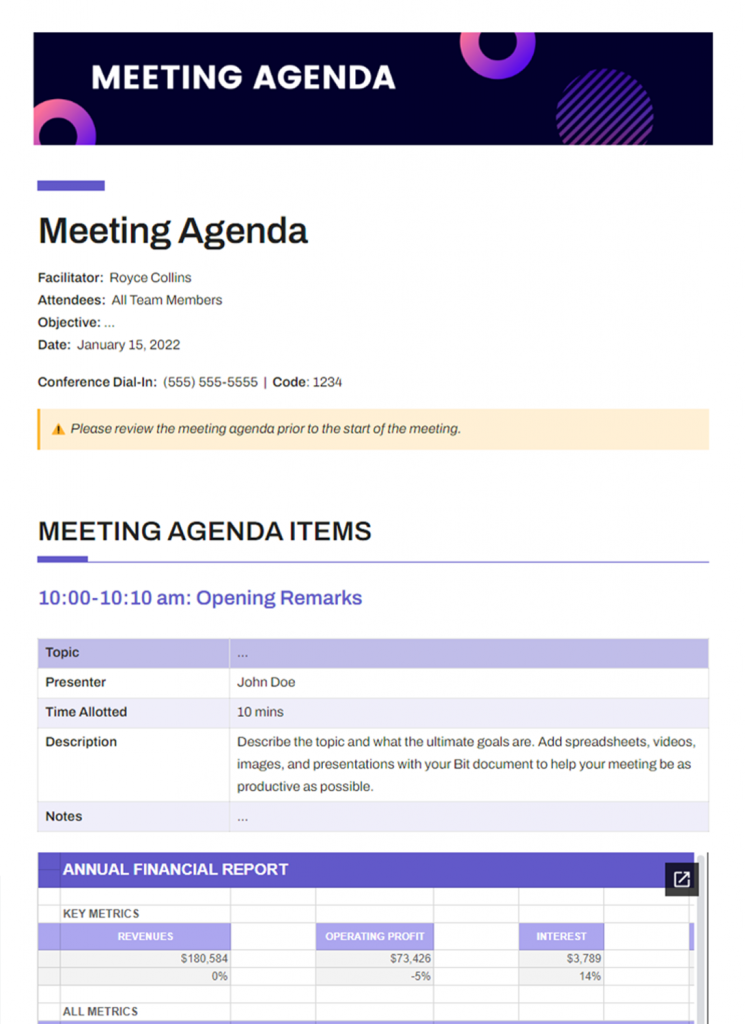
In order for your meetings to run smoothly, you need a clearly defined meeting agenda. Don’t forget to check out our free meeting agenda template that will make this process quick and easy.
FREE TEMPLATE
The Meeting Agenda Template That Makes Every Meeting Count
Includes agenda items, discussion goals, participants, decisions, & follow-ups.
✔ Improve team alignment
✔ Drive actionable outcomes
✔ Best for Teams, Managers & Executives
Takes under 1 minute • Trusted by teams at startups & enterprises
These are the following things must be included in a meeting agenda:
Step 1. Title
Give your meeting agenda a simple title that describes what the meeting is about. No matter whether it’s “Marketing Strategy Review,” “Quarterly Budget Planning,” or “Client Onboarding Discussion,” the title sets the tone and helps employees instantly understand the purpose of the session.
Step 2. Overview
Your summary serves as a brief outline of the meeting and should generally include all of your important introductory information, like
- Meeting objective (what you’re trying to achieve)
- Name of the facilitator or meeting lead
- Attendees
- Date, time, and duration
- Location or conference call link
A clear overview ensures everyone knows the logistics and expectations before stepping into the room.
Step 3. Resources
Add any supporting resources or materials that attendees need to go through prior to the meeting. These can include Excel sheets, PDFs, videos, cloud files, etc. When everyone comes prepared, discussions move faster, and decisions happen more confidently.
Step 4. List meeting agenda items
This is the heart of your agenda.
Write down every discussion point in the order of priority: most important first. Then assign a time slot for each item. This prevents the meeting from dragging on and ensures the core topics get the attention they deserve.
A structured item list helps the meeting stay focused, reduces unnecessary detours, and keeps everyone aligned.
Don’t miss this out:
Step 5. Review
End your meeting with a short review or Q&A session.
This is the moment for clarifications, quick feedback, and final decisions. Encouraging questions improves internal communication and ensures everyone leaves with clarity, not confusion.
But if you feel that building a solid meeting agenda from scratch is a tiresome process, here’s something to make the process even easier.
The Only Tool You Need for Perfect Meeting Agendas: Bit.ai
Feeling overwhelmed trying to keep meetings organized, on track, and actually productive? You’re not alone. Most teams deal with scattered notes, shifting priorities, and agendas that get rewritten right before the meeting starts. It’s frustrating, and it slows everyone down.
That’s exactly where Bit.ai steps in.
Well, Bit.ai isn’t just another doc tool you add to the pile. It’s an AI-powered docs, wikis, and knowledge management platform built to make creating, managing, and sharing content effortless for modern teams. Whether you’re drafting agendas, project plans, or client proposals, Bit helps you get it done faster and smarter.
Here’s what makes Bit.ai stand out:
- Real-time collaboration: Work simultaneously with your team, add @mentions, and keep feedback in one place.
- Interactive, media-rich documents: Embed PDFs, spreadsheets, videos, images, cloud files, and more directly in your agenda, no juggling apps.
- AI-powered writing assistance: Use Bit’s AI Genius and Doc Builder to draft, refine, and structure your meeting agendas in minutes, not hours.
- Visually polished, responsive layouts: Documents look great on any device, ensuring your team always has a professional, easy-to-read agenda.
- Smart sharing & tracking: Share agendas via trackable links, add password protection, or set expiration dates so you always know who viewed or engaged with your document.
Before you even start putting a meeting agenda together, Bit.ai gives you the kind of structure and clarity that makes meetings feel organized instead of chaotic. You’re not staring at a blank page, wondering where to begin, or digging through old files just to copy the same layout again. Bit gives you a clean space to outline what matters, set the right priorities, and get everyone on the same page from the start.
It takes a lot of the stress out of meeting prep.
And to make things even smoother, Bit.ai also offers a free meeting agenda template you can build on. It helps you pull everything together quickly, so your meetings stay focused, productive, and actually useful for your team.
Got your meeting agenda ready?
Make sure the key discussions and decisions are captured with this Meeting Notes Template →
Wrapping Up!
Now that you know how powerful a well-planned meeting agenda can be, it’s time to put it into action.
Use the free meeting agenda template of Bit.ai and start building meetings that feel clear, organized, and actually productive.
If you have any suggestions for us or have any questions, feel free to comment below!
FAQ’s
Why is a meeting agenda important?
A meeting agenda sets clear expectations, keeps discussions focused, and ensures meetings run smoothly and productively.
Are there different types of meeting agendas?
Yes, agendas vary based on meeting goals, such as informational, decision-making, brainstorming, or status update meetings.
Can I use the same agenda template for different meetings?
Absolutely! A flexible agenda template can be adapted to fit various meeting types by adjusting topics and time allocations.
What tools help create and share meeting agendas?
Tools like Bit.ai offer smart, collaborative templates with real-time editing and sharing features that simplify agenda creation and distribution.