Virtual meetings have become a regular part of professional communication. Whether team members are working from the office, remotely, or across different locations, online meetings help people collaborate, share updates, and make decisions every day.
However, participating in a virtual meeting requires more than simply joining a call. Small issues such as background noise, poor camera positioning, or speaking over others can affect communication and disrupt the discussion.
Following proper virtual meeting etiquette helps create a more professional experience for everyone involved. It shows respect for other participants, improves communication, and helps meetings stay focused and productive.
This guide covers the essential rules of virtual meeting etiquette, from setting up your technology to participating professionally during calls. Following these best practices will help you avoid common mistakes, communicate more effectively, and make a positive impression.
Let’s start and first understand what virtual meeting etiquette is.
What Is Virtual Meeting Etiquette?
Virtual meeting etiquette refers to the professional standards and best practices that guide people on how to communicate and behave during online meetings. It basically covers every aspect of meeting like joining on time, managing technical settings, active participation and engagement throughout the discussions.
Following a set of etiquette guidelines, teams can minimize distractions, avoid common technical and communication issues, and create a more productive meeting environment.
Now that we’ve defined virtual meeting etiquette, let’s explore why it plays such an important role in creating productive and professional online meetings.
Why Virtual Meeting Etiquette Matters
Proper online manners not only make a call run efficiently, but also make it more enjoyable. They directly impact how colleagues, managers, and clients perceive professionalism.
As virtual collaboration continues to grow, workplace research highlights how much time professionals spend communicating online.
According to Microsoft’s 2025 Work Trend Index:
- Meetings scheduled after 8 PM have increased by 16% year-over-year, reflecting the growing demands of digital collaboration.
- Employees receive an average of 117 emails per day.
- Workers handle approximately 153 Microsoft Teams messages daily.
With so much communication happening through virtual channels, following proper virtual meeting etiquette is essential for maintaining productivity, reducing misunderstandings, and ensuring meetings remain effective.
Without basic meeting guidelines in place, calls can become chaotic and counterproductive. Technical challenges also continue to affect online collaboration.
According to Owl Labs’ 2025 State of Hybrid Work Report:
- 77% of employees have lost time because of meeting-related technical difficulties.
- Workers lose an average of 6 minutes getting hybrid meetings started.
- More than one-quarter (27%) report losing 10 or more minutes per meeting due to setup issues.
These challenges demonstrate why preparation, clear communication, and proper virtual meeting etiquette are essential for productive online meetings.
Implementing standard rules in virtual meetings provides several benefits to daily operations like:
- Maintains a professional reputation: Good habits build trust and show respect for others’ time in virtual meetings.
- Boosts meeting efficiency: Reducing back-end issues and interruptions keeps the meeting agenda on track.
- Prevents miscommunication: Clear audio, facial expressions and focused attention help get the right message across the team.
- Fosters a fair environment: A structured approach towards meeting ensures all participants get a chance to speak and contribute effectively in virtual meetings.
- Leaves a positive impression: A professional online presence shows reliability to new prospects, key stakeholders and potential employers.
While these etiquette principles apply to most virtual meetings, the expectations can vary depending on the type of conversation. A one-on-one meeting, client presentation, job interview, and webinar all serve different purposes and involve different participants. Understanding these differences can help you choose the most appropriate approach for each situation. So, now let’s explore the different types of virtual meetings.
Types of Virtual Meetings
Not all virtual meetings serve the same purpose. Some focus on internal collaboration, while others involve clients, job candidates, or larger audiences. Understanding the different types of virtual meetings can help you recognize their purpose and the people typically involved.
1. Team Meetings
Team meetings are internal discussions that take place between employees, managers, or project teams. They are commonly used to share updates, discuss ongoing work, review progress, and coordinate tasks across departments.
These meetings are usually attended by people working on the same project, team, or business function.
2. Client Meetings
Client meetings involve conversations between a company and its customers, prospects, or stakeholders. They may focus on project updates, business discussions, product demonstrations, planning, or relationship management.
Participants typically include company representatives and external clients or decision-makers.
3. One-on-One Meetings
One-on-one meetings are private discussions between two individuals, most often a manager and an employee. They provide an opportunity to discuss performance, career development, workload, goals, or other work-related matters.
4. Virtual Interviews
Virtual interviews are online meetings used during the hiring process. They allow employers and candidates to connect remotely while discussing qualifications, experience, and job requirements.
Participants generally include the candidate, hiring manager, recruiter, or interview panel.
5. Webinars and Large Group Meetings
Webinars and large group meetings are designed to share information with a larger audience. They are often used for training sessions, company announcements, product presentations, educational events, or industry discussions.
Depending on the purpose, participants may include presenters, moderators, employees, customers, students, or members of the public.
While different meetings have different purposes, the basics of good virtual meeting etiquette remain the same. A quick checklist of virtual meeting etiquette can help you stay prepared, avoid common mistakes, and make a positive impression in any virtual meeting.

Hosting a company-wide meeting?
Virtual Meeting Etiquette Checklist (Quick Summary)
The Virtual Meeting Etiquette Checklist helps you stay organized and professional when you are in a Virtual Meeting. You should review this list before joining your Virtual Meeting.
Before the Meeting
- Test audio and video – You need to test your audio and video to ensure your microphone and camera are working properly.
- Join 5 minutes early – It’s a good idea to join the Virtual Meeting 5 minutes early so you have time to fix any problems that come up.
- Prepare notes – Note down information and topics you want to discuss during the Virtual Meeting.
- Close distractions – Close anything that might distract you, such as apps, notifications, and browser tabs.
During the Meeting
- Mute when not speaking – Keep your microphone muted when not speaking to prevent any interruptions.
- Stay engaged – Stay engaged by paying attention to the discussion and contributing when appropriate.
- Respect speaking turns – Respect the people in the Virtual Meeting and let them finish speaking before you respond.
- Use chat professionally – Use the chat feature appropriately and only send messages related to the Virtual Meeting.
After the Meeting
- Review action items – Review what you need to do and make sure you understand what is expected of you.
- Share notes – Share your notes with the people in the Virtual Meeting if they need to know something.
- Follow up on commitments – follow through on what you said you would do and complete your tasks on time.
Following these etiquette guidelines consistently can help meetings run more smoothly and improve collaboration. Virtual Meeting Etiquette is really important for Meetings. You should always follow these rules when you are in a Meeting. This will help you be more successful throughout your Virtual Meetings.
Now, let’s discuss the 10 Essential Virtual Meeting Etiquette Rules that every professional should follow to ensure smooth, productive, and respectful online meetings.
10 Essential Virtual Meeting Etiquette Rules
Having virtual meeting habits is really important. They can make a difference. The following rules can help you stay professional and make meetings better for everyone.
1. Join the Meeting on Time
Being on time is really important for work meetings. When you join a video meeting on time or a few minutes early, it shows you respect the people attending.
If you are late, it can interrupt what others are saying. They might have to repeat things. It can also make you seem unready.
So, you can try to open your meeting invite a minute early. This helps you join calmly and be ready.
2. Test Your Technology
Reliable technology is essential for effective virtual collaboration. Make sure your microphone, internet, camera, headset and screen-sharing tools are working before the meeting.
If your tech isn’t working, it can interrupt discussions and waste time. Problems with audio, video, or presentations can make meetings less effective.
Recent research from Jabra [Jabra Hybrid Meeting Survey (2026)] highlights how common technical issues remain in virtual and hybrid meetings:
- 75% of hybrid meetings experience at least one technical issue.
- 73% involve audio-related problems.
- 68% experience video or visual difficulties.
- Technical issues add an average of 11 extra minutes per meeting.
These findings show why testing your microphone, camera, internet connection, and presentation tools before joining a meeting is an important part of virtual meeting etiquette.
Before joining, test your microphone, camera, internet connection, and presentation tools. Check that your audio is working. Make sure you can share your presentation files properly. Be prepared with all your gadgets before entering a meeting!
Using the wrong platform can create unnecessary meeting issues
See the best video conferencing software →
3. Dress Professionally
What you wear still matters on video calls. Choose attire that reflects a professional work environment and suits the type of meeting you are attending.
Dressing professionally can also influence your mindset, helping you stay more focused and engaged during the discussion. While casual clothes might be okay for some meetings, meetings with clients often require formal attire.
4. Mute When Not Speaking
Background noise is a distraction during online meetings. Keep your mic off unless you are talking.
Dogs barking, keyboard typing or traffic sounds can make it hard for others to hear the person speaking. Turning off your mic helps keep the audio clear and reduces interruptions.
So turn off your mic when you join a meeting and turn it back on when you are speaking or answering a question.
5. Keep Your Camera On
Video helps make communication more effective. Keeping your camera on allows others to see facial expressions and reactions during the discussion.
Being visible helps show engagement and participation. While there may be situations where turning the camera off is necessary, many meetings benefit from face-to-face interaction.
Simple actions like maintaining eye contact with the camera, nodding in agreement, and staying visually present help build connection and show that you are attentive and involved in the conversation.
6. Use a Professional Background
The area behind your video contributes to the overall impression you make during a meeting. A clean workspace or simple virtual background helps reduce distractions.
Cluttered spaces or busy surroundings can distract from the discussion. A simple background helps keep attention on the speaker and the topic.
For example, use a blank wall or organized bookshelf as your background. If you are working in a public place, use a blur effect to reduce distractions.
7. Avoid Multitasking
Trying to handle other tasks during a meeting is often noticeable. Give your attention to the discussion while it is taking place.
Checking emails or using your phone can cause you to miss important information. It may also require others to repeat points that were already discussed.
So, close unnecessary browser tabs and keep your phone out of reach. Give the meeting the same attention you would give an in-person conversation.
8. Respect Speaking Turns
Good communication requires patience, especially when internet delays are involved. Allow the speaker to finish before responding.
Interrupting others can make discussions harder to follow. Listening carefully gives everyone an opportunity to share their ideas.
A quick tip: use the hand-raise feature if you have a question during a presentation and wait until the host invites you to speak.
9. Use Chat Professionally
The chat feature is useful for sharing information and asking questions related to the meeting. Keep your messages relevant to the discussion.
If you send messages that aren’t related to the topic, it can distract others. Use the chat to support the conversation, not to start side discussions.
10. End Meetings Professionally
Ending a meeting clearly helps everyone understand what happens next. Before you leave, review the points and any follow-up actions.
If you leave abruptly, it can create confusion about what to do after the meeting. A short summary at the end of the meeting helps ensure everyone leaves with an understanding.
So, spend a few minutes reviewing what you need to do and who is responsible for what. Thank the participants for their time before you end the call.
Following these 10 meeting etiquette rules helps you build good habits for virtual meetings. Let’s move a step further and look at how these practices apply in real workplace roles. First, we’ll discuss how employees should approach virtual meetings.
Don’t let action items get forgotten
Here’s how to write a clear meeting recap →

PRO TIP
Virtual meeting etiquette is ultimately about reducing friction. The fewer distractions, interruptions, and technical issues participants encounter, the more productive and engaging the meeting becomes.
How Employees Should Approach Virtual Meetings
Good virtual meeting etiquette is not just about being present on a call. Employees also need to stay engaged, communicate clearly, and follow through on responsibilities after the meeting ends. Here are some virtual meeting etiquette rules employees should follow.
1. Review the Meeting Agenda Before Joining
Review the meeting agenda before the scheduled start time. Keep any notes, spreadsheets, or project documents ready in case you need them during the discussion.
Searching for files during a meeting can slow things down and distract other participants. Being prepared helps meetings run more smoothly and shows respect for everyone’s time.
2. Maintain Visual Presence During the Meeting
Keep your camera on when you can. This way, other people can see your face. It feels more natural when you talk.
If you keep your camera off, it is hard for people to tell if you are really paying attention. When you are visible, it helps people work together and participate in the meeting.
3. Contribute Thoughtfully
Share ideas, updates, and questions that are relevant to the discussion. Keep comments focused on the topic being discussed.
Avoid repeating points that have already been covered. Clear and concise contributions help make meetings more productive.
4. Avoid Side Conversations
Private messages and unrelated chats can distract you from the discussion. Give your attention to the person speaking and the topic being discussed.
Save unrelated conversations for later. Staying focused helps prevent missed information and unnecessary follow-up questions.
5. Take Ownership of Assigned Action Items
Take note of any tasks assigned to you before the meeting ends. Complete them within the agreed timeline whenever possible.
Following through on commitments shows reliability and professionalism. Good meeting etiquette continues even after the call is over.
Employee participation plays an important role in successful virtual meetings. However, hosts and managers have additional responsibilities that help keep discussions organized and productive. Let’s discuss that in the next section!
Need a simple way to track decisions and follow-ups?
How Managers and Hosts Should Run Effective Virtual Meetings
Managers and meeting hosts play an important role in keeping virtual meetings organized. Their actions can help discussions stay focused, encourage participation, and ensure meetings achieve their purpose. Here are some virtual meeting etiquette rules managers and hosts should follow.
1. Set a Clear Agenda and Share It in Advance
Share the meeting agenda at least a day before the meeting. Giving attendees time to review the topics helps them prepare questions, ideas, and relevant information.
An agenda helps keep discussions focused and makes it easier to cover important topics within the scheduled time.
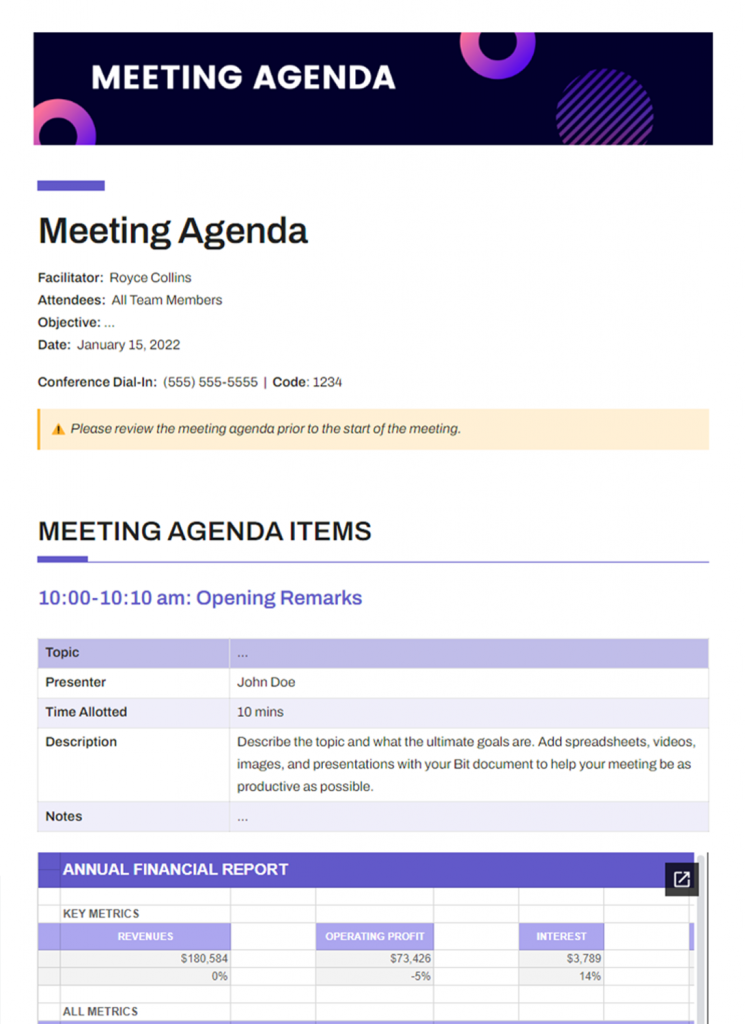
A well-structured agenda can instantly improve meeting productivity – grab this free meeting agenda template →
FREE TEMPLATE
The Meeting Agenda Template Teams Rely On
Includes objectives, discussion topics, action items, decisions, & follow-ups.
✔ Ready-to-use agenda sections
✔ Customize in minutes. Reuse for every meeting.
✔ Managers, Team Leads, Project & Remote Teams
Takes under 1 minute • Trusted by teams at startups & enterprises
2. Start and End Meeting on Time
It is very important to start and end the meeting on time. This shows that you respect everyone’s time. Start the meeting at the planned time. Do this even if some people are not there yet.
It is also very important to end the meeting on time as well. This helps people manage their work and meet commitments. They will not be delayed.
Great meetings start before the call begins
3. Encourage Active Participation from All Attendees
Some people may not feel comfortable speaking up during meetings. You can help by asking for their thoughts and ideas. Ask them questions. Invite them to share their feedback.
When everyone participates in the discussions, they are more productive. People stay engaged and interested in the meeting.
Struggling with quiet meetings?
4. Guide Conversations and Manage Disruptions Effectively
Sometimes technical problems happen during meetings. Sometimes people talk at the same time. When this happens, stay calm. Help the discussion get back on track.
If many people start talking at once, decide who should speak first. This helps keep the conversation clear and respectful.
5. Summarize Decisions
At the end of the discussions, briefly review the decisions that were made. This helps ensure everyone leaves with an understanding. A brief summary can reduce confusion and help attendees remember key outcomes after the meeting.
6. Assign Clear Action Items Before Closing
Before ending the meeting, make sure responsibilities are clearly assigned. Identify what needs to be done, who will do it, and when it should be completed.
Clear action items help teams stay organized and make it easier to track progress after the meeting ends.
Strong meeting leadership helps virtual discussions run more effectively. In some situations, however, meeting etiquette may need to be adjusted based on the event’s audience, purpose, or format.
Virtual Meeting Etiquette by Situation
When you are in a meeting, you have to think about who you are talking to and what you want to say. Virtual meetings are not all the same, so you have to adjust your behavior based on the situation. This will help you get your point across.
1. Virtual Job Interviews
During a virtual job interview, pay close attention to your communication style, professionalism, and technical setup. Little things can make a difference when someone is deciding whether to hire you.
- Join early: Join the meeting a few minutes before it starts.
- Test equipment: Make sure your microphone, camera and internet are working before the interview starts.
- Dress professionally: Wear clothes that are right for the job and the company you are interviewing with.
- Maintain eye contact: When you are talking, look at it so you seem to be paying attention.
2. Client Meetings
When you meet with a client online, you have to be professional and prepared. You want to make an impression and build trust with the client.
- Be punctual: Join the meeting when it starts.
- Avoid distractions: Turn off your phone. Find a quiet place to talk.
- Prepare materials in advance: Make sure you have all the papers and presentations you need before the meeting starts.
3. Team Meetings
Team meetings are a way for everyone to stay on the same page and talk about what they are working on. Even though these meetings might feel more casual, you still have to act like a professional.
- Encourage participation: Encourage your teammates to share their thoughts.
- Respect speaking turns: Wait for them to finish before you speak.
If you can adjust your behavior based on the type of meeting you’re in, you’ll communicate better and be more professional. If you do not pay attention to some of your habits, they can still give people a bad impression of you.
Running out of discussion topics?
Try these team meeting ideas to keep conversations productive →
Virtual Meeting Etiquette for Zoom, Teams and Google Meet
Meeting platforms like MS Teams, Zoom and Google Meet have a lot in common, but each has its own special tools that can affect how meetings go. If you understand these tools, you can communicate better. Avoid the technical problems people often encounter.
Zoom Etiquette
- Rename your profile properly: It’s a good idea to display your full name so others in the meeting can easily see who you are.
- Use reactions appropriately: reactions are a way to show you agree with someone or acknowledge what they are saying without interrupting them.
- Use waiting room professionally: Make sure your camera is working, your microphone is on, and that the room you are in is quiet and ready for the meeting.
Teams Etiquette
- Use status indicators: Update your status so your colleagues know whether you are available before and during meetings.
- Manage notifications: It’s a good idea to turn off alerts when someone is giving a presentation or when you are having an important discussion, so you are not distracted.
Google Meet Etiquette
- Use hand raise feature: The hand-raise tool lets people signal they want to speak without interrupting others.
- Manage captions properly: it can help people understand what is being said and support people who are hard of hearing.
Now, let’s look at some common mistakes to avoid in virtual meetings. Recognizing these errors can help improve communication, reduce disruptions, and make meetings more productive.
Not sure which platform is right for your team?
Common Virtual Meeting Mistakes to Avoid
Even very experienced people can make mistakes in virtual meetings. If you know about these mistakes, you can avoid distractions and communicate better.
1. Joining Late
If you get to the meeting after it has already started, you will interrupt what people are talking about. You will make other people repeat things they already said. To avoid this, open the meeting link a minute before the meeting is scheduled to start.
2. Poor Audio Quality
When you have sound problems, it’s hard to hear what people are saying. If there is an echo. If there is background noise or the sound is unclear, it can make it harder for people to understand what is going on and communicate with each other.
Audio issues remain one of the most common meeting disruptions. Research [Jabra Hybrid Meeting Survey (2026)] found that nearly three-quarters of hybrid meetings experience audio-related problems, making microphone checks and proper audio setup critical before joining a call.
You can use a headset or a separate microphone to improve sound quality during meetings.
3. Talking Over People
Interrupting someone while they are speaking can make conversations harder to follow. It may also prevent others from clearly sharing their ideas.
Wait for the speaker to finish before responding, especially when there is a slight audio delay.
4. Leaving Camera Off Without a Reason
Keeping the camera off for an entire meeting can make participation harder to assess. It also removes visual cues that help support communication.
If possible, keep your camera on during meetings unless you are dealing with technical issues or other valid concerns.
5. Checking Emails During Meetings
Reading emails or working on other tasks during a meeting can cause you to miss important information. It may also reduce your ability to respond when asked a question.
Give your attention to the discussion and save unrelated tasks for later.
6. Distracting Backgrounds
If the background is messy or there is a lot going on, it can distract people from what’s being said. If you choose a background, it can help people focus on the conversation.
You can use a wall, a clean workspace, or a special feature that blurs the background to help reduce distractions.
7. Not Participating Actively in Meetings
Virtual meetings work best when participants contribute to the discussion. Remaining silent throughout a meeting may make you seem unengaged.
Review the agenda beforehand and be prepared to share questions, updates, or ideas when appropriate.
8. Forgetting to Mute your Microphone
Background sounds can interrupt meetings and make it harder for others to hear the speaker. Typing noises, conversations, or household sounds can become distracting.
Keep your microphone muted when you are not speaking and unmute only when needed.
Avoiding these common mistakes can make virtual meetings more productive and professional. The next section provides a simple way to compare good meeting habits with behaviors that are best avoided.
Virtual Meeting Etiquette Dos and Don’ts
A simple list of things to do and not to do can help you remember how to behave in meetings. You can use this list as a reference before you join your online meeting.
| Do’s of Virtual Meetings | Don’ts of Virtual Meetings |
| Join the meeting a few minutes early. | Don’t join after the scheduled start time. |
| Test your microphone and camera beforehand. | Don’t try to fix technical issues during the meeting. |
| Keep your microphone muted when listening. | Don’t leave your microphone on when background noise is present. |
| Wear professional clothing that suits the meeting. | Don’t join client or formal meetings in overly casual clothing. |
| Look towards the camera when speaking. | Don’t focus on another screen or your phone while talking. |
| Use a clean workspace or a simple virtual background. | Don’t use a cluttered or distracting background. |
| Wait for others to finish speaking before responding. | Don’t interrupt or talk over other participants. |
| Use the chat for relevant questions and resources. | Don’t use the chat for unrelated conversations. |
| Stay focused on the meeting. | Don’t check emails or browse social media during the discussion. |
| Confirm your action items before leaving. | Don’t leave without understanding your next responsibilities. |
Good Example: John joins 5 minutes early, tests audio, stays focused, and summarizes action items before leaving.
Poor Example: Sarah joins late, keeps her microphone unmuted, checks emails during the discussion, and misses assigned tasks.
Good virtual meeting etiquette helps conversations run smoothly, but productive meetings also depend on staying organized. Keeping track of notes, action items, shared resources, and follow-ups can quickly become difficult, especially when teams collaborate remotely. This is where meeting management and documentation tools like Bit.ai can help support the process.
How Bit.ai Supports Better Virtual Meeting Management
Having manners during virtual meetings is important, but it can be tough to keep track of notes, to-dos, and documents. Even if you have habits, it is not always enough. Bit.ai is a tool that can help teams keep all their meeting information in one place. It is easier to stay organized before and after a call.

Here are some amazing features offered by Bit.ai to help you organize your meeting notes:
📋 Create Interactive Meeting Agendas Before You Meet
Walking into a meeting without an agenda is one of the most common etiquette mistakes. Bit.ai offers a meeting agenda template that helps your team prepare reports and presentations prior to the meeting.
add template
🤝 Real-Time Collaboration Without the Chaos
Virtual meetings often suffer from miscommunication and scattered follow-ups. With Bit.ai’s collaboration features, teams can brainstorm, edit, and refine documents in real-time.
📁 Organized Meeting Notes Everyone Can Find
One of the biggest post-meeting pain points is locating notes and action items. Bit.ai keeps work organized with workspaces and folders. No more digging through email threads.
🌐 Rich Media Documents That Replace Lengthy Briefings
Long pre-meeting emails are a thing of the past. Bit allows users to share rich media like YouTube videos, Google Docs, GIFs, spreadsheets, and more directly in the docs.
🔗 Smart Sharing with Trackable Links
Following up after a meeting matters as much as the meeting itself. Bit.ai lets you share living documents and wikis with a single trackable link. You can set expiration dates for time-sensitive content and even add password protection for sensitive materials.
🤖 AI-Powered Meeting Documentation
For teams looking to cut down on manual note-taking, Bit.ai’s built-in AI Genius can streamline the creation of meeting notes, SOPs, and process docs, so your team spends less time writing and more time acting on what was discussed
When you use Bit.ai to keep all your meeting notes, documents, and to-dos in one place, it is much easier to stay on top of meetings. Bit.ai also helps make sure that important discussions lead to follow-up and meaningful progress.
Too busy taking notes during meetings?
Virtual Meeting Etiquette Cheat Sheet
Keep this list near your workspace as a reminder of what to do during online meetings.
- Join Early
- Mute When Not Speaking
- Keep Camera On
- Stay Focused
- Respect Speaking Turns
- Use Chat Professionally
- Avoid Interruptions
- Take Notes
- Participate Actively
- Follow Up After the Meeting
Conclusion
Virtual meetings are now a part of our work life, so it is really important to have good meeting manners. If you do things like join the meeting on time, check your equipment, pay attention and be nice to the people in the meeting, it can make a big difference in how the meeting goes.
The good thing is that you do not have to make big changes to be better at meetings. Just following a few etiquette rules every time can make a big difference. Whether you are talking to a client, going to a team meeting, or having a job interview, following these meeting rules can help everyone stay on track, be professional, and get things done.
Over time, these habits become second nature, allowing you to focus less on meeting mechanics and more on meaningful collaboration.
FAQs about Virtual Meeting Etiquette
What is proper virtual meeting etiquette?
Proper virtual meeting etiquette means following professional meeting habits such as joining on time, muting your microphone when not speaking, staying focused, and participating respectfully during discussions.
Should your camera be on during virtual meetings?
In many cases, yes. Keeping your camera on can help improve communication and show engagement during the meeting. However, there may be situations were turning the camera off is appropriate, such as when technical issues arise or during meetings where video is not required.
Is it rude to multitask during a virtual meeting?
Multitasking can make it harder to pay attention and may cause you to miss important information. Giving your attention to the meeting helps you stay engaged and respond more effectively when needed.
What should you wear to a virtual meeting?
Choose clothing that matches the type of meeting you are attending. Professional or business attire is often appropriate for client meetings, interviews, and formal discussions, while internal meetings may have a more relaxed dress code.
What is the 40-20-40 rule for meetings?
The 40-20-40 rule suggests that meeting success depends on three factors: 40% preparation before the meeting, 20% effectiveness during the meeting, and 40% follow-up after the meeting. The idea is that planning agendas, preparing participants, and tracking action items are just as important as the meeting itself.
What are the most common virtual meeting etiquette mistakes?
Common virtual meeting etiquette mistakes include joining late, multitasking, interrupting others, leaving microphones unmuted, using distracting backgrounds, and failing to test audio or video before the meeting.
About Our Editorial Team
Our Editorial Team researches, writes, and reviews every article to help ensure it is accurate, practical, and up to date. To learn more about our editorial standards, content review process, and official social media profiles, visit our Editorial Team page.
Why Trust This Article?
The information in this article is based on reputable and authoritative sources. We review our content periodically to keep it accurate and up to date.
If this was useful, read this…