Is Your Product Development Process Slowing You Down?
Have you ever felt that your product development team is diligently working, but progress is made at a snail’s pace? Missed deadlines, broken feedback, unclear priorities, and isolated data can make even fantastic concepts sit idle on the path to launch. That is exactly when product management software comes to the rescue. It helps you merge tasks, track the progress and get your team aligned in perfect harmony.
Tools such as Bit.ai go even further by providing a shared workspace where teams can co-create product documentation, maintain organized product information, and keep everyone aligned with real-time updates. Instead of files getting lost across tools and inboxes, teams can store roadmaps, PRDs, research, and discussions in one structured space while continuing to use their preferred task or development tools.
So, now that you know what product management software can do for you, let’s see what it can really do. ?
What is Product Management Software?
Did you ever attempt product development without a system and have the sense that things were slipping through the cracks? Product management software is built to eliminate that very issue. This is a web application that allows teams to plan, track, and execute the complete product life cycle. From ideation and prioritizing features to development and launching, this application brings tasks, notes, and dialogue with your team all to one place.
Unlike most general project management tools, product management tools are developed for mapping roadmaps, tracking progress, and managing product information. They let you see timelines at a glance, mark key dates, divvy up work, and get smart data that helps your team be more productive.
Now that we know what product management software does, let’s jump into the perks. Let’s see how picking the right tool can totally change the way you work.
Key Benefits of Using Product Management Software
Using product management software has the ability to revolutionize how your team collaborates, plans, and carries out projects. The following are the greatest advantages that you can expect when you utilize the appropriate tool.
1. Centralized Collaboration
You know that feeling when your product information is scattered across emails, chats, and old documents? Centralization of everything brings order. Product specifics, records, and discussions of the team now all stay in one place at last.
You and your team can edit together, share updates instantly, and stay aligned on priorities. Everyone sees the same information, which keeps momentum steady and decisions clear.
2. Faster Workflow
Having your workflow be part of one unified system accelerates the whole process. It is possible to do automatic running of the operations that form your daily work, document the main events, and ensure that the different groups are in sync without having to follow the updates through various tools.
Your focus shifts from looking for the latest updates to delivering the features that are valuable to the customers. Your entire development cycle becomes smoother, with fewer delays and far less miscommunication.
3. Improved Product Roadmapping
Roadmapping becomes easier when you can see your priorities, dependencies, and timelines all in one visual view. You instantly spot bottlenecks before they slow you down and allocate resources more intelligently.
And when priorities shift — because they always do — you can adjust quickly while still keeping your release schedule on track. You stay flexible without losing control.

Read more:
4. Enhanced Resource Management
It’s much easier to distribute tasks fairly and to maintain a good workload ratio among the workers when you have clear visibility of what everyone is working on, nobody will get exhausted. You know who has the skills and who needs the help before the problems get bigger.
This visibility helps you make smarter decisions every step of the way. By keeping workloads manageable, you set your team up for consistent, sustainable progress.
5. Data-Driven Decisions
Real data helps you make smarter choices about your product. When you get the inside scoop on how people are using things, how your team’s doing, and how work flows, you can figure out what your users care about and put those things first.
No more guessing. Now, you can fix your plan, make your strategy better, and get your team to focus on features that actually make a difference.

Did you know?
According to a PwC study, high-performing product teams are 30% more likely to hit their roadmap goals when they use structured collaboration tools effectively.
Having found the advantages, explore top product management tools such as Bit.ai to take back your workflow. ?
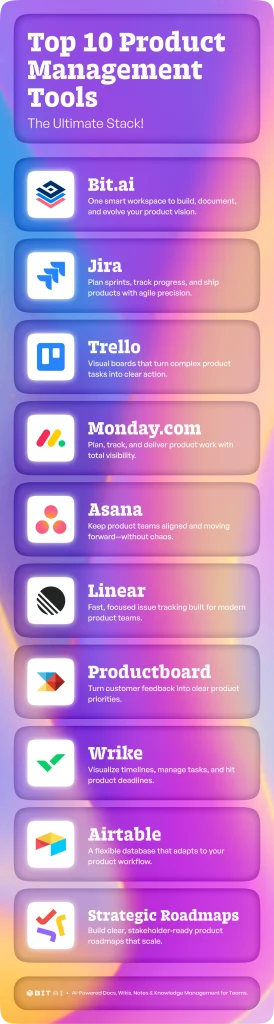
Top 10 Product Management Tools
Product management software can make teamwork better, streamline procedures, and enable your team to successfully carry out projects with proper software. These are the top products to look out for today!
1. Bit.ai

Imagine setting up a workspace where every feature plan, roadmap and product requirement document is kept up to date, arranged neatly and accessible without any trouble. That’s how working at Bit.ai feels. It’s an AI-powered platform designed for teams who want collaboration to feel effortless and updates to happen in real time.
With Bit.ai, you can create, organize, and share everything your product team needs in one place. Roadmaps, PRDs, sprint notes, user research, and handoff documents stay connected inside well-structured workspaces. Your team can work together simultaneously, place resources such as prototypes or videos, and make the crucial product knowledge easily accessible.
Version History keeps everyone aligned by letting you review previous changes. Role-based permissions help protect sensitive information and ensure the right people have access. And with integrations and rich embeds for tools your team already uses, Bit.ai fits naturally into your existing workflow.
Bit.ai doesn’t just store your product work. It becomes the place where your product vision grows, shifts, and strengthens with every collaboration.
Key Features
- Real-time collaborative editing
- Work together inside the same document and watch updates appear instantly, no matter where your team is located.
- Smart templates for product workflows
- Use an intelligent, ready-to-go template for product roadmaps, PRDs (product requirement documents), and product launches to save time and keep processes consistent.
- Unified knowledge hub
- Store every project file, spec, and decision in one organized repository, so your team never has to hunt for information again.
- Advanced permissions
- Use role-based permissions so that only authorized people can access what they are meant to.
- Version History
- Keep track of all changes to the document with version history, which promotes accountability and makes it simple to revert to the previous update.
- Rich media embedding
- Add videos, Figma prototypes, links, forms, charts, and more to create interactive product documents your team will actually want to use.
- Integrations with 100+ tools
- Connect Bit.ai with Airtable, Miro, Google Drive, Asana, and other essential tools to unify your workflow and keep your product development process in sync.
Pricing: Free plan; paid plans start at $8 per member/month
2. Jira

Jira is a highly useful product management platform built to support software and product development teams. It assists you in planning, tracking, and directing projects in a productive manner through offering end-to-end visibility into tasks, sprints, and progress. You can prioritize features, manage backlogs, and guide your team with visual Kanban or Scrum boards that make progress feel tangible.
Its reporting and analytics help you understand performance patterns and shape a smarter product roadmap. With Jira, your team moves with clarity, confidence, and momentum.
Key Features:
- Kanban and Scrum agile boards to organize tasks.
- Planning sprints and backlogs to streamline the flow of work
- Workflows that can be converted into business processes to coordinate team procedures
- Analytics and reporting to follow up on the progress and performance
- Integration with Slack, Confluence, and other platforms
Pricing: Free for up to 10 users; paid from $8.15/user/month
3. Trello

Trello is a versatile, user-friendly product management solution that allows teams to see tasks and projects displayed on boards, lists and cards. You can assign tasks, set due dates, attach files and see activity in real-time.
The ease of use of Trello makes it perfectly suitable for teams of all sizes, whether you are dealing with one project or complicated product processes.
Automation features reduce repetitive tasks, keeping your team focused on what’s a priority and transparency at every development phase.
Key Features:
- Cards with tasks and a visual board that are easy to sort
- Personalized labels, task assignments, and deadlines
- Butler’s automation does work to prevent repetition.
- Notify teams and collaborate in real-time
- Integrate with Slack, Google Drive, etc.
Pricing: Free plan; premium plans at $10 per user/month
4. Monday.com

When your team needs a clearer way to plan, track, and deliver projects, Monday.com gives you a workspace where everything becomes easier to follow. Graphical boards, time schedules, and control panels boost your understanding of the priorities at a glance, thus the whole team is aware of what is the exact matter that requires their attention and when assigning tasks, setting deadlines, and monitoring progress all happen in real time, keeping your workflow smooth and predictable.
Automation of repetitive tasks, cutting down on manual hand-offs, and keeping everyone in the loop through the integration of Slack, Google Drive, etc. A single storage of project data ensures faster collaboration and confident delivery by the team.
Key Features:
- Personalized dashboards and project boards for openness
- Views of calendars and timelines for scheduling and planning
- Automation of workflows to reduce time spent on monotonous tasks
- Assignment, tracking, and notification of tasks for a coordinated team
- integration with Google Drive, Slack, and other programs.
Pricing: Starting at $9/user/month; custom enterprise pricing.
5. Asana

When your projects start growing in complexity, you need a system that keeps everything organized and moving. Asana provides an easy-to-understand system for you to plan, organize, and keep track of the work that is carried out by different teams.
Automations are there to relieve you from repetitive tasks, and integrations with tools such as Slack and Google Drive are there to facilitate communication and documentation between each other.
With Asana, your team will be efficient, in agreement, and able to take the next steps in the project without hesitation.
Key Features:
- Project and task creation with assignment and due date
- Timeline and calendar view planning
- Workflows are automated to save time spent on repetitive tasks.
- Real-time collaboration and notifications
- Integration with Slack, Google Drive, Jira, and other tools
Pricing: There is a free version available; the paid versions start from $10.99 per user/month.
6. Linear

Think of those workdays when tasks pile up, bugs multiply, and priorities feel like they are constantly shifting. Linear brings order to that chaos. It gives product and engineering teams a clean, structured space where issues, backlogs, and sprints feel manageable instead of overwhelming. You open it, and everything just makes sense — what is being worked on, what is next, and how fast your team is moving.
Linear focuses on speed, flow, and simplicity. Automations remove friction, roadmaps make the trajectory visible, and connections to GitHub, Slack, and Figma prevent your team from being out of touch. Nothing is perceived as a burden or a challenge. The work merely flows with lucidity, concentration, and speed.
Key Features:
- Issue tracking, backlog, and sprint planning
- Super fast, distraction-free interface
- Roadmapping and workflow automation
- Integrations with GitHub, Slack, Figma, and more
Pricing: Free plan available; paid plans start around $8/user/month
7. Productboard

Productboard is a product management tool that allows teams to prioritize features and align development with customer needs. It helps you collect customer feedback, rank feature requests, and shape roadmaps that reflect what users actually need. You can organize insights, highlight priorities, and guide your team toward building the initiatives that make the biggest impact.
Collaboration becomes smoother with customizable workflows, task assignments, and clear progress tracking. And with integrations like Jira, and Slack, all your product data and documentation stay connected. The result is faster alignment, smarter decisions, and product releases that land exactly where customers expect.
Key Features:
- Collect and structure user feedback for product selection.
- Set priorities for programs and features by customizing workflows
- Build and share visual product roadmaps
- Assign and monitor tasks among teams
- Ability to integrate with Jira, Slack, or others.
Pricing: $20/user/month; enterprise plans available.
8. Wrike

Beyond tasks and timelines, projects thrive when supported by visuals that show how everything connects. Such a need is satisfied by Wrike, which provides you with that understanding by means of personalized dashboards, Gantt charts, and task lists that disclose what activities are ongoing, which person is accountable, and what percentage of the deadline has been achieved. Every moving part becomes easier to understand and manage.
Automations reduce manual effort, while real-time collaboration keeps everyone aligned no matter where they work. And with integrations like Slack and Google Drive, all your updates and documents stay connected. Wrike’s reporting and analytics help you refine workflows, boost productivity, and guide your product development process with confidence.
Key features:
- Gantt charts, task lists, and customizable dashboards.
- Delegating tasks, seeing them through, and controlling deadlines
- Automating workflows and removing boring tasks
- Real-time notifications and collaboration
- Integrations with Slack, Google Drive, and other applications
Pricing: Paid plans start at $9.80 per user/month; a free version is available.
Read this now:
9. Airtable
Sometimes you need the power of a database combined with the ease of use of a spreadsheet, and that’s precisely where Airtable excels. It offers you a flexible work area to plan product specifics, manage projects, and have a look at everything through grids, calendars, or Kanban boards. There is no need to change tools or lose context as you get to see your product from each and every angle.
Collaboration feels natural with real-time editing, comments, and shared views that keep your entire team aligned. Airtable keeps all your project details in one place by connecting with the tools that you are already using, for example, Slack, and Google Drive. It is a way for teams to make their work more efficient and effective regardless of their location, and hence, everyone is on the same page and can make decisions based on trust.
Key Features:
- Adaptive perspectives like grids, calendars, and Kanban boards
- Task delegation, progress monitoring, and prompts.
- Teamwork through co-editing, commenting, and sharing.
- Automation to get rid of repetitive workflows.
- Slack, Google Drive, and other integrations
Pricing: Free plan is available; paid plans begin at $10/user/month
10. Strategic Roadmaps (formerly Roadmunk)

Product strategy often becomes difficult when ideas, priorities, and timelines live in different places. Strategic Roadmaps offers product teams the possibility of visualizing their plans clearly, allowing stakeholder alignment and providing a perspective on the timeline of initiatives. Instead of juggling static spreadsheets or scattered notes, you can build structured, presentation-ready roadmaps that communicate direction clearly.
It helps teams map priorities, outline upcoming releases, and adapt plans as things evolve, while keeping everyone aware of what is coming next and why. By the use of clear roadmap views along with collaboration support, it is simpler to negotiate trade-offs, change plans, and keep all the team members informed during the product development process.
Key Features:
- Visual, presentation-ready roadmap views
- Timeline and swimlane planning
- Priority and initiative structuring
- Collaboration and stakeholder alignment tools
- Integrations with popular product and project platforms
Pricing: Paid plans available; pricing varies based on features and team needs.
Tips to Choose the Best Product Management Tool
The productivity of your team can be made or broken by the choice of product management software. Here’s how to make sure the tool you select is ideal for your workflow.
Step 1: Establish Workflow Needs
Start by thinking about the particular workflow needs that your team has. Do you require robust features related to collaboration, roadmapping, or task management? Having your own needs in mind will help you narrow down the tools that are best for your processes globally.
Step 2. Assess Collaboration and Documentation Features
Assess whether and to what extent each platform supports team collaboration. Will multiple users be able to collaborate and edit documents? Is there real-time communication? Bit.ai has a centralized doc repository and adds transparency for remote or distributed teams.
Step 3: Look at Integrations
Your product management software must be able to integrate easily with apps your team is already operating within, such as Slack, Google Drive, or Trello. Integrations prevent work duplication and ensure all data is always current. Moreover, robust integrations enable you to automate workflow between tools, which saves time and reduces error across tools.
Step 4. Usability Testing and Beyond
As a simple interface helps to speed up adoption, scalability will enable the platform to scale with your team. Avoid rigid and complex tools that are not going to meet anticipated future needs. Be aware of tools with automated or near-automated workflow models, configurable dashboards, and a chance of Future reconfiguration for different needs once your product states change or your team in data science expands.
Step 5: Compare Prices and Support Options
Look at both price and support. Look for a free trial, plans with different limits, or quick customer support. If the price is fair, but you are still getting just the essential features for global teams. Also, evaluate if the supplier provides onboarding resources, training, and regular updates to help your team maximize usage of the software in the long run.
Next, we’ll wrap up by summarizing how choosing the right software can transform your product development workflow.
Wrapping It Up
Choosing a good product management software is essential for streamlining your processes and improving your collaboration so that you can achieve success when launching products worldwide. Finding a product management tool that meets your team members’ needs and can integrate with other systems already being used by your business will help to ensure that your team is set up for long-term success.
Tools such as Bit.ai not only synchronize documentation and product roadmaps but also enable teams to work together, monitor updates, and and document plans and progress in real time. Everyone is kept on the same page, deadlines are achieved, and product development workflows are smooth and transparent.
Consider your workflow’s foundation to be your product management platform. To make sure the software keeps fostering collaboration and productivity throughout your company, evaluate usage on a regular basis, get input from the team, and update procedures.
FAQs
- What is a product management tool, and why do teams need it?
A product management tool is an application that assists teams in coordinating, monitoring, and carrying out the product development process in a productive way. It combines tasks, documentation, and communication in one location, thus making the teams united and well-structured.
- How is workflow efficiency improved by product management tools?
Task assignment, tracking, and team communications are scheduled using product management software. These tools take care of the repetitive tasks that are monotonous and time-consuming, and they also provide insightful data through analytics and reporting. Hence, teams become free to focus on value-creating work, stay in sync with product roadmaps, and use data to make decisions on a global scale.
- What product management tool is best for startups?
Startups first and foremost look for products that are easy to onboard, scalable, and cheap. Some of the relevant products are Airtable, Trello, which are perfect for small teams, providing real-time collaboration, task management, and seamless integration with other crucial apps to enable effective product workflows from the first day.
- What are the essential features of a product management platform?
Seek out the likes of centralized documentation, task management, custom workflows, real-time collaboration, automations, integrations with your tools, and powerful reporting. A platform that doubles as efficiency and scalability equates to your team being able to tackle sophisticated projects and changing product requirements globally.
Keep Reading & Learning: