Have you ever left a meeting wondering who will actually do what? You’re not alone. Even the best teams can hit a wall when they don’t have clear-cut action items. Think of these items as the little pushes that turn talk into real progress after a meeting.
When action items are handled properly, your team won’t question who must do what and by when. You can document action items clearly, keep discussions and responsibilities organized in one place, and collaborate using tools like Bit.ai that centralize meeting notes and documentation.
Having set the stage for the value of action items, let us now clearly and formally define what action items are and why they play a crucial role in team task management. ⏩
What are Action Items? (Definition)
Action items are precise and defined tasks assigned to team members following meetings, conversations, or project planning. They are actionable, defined steps that ensure discussion leads to assigned responsibility and a due date when appropriate.
In a meeting, action items enable you to capture responsibilities straight from discussion points. This way, your meeting notes with action items become not just records, but work plans that create results. Defining action items dissolves ambiguity, reduces follow-up emails, and puts everyone on the same page with priorities.
In addition to meetings, action items are essential to monitoring projects. When recorded and scheduled in an appropriate system, team members gain visibility into workloads, can prioritize work, and monitor progress across projects. This helps to make task management for the team more structured and less likely to misplace tasks.
Pro Tip: Always assign a due date and a responsible team member to each action item to increase accountability and completion rates.
Having a notion of action items, let’s discuss the main benefits of keeping track of them appropriately for your team. ⏩
Advantages of Tracking Action Items for Teams
Tracking action items can significantly improve how your team collaborates and gets work done. Your teams stay clear of ambiguity and progress seamlessly on projects through designated, competent, and tracked work. Because work is a structured and predictable process, it sets up accountability and collaboration and reduces the chance of important work being missed.
1. Increased Accountability
When every action item has a clear owner, there’s no guessing about who is responsible for what. Members of the team are clear about what they must deliver and when, which eliminates uncertainty and keeps work from getting lost.
Reliability is naturally increased by this clarity. People take responsibility and fulfill their obligations when they are aware of them. This builds trust over time and increases the overall dependability of your team.
2. Increased Productivity
When tasks are clearly defined, your team doesn’t waste time figuring out what comes next. They can focus on high-priority work instead of sorting through unclear notes or waiting for direction.
Clear action items also minimize duplicate efforts and reduce unnecessary meetings. With everyone aligned on what needs to be done, your team can get more work done effectively while maintaining quality.

Also Check:
3. Efficient Follow-Up
Having all your action items in one spot makes it way easier to follow up. You can quickly see what’s complete, what’s not, and if anyone’s facing issues.
By centralizing all action items, you have a clearer overview of the progress of a project, which keeps it moving forward in a timely manner and reduces the likelihood of missing deadlines or experiencing delays due to the items being overlooked and/or dropped.
4. Enhanced Collaboration Between Teams
Teams can collaborate more easily when everyone can see the action items. Coordination, resource sharing, and intervention are all possible.
Miscommunication is also decreased by clearly defined roles. When everyone is on the same page, working together is easier and reaching common objectives is much easier.
5. Simplified Project Management
Action items act as a bridge between daily work and big-picture project goals. They give your team a structured path to follow, helping them break complex projects into manageable steps.
This structure keeps projects on track. Deadlines become easier to meet, resources are used wisely, and everyone involved has a clear view of progress from start to finish.
Bonus For You:
Turn every action item into a clear task with this ready-to-use to-do list template. →
With the benefits in mind, let’s move on to step-by-step organizing and managing action items so that they become actionable and productive. ⏩
How to Organize and Manage Action Items?
Translating meeting talk or project plans into doable actions doesn’t need to be complicated. By using a consistent approach, you can be sure that action items will be clarified, assigned, and tracked in order to promote maximum efficiency on the team.
Here is a simple guide for keeping track of action items with minimal effort:
Step 1: Identify Action Items
As you peruse your meeting notes or review a team project conversation, take notice of any tasks that will require follow-up. Be specific, be measurable, and be actionable in order to prioritize. This helps your team to prioritize effectively and make sure that everything gets done.
Got a conversation full of “we should…” and “let’s do…”?
Use Bit.ai’s AI conversation summarizer to surface the important points and next steps, so action items don’t get buried in the discussion →
Step 2: Assign Ownership
Assign each action item to a team member who is responsible. Having clear ownership prevents any ambiguity on who owns what action item and ensures that it gets done on time. Everyone knows his/her role, and responsibility comes as a part of the process.
Assign tasks, set clear ownership, and keep everyone on the same page with our task delegation template →
Step 3: Set Deadlines
Assign deadlines to every action item. A timeline provides a sense of urgency, enables task prioritization, and keeps your team on track. Deadlines also allow easier monitoring of progress and tracking of workloads.
Step 4: Categorize and Prioritize
Task-priority, project, or task-type. Prioritization guarantees that the most essential matters are attended to first and that the less essential issues are addressed at the appropriate time. This will help to prevent bottlenecks and keep the team moving on the identified top priorities.
Step 5: Track Progress
Use one tool or system to track all action items. You are encouraged to keep tasks updated, mark items as done, and follow up on remaining tasks so that nothing is missed and things are clear and visible to members of the team.
Step 6: Review and Adjust
Make a point to review action items during team meetings and regular progress reviews. This involves realignment of deadlines, re-assignment of tasks if necessary, and/or feedback to improve workflows. Ongoing review keeps the project on track, and accountability is high.
Quick Add-On:
Transform your meeting notes into an execution plan with this action-focused Free Meeting Notes Template. →
Next, we will take an in-depth look at the best tools to track and manage action items, including Bit.ai and other AI options.⏩
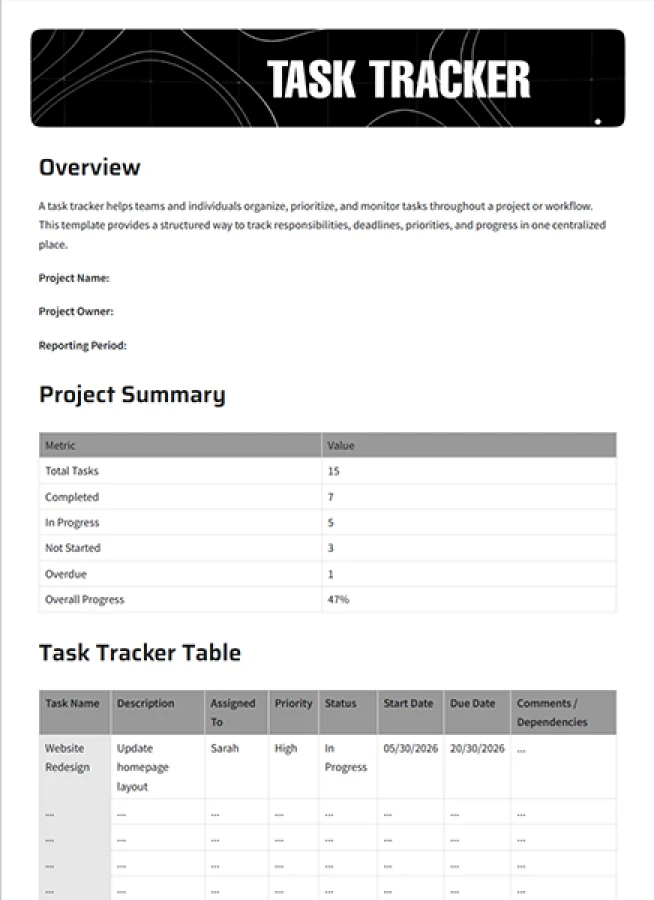
FREE TEMPLATE
Turn Team Action Items Into Actionable Tasks
Includes task assignments, deadlines, priorities, status tracking, & progress updates.
✔ Keep every action item organized
✔ Assign tasks and track progress
✔ Perfect for Teams, Managers & Project Leads
Takes under 1 minute • Trusted by teams at startups & enterprises
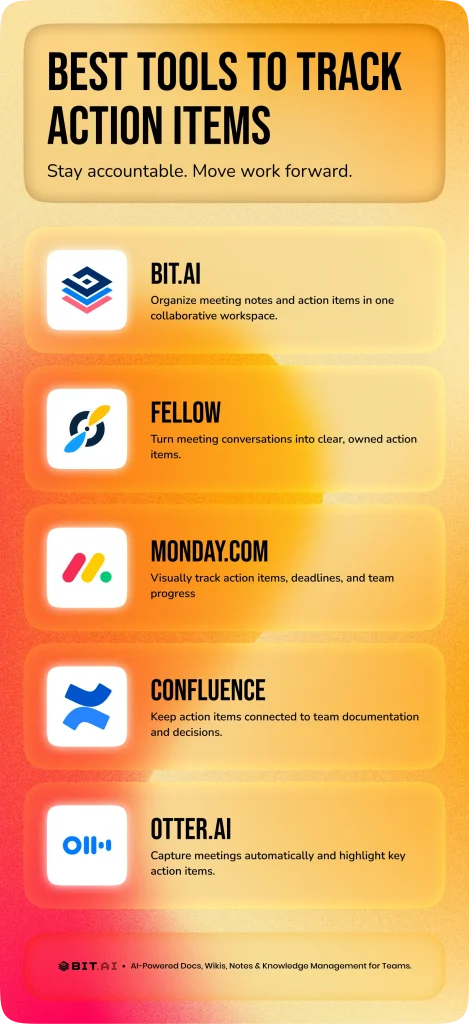
Best Tools to Track Action Items
Selecting the right tool to handle action items could be the key to an effortless and straightforward workflow. Below, we compare tools for documentation, meetings, and task management so you can pick what fits your needs.
1. Bit.ai – Organize Action Items and Improve Team Collaboration
Imagine finishing a meeting and knowing everything important has a clear place to live. No disorganized notes, no left-out tasks, only one organized space for conversations, and documented tasks that are always visible and easy to refer to. That is the role of Bit.ai.
Bit.ai is an AI-powered platform for documents, wikis, and knowledge sharing that helps teams bring clarity and structure to their work.
Instead of letting meeting outcomes go to waste in untraceable files or chat threads, Bit.ai makes it possible for you to keep the discussions recorded, action points outlined, and the context ongoing, all in one collaborative workspace.
Teams can work together in real time, add comments, share updates, and stay aligned inside the same document. This keeps communication clear and makes it easier to turn conversations into well-documented responsibilities without losing important details.
Bit.ai also supports structured organization and control. Version History helps you revisit changes, Trackable Links help you understand engagement, Role-Based Permissions manage access, and Guest Access allows you to work securely with external stakeholders. Integrations with tools like Google Drive help you connect Bit.ai with your existing workflow.
Bit.ai is not a traditional project management or automation tool. Instead, it strengthens how teams document, collaborate, and stay aligned so everyone has the clarity they need to follow through confidently.
Key Features
AI-powered document creation
Bit.ai’s AI Doc Builder helps you structure meeting notes, summaries, and documented action items faster. It assists in organizing information clearly so your team has a reliable reference to work from.
Ready-to-use templates
Bit.ai provides templates for meeting notes, project documentation, and team collaboration. These stunning templates give you a structured starting point so you do not have to format everything manually.
Real-time collaboration
Team members can work together in the same document, leave comments, tag teammates, and share updates. This keeps communication clear and makes it easier for everyone to stay aligned.
Organization and control
Bit.ai supports Version History to review changes, Trackable Links to understand engagement, Guest Access to work with external collaborators, and Role-Based Permissions to manage who can view or edit content.
Integrations that support your workflow
You can connect Bit.ai with tools like Google Drive and other commonly used tools, so your documentation stays connected to the rest of your work environment.
Flexible sharing and security options
Bit.ai lets you share documents using live links and trackable links. You can also use controls such as password protection, expiration settings, and guest permissions to share information securely.
Pricing: Free plan available, pro plan at $8 user/month, Business plan $15 user/month
2. Fellow – Turn Meetings into Clear Action Items
Meetings are only good if they lead to real action. Fellow is intended to assist with precisely that. It facilitates the conversion of conversations into explicit tasks with owners, due dates, and follow-ups. Nothing is lost after the meeting because agendas, notes, and decisions are all connected.
During meetings, you can hand out tasks on the spot, keep tabs on how things are moving, and easily check old decisions. With shared meeting plans, reminders, and smooth connections to other tools, it gets everyone to own their work and make sure stuff actually gets done instead of just being jotted down.
Key Features:
- Make action items straight out of meetings and assign them.
- Collaborative meeting notes and shared agendas
- Unambiguous ownership, due dates, and reminders for follow-up
- Monitor the status of action items during meetings
- Slack, calendar, and productivity tool integrations
Pricing: Free plan available, Team plan starts at $7 per user per month
3. Monday.com – Monitor and Bring Your Action Items to Life Visually
Monday.com gives your team a place to really get things done. It simplifies monitoring project status and makes it very clear. Just think about it, you open a board and all your tasks are shown on timelines or calendars, and you have instant knowledge of the location of everything. Giving out work, setting when things need to be done, and just watching how everything moves ahead becomes easy.
Its AI features assist you in identifying opportunities to streamline your workflow and prioritizing what really matters.
Monday.com keeps everyone in sync and responsible, regardless of the size of your team or the complexity of your project. It transforms disparate action items into a coordinated, worldwide endeavor where each advancement is deliberate and unambiguous.
Key Features:
- Visual boards, calendars, and timelines
- Prioritize and receive suggestions using AI
- Add tasks to your boards with deadlines and mark progress
- Communicate in the moment and receive real-time notifications
- Connect with best-in-class productivity tools
Pricing: Basic $9/user/month, Standard $12/user/month, and Pro $19/user/month
4. Confluence – Keep Action Items Organized Within Team Documentation

Confluence is specifically designed for teams wishing to have a single location for recording discussions, decisions, and subsequent actions. Instead of letting meeting notes sit unused, Confluence lets you turn them into clear, documented responsibilities that everyone can access whenever they need context.
You can capture notes, list action items, and structure ongoing project information in one collaborative space. Team members are able to leave comments, post updates, and be on the same page in the very same workspace, which reduces misunderstanding and makes the crucial part of the work to be seen.
Key Features:
- Centralized documentation for meetings and projects
- Pages for capturing action items alongside discussion context
- Real-time collaboration with comments and mentions
- Organized spaces to group related work together
- Easy sharing and access controls for teams
Pricing: Free for up to 10 users. Paid plans start at approximately $6.70 per user per month, with higher tiers available for growing teams or enterprises.
5. Otter.ai – Turn Meetings Into Clear, Actionable Notes

Meetings move fast, and it is easy for important ideas to disappear the moment the call ends. Otter.ai comes as an AI meeting partner and helps you to monitor everything important. It captures dialogues, converts them into text instantaneously, and creates overviews, so your group always has a transparent reference whenever discussion about decisions and next steps arises.
Rather than searching for various notes in different places, teams can always go back to searchable transcripts, briefings, and marked tasks to get the context they need. This not only simplifies the process of making the next moves but also enhances the sharing of responsibilities and the likelihood that the discussions will lead to actual advances.
Key Features:
- Real-time meeting transcription and summaries
- Automatic capture of key points and action items
- Shared transcripts for team visibility
- Searchable notes to revisit decisions and responsibilities
- Works with Zoom, Google Meet, Microsoft Teams, and more
Pricing: Free plan available; Paid plans start at approximately $8.33 per user per month, with Business and Enterprise options for larger teams.
Wrapping Up: Make Every Action Item Count
When everyone in your team knows what needs to be done and who is going to do it, work goes smoothly. Action items are the cornerstones of productive meetings and successful projects—they turn thoughts into action. With the right tools like Bit.ai, you can organize discussions, document action items clearly, and keep everyone aligned in one place.
Bit.ai’s collaborative workspace helps teams keep important discussions, responsibilities, and context in one organized place. You get clear visibility into documented responsibilities, shared updates, and the context behind decisions.
By setting accurate action items and keeping them in a centralized AI workspace, your team can finally move from talk to done – fast and smarter.
FAQs
- How do you maintain action items effectively?
For efficient monitoring of action items, use a single platform that helps your team stay organized and aligned. Bit.ai is well suited for documenting conversations and listing action items, while tools such as Monday.com can be used when you need more dedicated task-management features like deadlines, status tracking, and automations.
- What do action items do to improve team productivity?
Action items impose order on collaboration by creating accountability and setting timelines. They keep everyone on track, cut down on mix-ups, and make sure projects run smoothly, without anyone doing the same thing twice or getting confused.
- What are the action items for a team meeting?
During a team meeting, the action items list indicates the exact tasks or responsibilities allocated through the discussions. They usually include a description, a person responsible for the task, a deadline, and a method to check if the task is completed or not, in order to establish accountability and task completion.
- How can an action plan for improving team performance be developed?
First of all, make sure you have very precise objectives that are easy to measure, then split them into quantifiable actions and lastly assign each task to a specific person. Utilize team collaboration tools to monitor the work done, communicate changes, and have all members of the team pull in the same direction as regards to the priorities set.
Keep Reading & Learning:
- 15 Free Online Notepads That Make Note-Taking Super Easy! →
- 11 Best Focus Apps to Eliminate Distractions! →
- AI-Powered Collaboration Tools: Smarter, Faster, Better Teamwork →
- 10 Essential Meeting Etiquette Rules for New Professionals →
- Status Report: How to Write It with Examples, Templates & Formats →