Have you ever launched a client project and experienced that split second of doubt about whether you forgot some detail that was important? Maybe an access credential, a kickoff task that you need to complete or communicate, a timeline item, or just a little welcome note to set the stage. This is exactly what a client onboarding checklist is for.
Imagine this: You land a fresh client. Everyone’s pumped, things are moving fast, and you all know what’s up. But without a clear checklist, even great teamwork can get messy. Missing one little thing might not seem like a big deal, but it can mess up communication, deliveries, and trust.
In today’s world, speed, clarity, and a polished onboarding experience are what clients expect from that very first touchpoint onwards. Your checlist is the bedrock that helps you deliver that experience confidently: it brings order to chaos and helps both sides to start on the same page.
Ready to dive in?
Now that you are warmed up, let’s move into Understanding Your Client Onboarding Checklist and see what really goes into creating one that works every time.
Understanding Your Client Onboarding Checklist
Ever start working with a new client and think, “I hope I’m not forgetting anything important”? That tiny moment of uncertainty is precisely why your client onboarding checklist exists in the first place.
It takes scattered steps and turns them into a guided path to keep you organized and set up your client for success from the very start.
A structured onboarding checklist is more than a list of things to do; it’s an initial impression of your workflow, the beginning of a very long-term relationship. Each checkmark represents clarity, preparedness, and professionalism.
You don’t scramble for documents, access details, or next steps; you move with intention. Your client sees it within minutes.
A great checklist gives you a repeatable onboarding experience with very clear expectations for your clients anywhere in the world. Whether it’s onboarding a consulting client in New York or a software partner in Berlin, your checklist makes sure everyone knows what’s going to happen next. It establishes trust, reduces risk, and sets the standard your entire team can follow.

Pro Tip:
Review your checklist quarterly. The needs of clients evolve, and industries shift; your process needs to grow with that.
Ready to see why this goes beyond a checklist of tasks? Let’s dive into why the Client Onboarding Process Matters and understand its very real impact on long-term success.
Why the Client Onboarding Process Matters
A well-thought-out onboarding process achieves more than just welcoming a client. It sets the scene, illuminates the way, and turns the start of your working relationship into a meaningful and exciting experience.
By providing some structure to those first few steps with a client, you create something all relationships need: clarity, confidence, and momentum. ?
Here’s how a solid onboarding process enhances your entire client experience:
1. Establishes expectations at the very beginning
Imagine your client entering a new initiative with absolutely no ambiguity. The client knows what to expect, how you will work with them, and what success will look like to achieve. Immediately setting expectations is like flipping on a light switch before anyone takes one step.
2. Builds early trust in the relationship
Clients instantly feel in capable hands. A smooth onboarding flow shows you’ve thought things through and that you respect their time. Trust grows before the first deliverable even arrives.
3. Amplifies customer success results
Great onboarding is like setting the base of a building: if that base is solid, then everything you build afterwards only gets stronger. A supported client is one who is motivated, and motivated clients do so much better.
4. Avoids undue back-and-forth motions
No more digging through emails, chasing details, or guessing what comes next. A structured process keeps everything organized so you can focus on what actually matters: great execution.
5. Provides consistency in the experience of customers worldwide
Whether your client is in Sydney, Dubai, or San Francisco, your onboarding process remains polished and predictable. It feels seamless no matter the time zone or industry.
A well-thought-out onboarding journey creates the impression for clients that they are not just kicking off a project but stepping into a partnership based on clarity and care.
Pro Tip:
Add a small “Here is what to expect next” message after every client milestone. It keeps the momentum strong and reduces uncertainty at every turn.
Now, onto Key Elements Every Client Onboarding Checklist Should Include, so you can create a checklist that never misses a beat.
Key Elements Every Client Onboarding Checklist Should Have
A strong onboarding checklist is like a guided path leading your client from a place of uncertainty to complete clarity. When everything has a function, your workflow morphs into an experience that feels polished, thoughtful, and ready for global teams to follow. ✨
Here are the key elements that make your onboarding checklist truly powerful:
1. Make sure information is clear
This is where the foundation is laid: gathering project objectives, brand files, access data, customer profiles, and any existing resources. The more complete your early information is, the easier every future step becomes. You’re creating a shared understanding that eliminates second-guessing and keeps both sides aligned from the start.
2. Clearly defined goals and expectations
Clients want a vision and clarity: this is the point where you will define what success will look like, the measurements for progress, and what timelines each stage will take. Setting expectations up front helps to avoid confusion or any delay; thus, your client can feel secure about the road forward.
3. Smooth access and account setup
Tools are the backbone of collaboration. Make sure all drives, CRMs, task boards, and shared workspaces are set up, easy to get to, and simple to use. A clean setup saves time for fixing problems and gives clients one place for everything.
4. A predictable communication rhythm
Great communication is like a steady pulse that keeps the whole project alive. Define your weekly updates, feedback loops, review sessions, escalation channels, and check-in moments. When clients know exactly when they’ll hear from you next, the partnership feels calm, coordinated, and intentional.
Quick Tip:
Ask your clients for feedback to understand what they really need and improve your communication rhythm.
5. Your kick-off starter pack or first deliverable
Think of this as the opening scene of your movie. A welcome kit, a roadmap, a starter guide, or an initial deliverable sets a tone for what working with you is going to feel like. It showcases quality, structure, and attention to detail before the work even begins.
Each of these elements reinforces trust, eliminates friction, and provides your client with the seamless beginning they expect. Together, they make onboarding an experience rather than a checkbox list.
Pro Tip:
At the end of each element, add a little “Here is what happens next” note. Clients love to know how each step connects with the bigger picture.

FREE TEMPLATE
A Simple Checklist Template to Keep Tasks Organized
Create clear, actionable checklists to organize tasks, track progress, and make sure nothing falls through the cracks.
✔ Add tasks, steps, and key details
✔ Easily customize and reuse for any process
✔ Ideal for teams, projects, and everyday workflows
Takes under 1 minute • Trusted by teams at startups & enterprises
Now you are ready to walk through the journey itself. Let’s move into the Step-by-Step Client Onboarding Process Explained and outline the flow from the first meeting up to full collaboration.
Client Onboarding Process: A Step-by-Step Explanation
It’s all about a seamless onboarding experience that’s built upon a clear sequence of steps, moving your client from the very first interaction through to a fully aligned partnership. And when each step feels intentional and well-timed, your client moves through the process with confidence and clarity about what comes next. ✨
Here is the full journey, set out in smooth, cinematic steps:
Step 1: Initial Contact and Qualification
That’s where everything starts: you gather basic information, understand what the client is trying to achieve, and find whether the partnership is a good fit. It sets the tone and allows for proper preparation of the onboarding path.
Step 2: Proposal, Agreement, and Documentation
When both parties feel they are on the same page, one would put forward their proposition, solidify the terms, and submit any necessary paperwork. This step brings order, clarity, and security to the relationship.

Facing difficulty in managing clients?
Check out these 9 Client Management Software You Must Check Out! →
Step 3: Welcome Package and Kickoff Preparation
Your client should get a warm welcome into the journey that lies ahead-this might be through a starter guide, a welcome message, or a short video, creating excitement and helping clients feel supported right from the get-go.
Step 4: Data Collection and Access Permissions
You gather the necessary files, brand assets, credentials, or any information to get started working. A clean handoff here avoids delay and makes sure your team will have everything needed to deliver high-quality results.
Step 5: Set Up Workflow and Align Tasks.
You set up your shared toolset, dashboards, project boards, and communication channels. During this stage, a coordinated environment will be set up where the tasks, deadlines, and responsibilities are clearly defined.
Step 6: First Deliverable or Kickoff Meeting
It’s time to shine: whether it be a roadmap, sample deliverable, or first phase of work, this step engenders trust and shows the client what they will experience with you.
Step 7: Review Loop, Feedback, and Long-Term Success Planning
You collect feedback, make refinements to your process, and set the stage for future collaboration. This closing step really shows the client they are being taken care of, heard, and excited about the partnership to come.
Each one of the steps plays its part in building a client experience that is professional, organized, and truly enjoyable.
Now that the journey has been mapped out, it’s time to move into the Bit.ai Client Onboarding Checklist Generator and show how to build this cinematic onboarding flow in minutes.
Need to create a report that wows your client?
Bit.ai Client Onboarding Checklist Generator
Docs, wikis, and a knowledge management platform powered by AI, built for teams who wish to make their workflows feel fast, fluid, and beautifully organized. Bit.ai gives you a stunning advantage by letting you create fully structured client onboarding checklists in just a few seconds.

Picture this moment: you open Bit.ai, you type a simple prompt, and you watch your checklist unfold on the screen in real time. It feels like setting a scene where everything clicks into place exactly when you need it. No old templates. No copy-paste chaos. No formatting struggles. Just one clean, intelligent generator that builds your onboarding process with precision.
The Bit.ai Client Onboarding Checklist Generator lets you create checklists for your clients anywhere across the globe. Whether it is New York-based creative agencies or consulting teams in Berlin, Bit turns onboarding into a consistent, seamlessly streamlined experience that your entire team can have confidence in following through with.
Try the Generator
Use the Bit.ai client onboarding checklist generator here:
👉 Client Onboarding Checklist Generator 👈
Here is a Sample of What the Generator Can Create
The following is a brief sneak peek into the kind of checklist Bit.ai can create in seconds:
This is just a small sample. The generator creates much longer, customized checklists based on your prompt.
Why Bit.ai’s Generator Stands Out
The Bit.ai Client Onboarding Checklist Generator allows you to transform disorganized onboarding flows with a list of onboarding steps into a clean, structured checklist, all in one generated checklist, with just one prompt. Save your time from the setup and give your clients a professional onboarding experience from the very first moment.
Key Features
AI-driven checklist creation
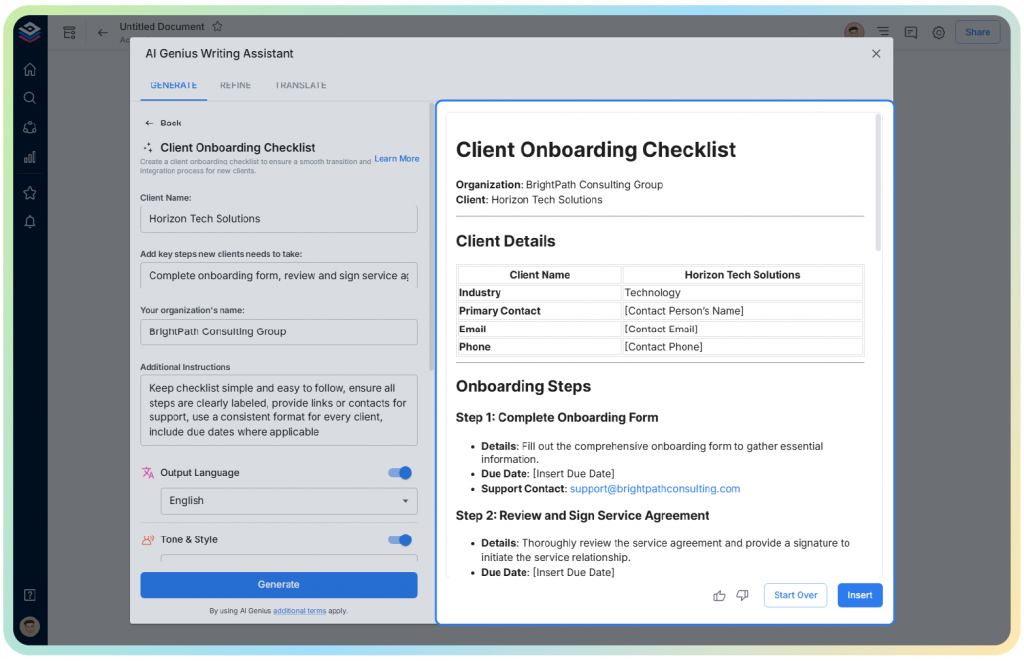
Bit.ai’s AI transforms simple prompts into full, structured onboarding checklists. You describe your client, your workflow, or your process, and the AI creates from it a polished checklist that looks like it took hours in creation. It understands the structure, tone, formatting, and global best practices, so that your output always feels clean and professional.
AI Writer for edits, rewrites, and expansions
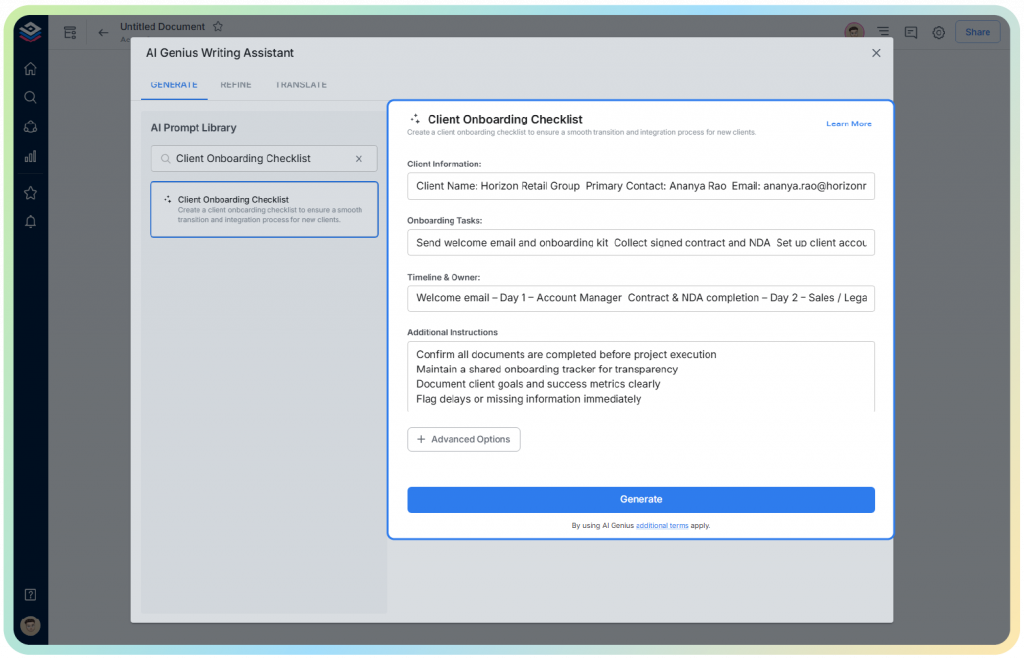
You can highlight any portion of your document and ask Bit’s AI Writer to rewrite, simplify, expand, or refine it. Whether you need a more formal tone, a cinematic style, or a shorter version for client sharing, the AI adapts in an instant. This allows teams to maintain consistency with ease, rather than having to jump between tools.
Smart formatting and auto-organization
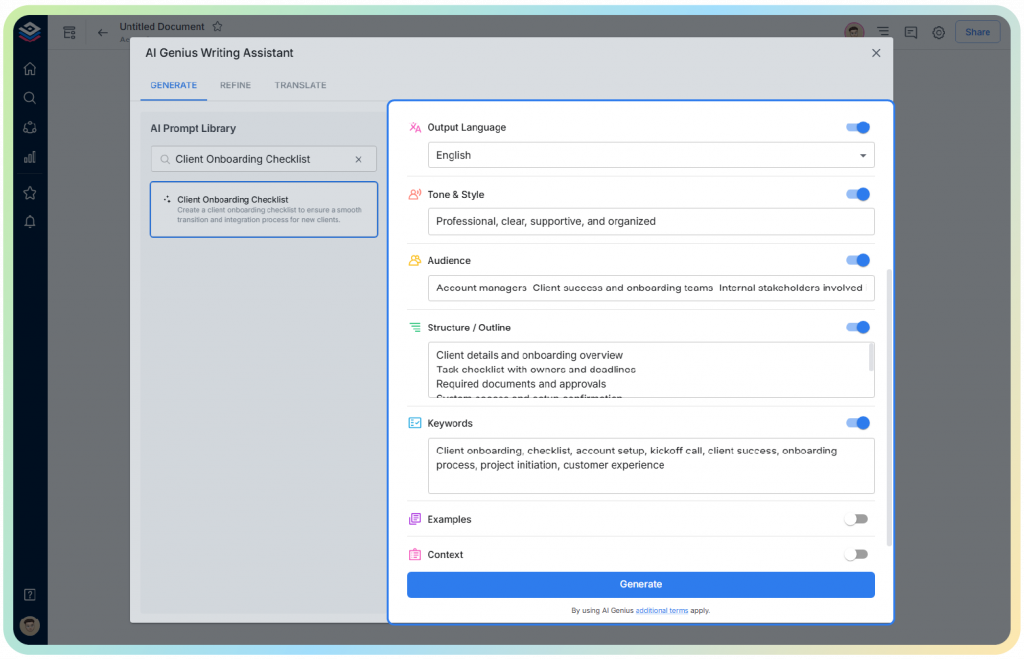
Bit.ai uses built-in intelligence in formatting headings, lists, tables, references, and embeds. Your document stays clean and consistent without manual layout work. This is so helpful when multiple teams are collaborating on producing a document that evolves quickly.
Real-time collaboration across global teams
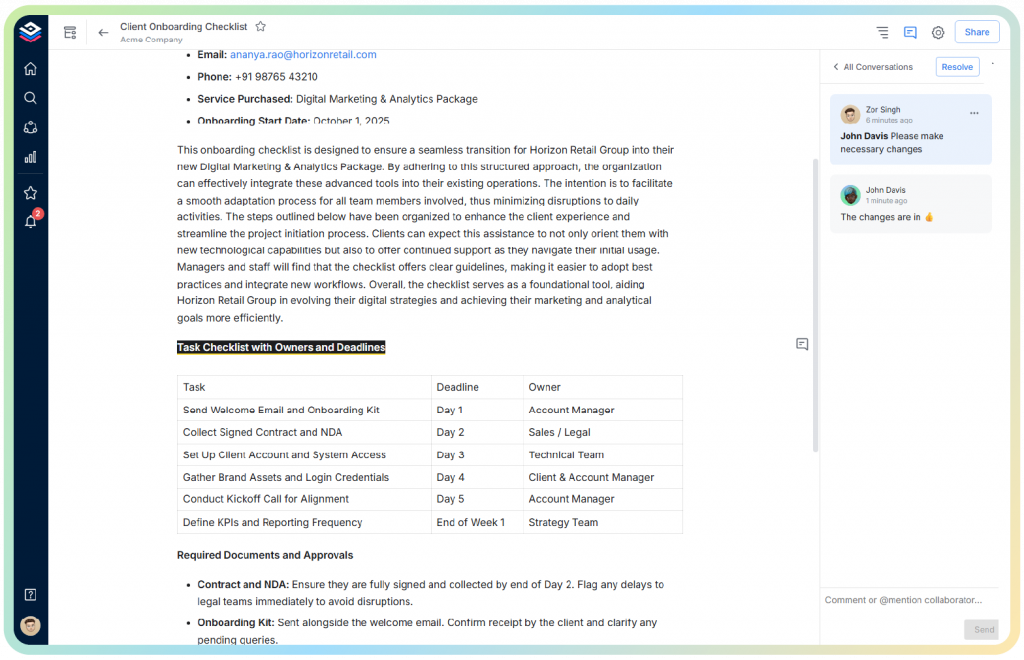
Everyone can edit, comment, tag teammates, and co-create in real time. Whether your project team is in Singapore, London, or Toronto, nothing feels out of sync. Bit.ai feels like a live collaborative workspace where ideas move fast, and workflows stay aligned.
Smart interactive documents
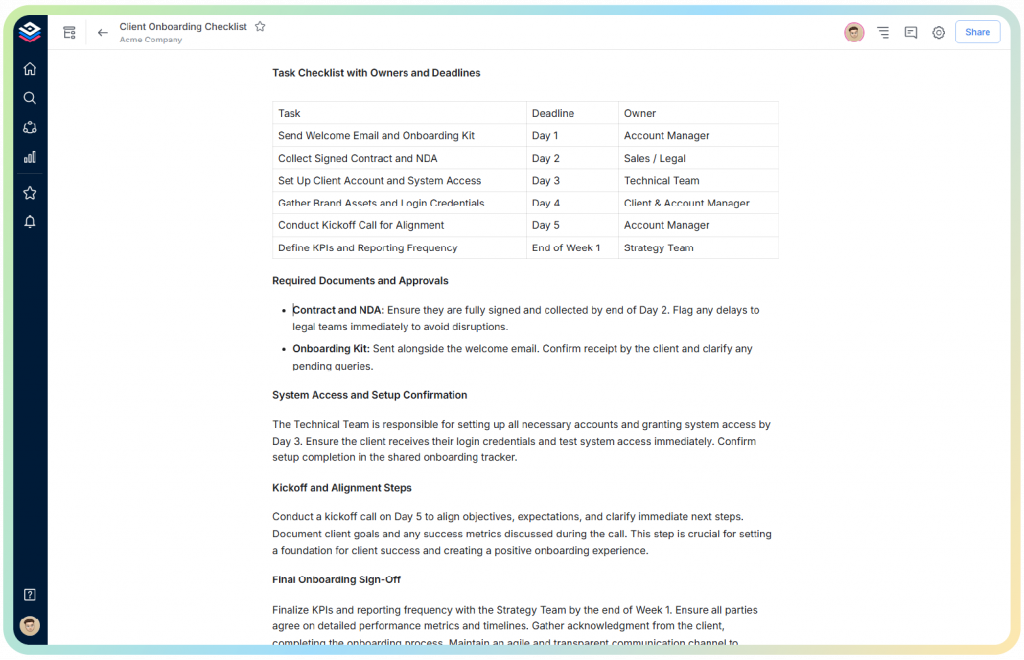
Bit.ai is more than a document. You can embed videos, PDFs, charts, cloud files, dashboards, whiteboards, and much more. So, this turns your onboarding checklist into an interactive hub rather than a static file, giving the client a richer experience.
Template library + cloning
With one click, your team can turn any checklist into a reusable template. This means that, regardless of whether your team is scaling or your client base is expanding globally, your onboarding process will be uniform.
Version history for audit and evolution
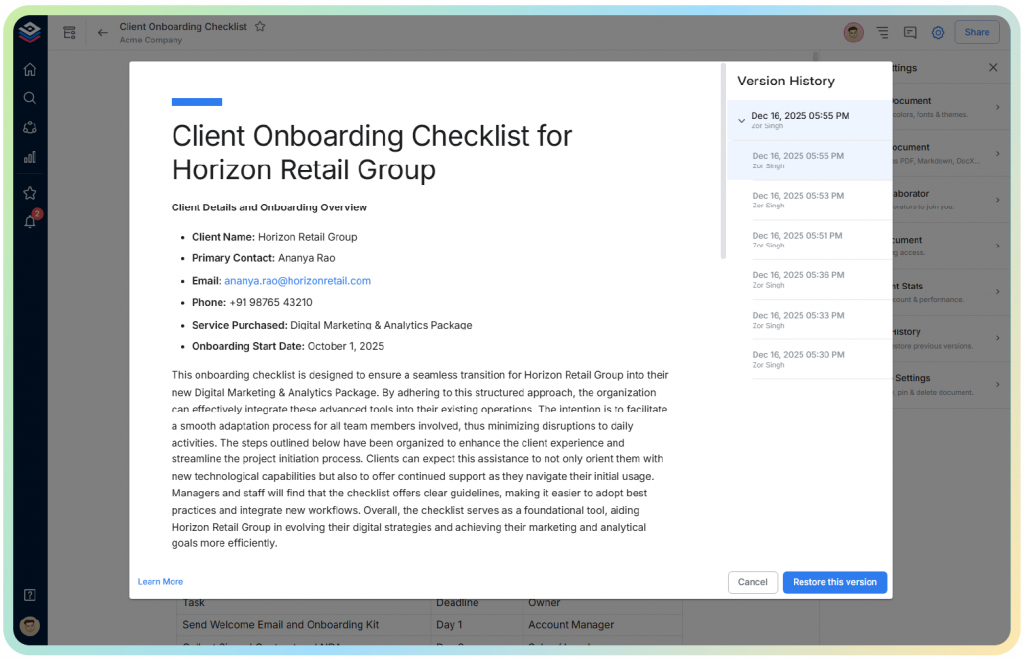
Every edit is saved. You can rewind, restore, compare versions, or track how your onboarding process evolves over time. This ensures no detail is ever lost and that your documentation stays clean and reliable.
Multiple sharing modes
Share your onboarding checklist as a live link, a private workspace document, a secure read-only page, or an exported file whenever you want. Clients can view without signing up, making sharing globally easy.
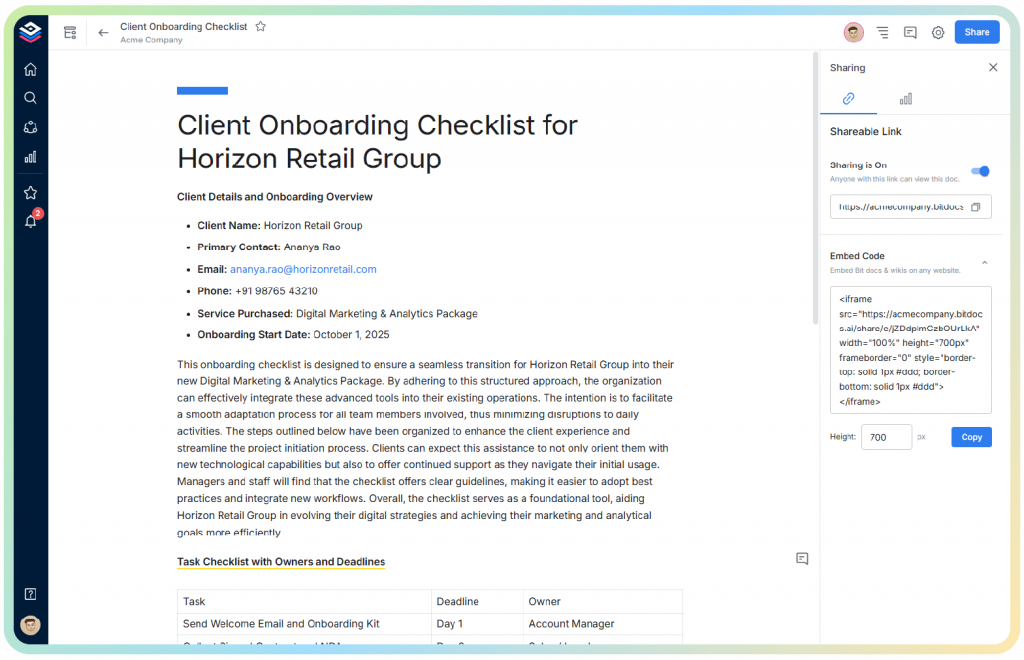
Smart widgets and blocks
Insert tables, task lists, toggles, highlights, callouts, forms, code blocks – and much more. These blocks allow you to create documents that are as stylistically appealing as they are functionally strong – no additional tools required.
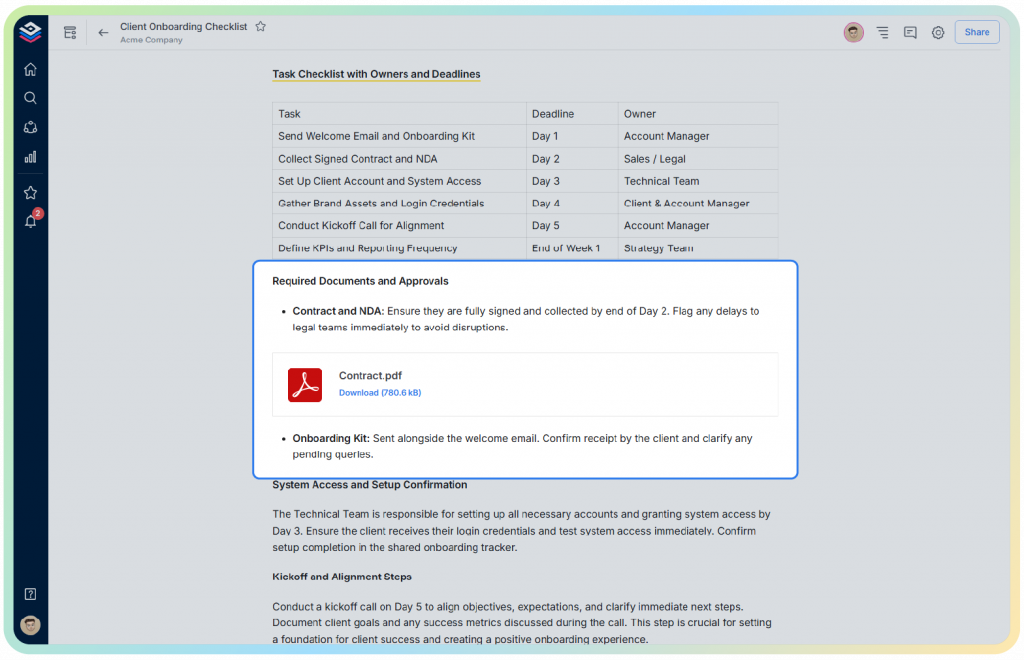
Role-based permissions and security
Control who can view, comment, edit, or share your onboarding documents. Bit.ai provides enterprise-grade permissions that keep your client data safe and your workflow structured.
Pricing:
Bit.ai has a free plan that you can use immediately. Other, more advanced AI features, workspace controls, and team-level collaboration are only available at higher premium tiers starting at $8/ 8/month.
Bit.ai turns onboarding from routine to an experience that feels smooth, guided, and beautifully crafted.
Pro Tip:
Once you’ve generated your checklist, ask Bit.ai to simultaneously create a matching welcome kit or kickoff brief to pair with it. This pairs perfectly with your onboarding flow and gives clients a world-class entry point.
Ready to bring it all home? Let’s move into Final Thoughts and wrap up your onboarding journey with clarity.
Final Thoughts
A strong client onboarding checklist does not only contain the tasks. The checklist is meant to create an intentional and guided experience through the support system from the first time your client enters your space. When things are clearly defined, everyone is on the same page regarding expectations, and all of the details are connected seamlessly, every client can be confident they made the right decision.
With the right structure, a considered checklist, and the assistance of tools like Bit.ai, you’re no longer just managing onboarding. You’re designing it, like a director would build a scene. Your clients feel welcome; your team feels aligned. And your entire workflow goes faster, gets stronger, and becomes more professional.
Every great partnership starts with a moment of clarity. Your onboarding checklist is that moment. It sets the tone, builds trust, and prepares your clients for success long before the first deliverable is in their hands.
You are now fully equipped to guide clients with confidence. Next, let’s answer some of the most common questions teams around the world have when building their onboarding process.
FAQs
What information should an onboarding checklist contain?
Your onboarding checklist should include information gathering, access setup, kickoff preparation, communication plans, deliverable timelines, and feedback loops. These core elements listed herein create clarity and alignment, which facilitate a seamless transition onto the project.
What are the 7 steps in the client process or client onboarding process?
The 7 key steps typically include:
- Initial contact and qualification
- Proposal and agreement
- Welcome package and kickoff setup
- Access, permissions, and data collection
- Workflow setup and alignment
- First deliverable or kickoff meeting
- Review, feedback, and long-term success planning
Why is a client onboarding checklist important?
This creates clarity, reduces confusion, and nothing will fall through the cracks during onboarding. Clear and predictable onboarding will make your clients feel more confident, while your team will appreciate the repeatable workflow that boosts efficiency.
Can multiple people on a team work on an onboarding checklist in Bit.ai?
Yes, Bit.ai offers real-time collaboration in which teams can edit, comment, build, and create onboarding documents together, keeping global teams aligned and ensuring your workflow stays clean and coordinated.
If this was useful, read this…
- 15 Proven Customer Service Automation Tools to Boost Support! →
- Customer Research: Importance, Types & How to Conduct It Right →
- Customer Needs: Most Common Types You Should Know About! →
- Customer Success (CS): Meaning, Importance, and Key Functions! →
- 15 Essential Client Project Documents For Your Business! →