Automating your cost-benefit analysis (CBA) reports may seem tough, especially if you have spent the last several years managing multiple spreadsheets, emails, and files. However, if you’re tired of organizing and calculating numbers traditionally, you’re not alone.
Many teams today are looking for a better and easier way to conduct cost-benefit analyses, something that saves time, reduces error, and aligns everyone’s work. The good news is you can turn your reporting process right-side-up with a few tools and techniques.
In this CBA journey, we’ll show you the perfect ways to automate your cost-benefit analysis, improve productivity, and make your report 10x effective. We’ll explain everything from scratch for newbies or beginners, benefits, tools, a full-step example, and of course, pro-tips for a seamless experience.
Let’s start with the basic definition of Cost-Benefit Analysis and help you take your CBA from tedious to easy to effortless, as your next report awaits.
What is Cost-Benefit Analysis?
Let’s take a step back before jumping into automation and establish what a cost-benefit analysis is and why it’s such a valuable tool in the first place.
Cost-benefit analysis (CBA) is a systematic way to assess the monetary advantages against the costs involved with a project, proposal, or investment. You list all the prospective costs (resources, time, tools, etc.) and contrast them with expected benefits (profits, savings, growth, etc.). Essentially, CBA helps you, your team, or your stakeholders make decisions with more informed confidence.
A good CBA report will answer things like:
- Is this project worth my spending?
- What will we gain against what we will spend?
- Are we missing any hidden costs?
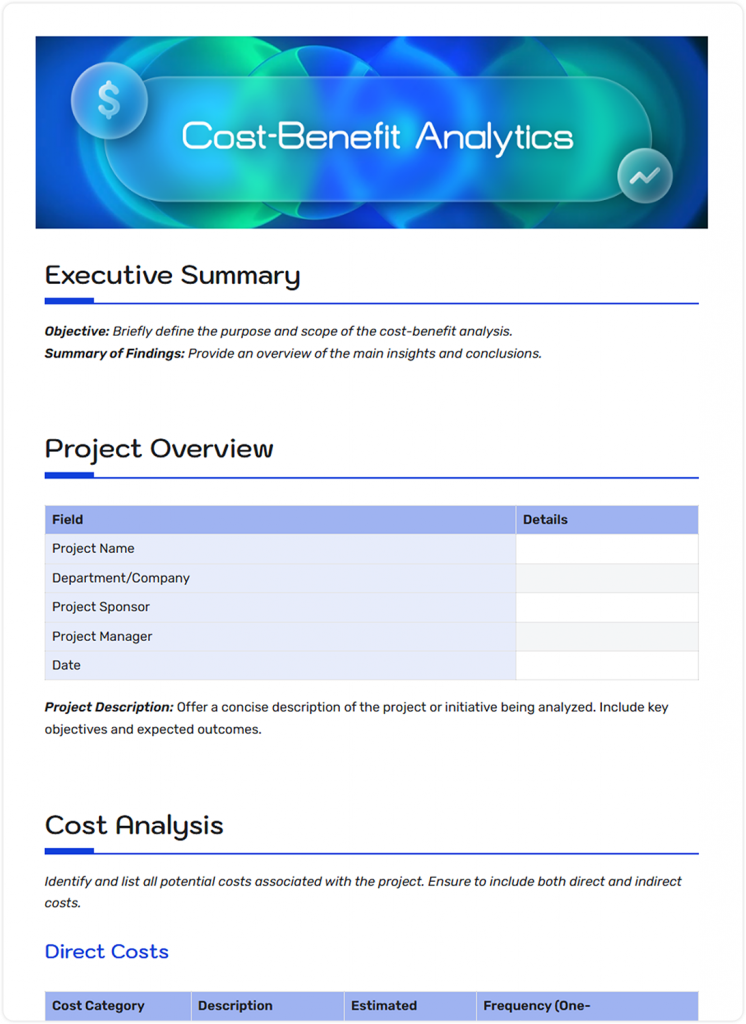
If you have never used a cost-benefit (CBA) analysis before, there is no need to worry. Find a sample cost analysis example below, which is designed for beginners.

Now, let’s move on to the benefits of automating your cost-benefit analysis.
Benefits of Automating Cost‑Benefit Analysis
Before we get into how to automate your Cost-Benefit Analysis, we need to take a moment to consider what makes automating your cost-benefit analysis (CBA) a big deal. When you’re juggling budgets, evaluating new tools, or building a business case for stakeholders, manually crunching numbers to assess the feasibility of projects is not only time-consuming but also prone to human error.
By automating your CBA process, you can turn the work that used to take hours or days into a streamlined, accurate, and data-driven workflow.
Here are the key benefits of automating your CBA:
1. Data Processes at Speed
We have all been there: the nightmare of spreadsheets—switching between tabs, trying to search for the one cell that won’t compute in the right way. That’s what automation can resolve. There are tools like Bit.ai, integrations with Google Sheets, or even Zapier that can pull from different sources and do the math. Totals, averages, ROI? A few seconds. No more 15 copies of “Final_v3_CBA.xlsx.”
2. Live Collaboration
No more email chains with five attachments and subject lines like “Updated draft – please use this one.” When you turn to a smart doc platform like Bit.ai, everyone on your team can simultaneously edit the same CBA report. You can tag teammates, leave comments right where they belong, and even go back to earlier versions if needed. It’s like having everyone in the same room when you’re not.
3. Visualize It
Numbers can be pleasing; however, visuals convey the message. With automation, you can slot in interactive charts, cost tables, or dashboards right into your report. Bit.ai lets you drop in a live Google Sheet, Tableau chart, or Excel graph updated in real-time. This makes your benefits crystal clear; stakeholders “get it” at a glance without you explaining every number.
4. Reduces Error
Manual calculations = human mistakes. (And let’s be honest, nobody wants to explain a wrong ROI to their boss.) Automated templates and built-in formulas keep things accurate. With Bit.ai, you can embed formulas or link spreadsheets so numbers always stay fresh and correct. That means less second-guessing, fewer headaches, and way more confidence in your results.
5. Shareable & Exportable
When the report is done, you don’t have to panic to create a PowerPoint. You just need to click share. Bit.ai allows you to export it as a PDF, create a live link, or simply embed the report in your organization’s wiki. Share with stakeholders, send to investors, or drop it into Slack, and never have to create another copy.
6. Easy Versioning
We’ve all been there: “Wait, which version are we using?” Automated platforms solve that. Bit.ai, for instance, keeps a version history so you can see who changed what and when. If you ever need to roll back to a previous draft or track why a decision was made, you’re covered. It’s like a time machine for your CBA reports.
With these advantages in mind, you may now be thinking: how do I make this automation happen? Let’s take a look at how Bit.ai can help you automate your cost-benefit analysis.
Using Bit.ai for Automated CBA Reports
When it comes to automation, it is important to use the right tools because they can make or break your cost-benefit analysis (CBA) process. While spreadsheets will likely seem like a natural choice, they do not provide any collaboration, version control, or ability to visualize insights in real time, which are valuable when doing a CBA.
In this section of the guide, we’ll discuss Bit.ai to make the CBA workflow easier and faster, from intelligent documentation to visual dashboards, so you can stop worrying about formatting and start focusing on informed decision-making.
Bit.ai is the smartest document collaboration and knowledge management platform designed to improve team collaboration. Consider Bit.ai a modern-day version of “smart living documents,” or an interactive report to share with team members, who can understand without technical knowledge. Here is how it follows your workflow from beginning to end.
Embed Live Content Directly into Your Report
One of the most advantageous features that Bit.ai offers is “smart widgets” that allow for live content to be embedded (i.e., spreadsheets from Google Sheets or Excel, financial charts, cost diagrams, and even dashboards) right into your document. This way, your cost table is updated automatically for benefit projections and vice versa without having to update manually. You can also embed visuals if you are using tools such as Lucidchart, Airtable, or Tableau, all of which make your report compelling yet equipped with good data.
Collaborate in Real-time
Bit makes real-time collaboration easy. Whether you’re working with your finance team, project leads, or stakeholders, you can co-edit the same document, comment inline, and tag teammates for feedback. This eliminates unnecessary back-and-forth emails and removes the confusion of multiple versions of files. Everyone is literally on the same page.
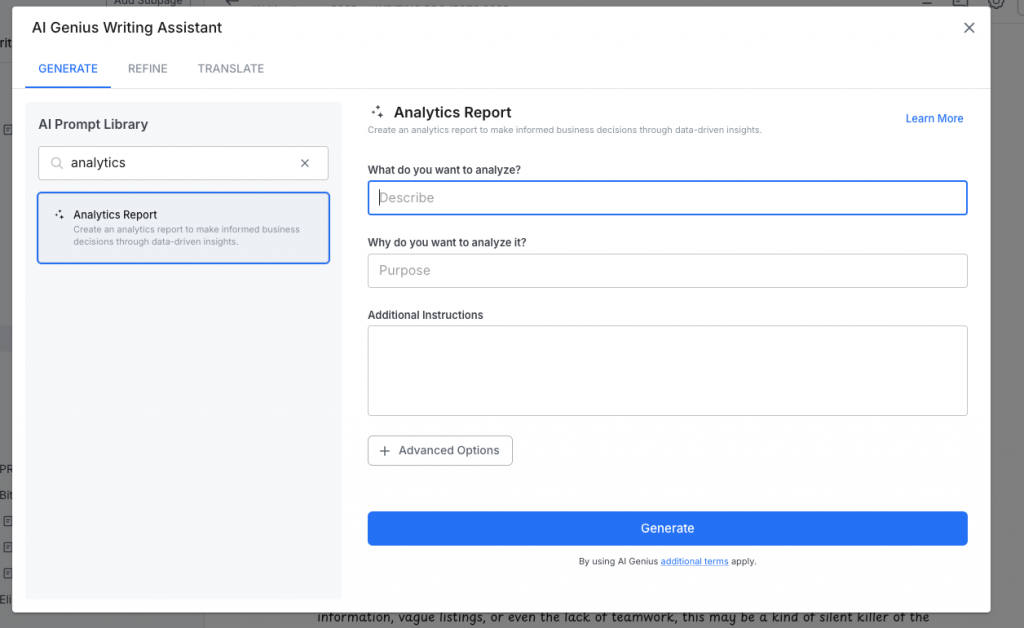
Get Assistance Writing with AI Genius Writer
Writing reports manually can take a lot of time, especially if you’re unsure how to organize your analysis or express your ideas. Bit’s AI Genius co-writer can help do that. It can help you structure your CBA report, write executive summaries, format your tables, calculate ROI using basic formulas, and even improve your writing! It’s like having a writing assistant built into your document editor.
AI Doc Builder
Bit.ai’s AI Doc Builder makes starting a document much easier. Instead of wasting time on a blank page, you just need to enter a simple prompt, and you get a well-structured draft in seconds. It’s like having a rough outline ready in minutes. This way, you can save time on formatting and focus more on the actual content.
Share Reports the Way You Prefer
When you have your report finished and ready, Bit allows you to choose your own sharing preference. You can share a live link, which is always the latest version, embed it in another tool (like Notion, Confluence, or your intranet), or export the report as a PDF. Bit users can also share reports with guests, apply password protection, link expiration, and view tracking, so you can track who has clicked through and seen what.
Organize Your Workspace to Grow
Bit is not only about creating ad-hoc documents. Bit is meant to grow alongside the user’s needs. Users can build workspaces for different teams or projects, organize content into folders and subpages, and develop full internal company wikis for cost savings initiatives, policy documentation, or recurring project reporting templates. With the search bar and tagging functionality inside Bit, everything will always be found easily, even if it is two months old.
Step-by-Step Guide: How to Automate a Cost‑Benefit Analysis Report
When cost-benefit analysis is automated, it becomes significantly easier and more valuable. Instead of flipping through spreadsheets, unorganized notes, and long email strings, automation brings you to a consolidated, streamlined workflow. So, the steps below give you a straightforward approach to building automated CBA reports.
Here’s an example of how an automated CBA workflow looks:
Step 1: Start Fresh with a Workspace
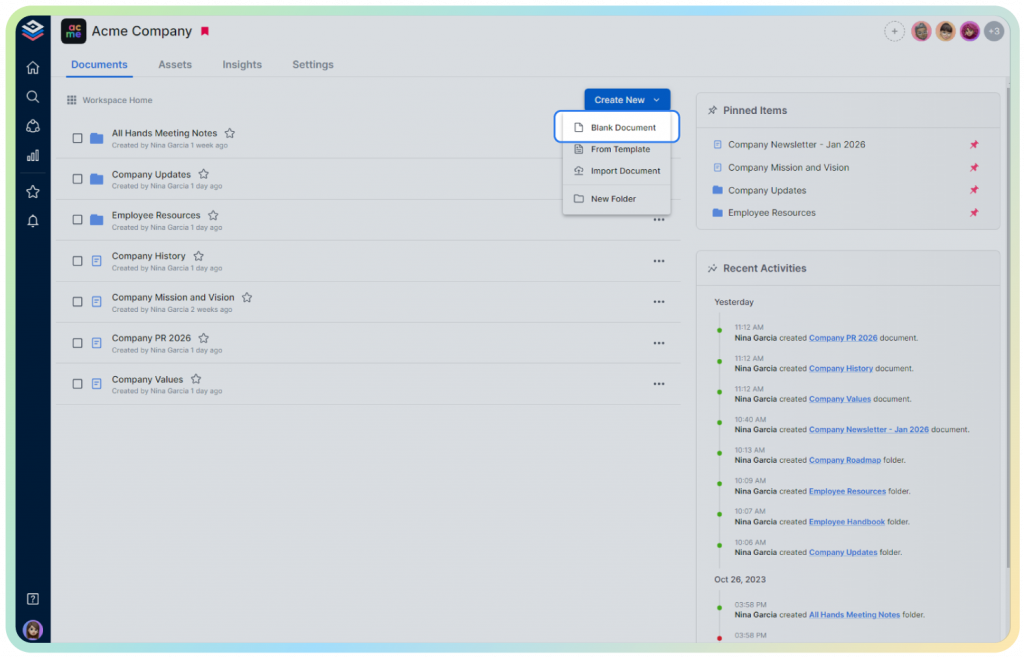
Create a new workspace or document in Bit.ai for your CBA project. Name it clearly, like “CBA – CRM Implementation,” so your team immediately knows what it’s for. A well-organized workspace keeps all your project assets in one place.
Step 2: Set the Stage with a Quick Overview
All good reports begin with a quick overview. Start with a brief “introduction” at the top: What’s the project? Why are you doing this analysis? What problem are you solving? You can use Bit.ai’s headings, bullets, and highlights to structure this section clearly for anyone reviewing the report.
Step 3: Embed Your Cost Data
Rather than entering numbers manually, you can embed your Google Sheet or Excel file directly into Bit.ai. This keeps your data live, so any updates in the original spreadsheet automatically reflect in your doc. Don’t forget to include both direct costs (like licenses and equipment) and indirect costs (like training time or downtime).
Step 4: Show Off the Benefits
Now, add your expected benefits: savings, revenue, efficiency, and reduced risks. And instead of just listing them, make the document pop! Embed charts, dashboards, or visuals in the document to make the benefits easy to see and understand.
Step 5: Include Your Calculations
Bit.ai makes it easy to display your numbers, but the calculations themselves should be done in a spreadsheet or other tool like Excel or Google Sheets.
Once you’ve calculated figures such as ROI or NPV, you can embed your tables, charts, or dashboards directly into your Bit.ai document. In this way, your CBA report stays accurate, up-to-date, and beautifully organized—all in one place.
Step 6: Get the Team Involved
Before you hit publish, invite your teammates to review. Bit.ai makes collaboration painless — people can comment, tag, and suggest changes right inside the doc. No version chaos, no endless “final_v3_revised2” files clogging your inbox.
Step 7: Share or Publish Your Final Report
After you’ve polished the report, Bit.ai makes it easy to share. You can share your doc as a public link, export as a PDF for offline use, or share internally with your team. No need to waste time making a separate slide deck — your Bit.ai doc is presentation-ready with just a click.
Common Pitfalls in Cost‑Benefit Analysis Automation (And How to Avoid Them)
Cost-benefit analysis does not necessarily mean error-free; mistakes are still possible, particularly when systems aren’t set up thoughtfully from the start. If we don’t pay attention to outdated information, vague listings, or even the lack of teamwork, this may be a kind of silent killer of the quality of our work. Below are the most common pitfalls that teams fall into when automating their CBA reports, and how you can ensure that you do not fall into these traps with a little bit of initial planning.
Using Old or Inaccurate Data
Automation tools will read data from the sources that you maintain, but they do not replace the stale inputs. Incase your sheets on Excel, your cost trackers, and your project databases are not updated on a regular basis, then your automated report would show outdated or even misleading information.
Making the Report Overcrowded
It is very easy to put all the information you come across in a single report. However, an excessive amount of information will make your analysis complicated or hard to follow, especially when something unrelated or vague costs/benefits are mentioned.
Lack of Version Control
Editing and sharing files, in particular spreadsheets, manually may cause overwriting of data, numerous versions of the same file, or the data being lost. It is an unsaid problem that easily becomes bigger from small.
Missing Early Collaboration
When the stakeholders are not engaged in the process at an early stage, odds are high that changes and conflicts will occur at the last minute. Input and alignment shouldn’t come just before the report is finalized.
Keeping these pitfalls in mind and developing some basic mechanisms of preventing them, your automated cost-benefit analysis reports can be considerably more reliable, streamlined, and decision-friendly. Let’s see some of the pro tips for more clarity, consistency, and collaboration.
Pro Tips for Effective Cost‑Benefit Analysis Automation
You have already taken a great first step by automating your cost-benefit analysis, and a successful analysis requires a little more consideration. Small changes, whether it’s using the right data or changing up how you share and collaborate on your report, will improve the accuracy and usability of your CBA conclusions. Try these few quick tips to get more value out of your report.
☑️ Tip 1: There should always be a summary section that summarizes total costs, total benefits, and ROI. Decision-makers love quick summaries and important pointers.
☑️ Tip 2: Select important parts by means of conditional formatting or coloring.
☑️ Tip 3: You can use visual bookmarks to create links to related documents (such as project proposals or earlier CBAs).
☑️ Tip 4: You can prepare a common template of cost-benefit analysis where you will not need to start over every time.
☑️ Tip 5: Whenever you can, get multiple sources of data to be integrated, where they can automatically update whenever something changes.
You’ve made it through the deep dive, so let’s pull it all together. Here’s a quick recap of everything you read to keep in mind as you move forward with automating your CBA reports.
Wrapping Up
Automatic reports of your cost-benefit analysis are not only a productivity tip but a smarter decision-making process as well.
By having the necessary tools, in particular, a collaborative platform, such as Bit.ai, you will be able to make clearer, graphic reports, team up without turmoil, monitor all changes, and share knowledge in real-time. So go forth and take the first step to automating your cost-benefit analysis report, and remember to make it a perfect one! ADIOS!
FAQs
Q.1 What is Bit.ai’s automation of a cost-benefit analysis?
A. First, make a new file in Bit. Embed tables, charts, and equations using smart widgets. Share/export your report, work with your group, and follow versions.
Q.2 What are the advantages of using automation in cost and benefit analysis?
A. Automation is time-saving, error-reducing, and enhances teamwork. It does not distract you from focusing on the actual insights, but on manual formatting.
Q.3 Is cost savings analysis equal to cost-benefit analysis?
A. Not exactly. Cost savings analysis merely concentrates on the measure of cost savings, whereas cost-benefit analysis pays attention to the measure of cost as well as the overall value or the benefits that will accrue to you.
Q.4 Does Bit.ai assist in creating an example of cost analysis of a project?
A. Yes! With Bit.ai, you can insert real cost tables, project outlines, visuals, and work together with your colleagues. You may even go by a pattern sample of cost-benefit analysis.
Q.5 How does artificial intelligence affect cost-benefit analysis reporting?
A. AI can assist in the retrieval of data across multiple sources, automate calculations, raise an alarm when there is an anomaly, and produce a summary within a short period. Together with services such as Bit, it makes reporting a lot smarter.
Q.6 What is the distinction between cost-effectiveness analysis and cost-benefit analysis?
A. Cost-effectiveness analysis is a comparison of costs with results and outcomes (e.g., efficiency or health outcomes), whereas cost-benefit analysis compares costs with the dollar value of benefits.