Have you ever been part of a project where everyone is working hard, but progress still feels slow and unorganized?
Project updates get lost in messages, feedback takes too long, and teams spend more time following up than actually getting work done. Without a clear project collaboration process, even simple tasks can create confusion and delays.
Effective project collaboration helps teams stay aligned, organize communication, track progress, and manage tasks more efficiently. With the right collaboration workflow, teams can share updates easily, improve teamwork, and keep projects moving without unnecessary back-and-forth.
So, in this practical guide, you will learn what project collaboration means, why collaborative teamwork matters, and how to improve project management and communication in daily work.
Now let’s get started and understand what project collaboration actually means and how it works in practice.
What is Project Collaboration?
Project collaboration is the process of team members working together to plan, manage, and complete a project efficiently. It involves sharing communication, tasks, updates, feedback, and resources in a structured way to keep everyone aligned and focused on common project goals.
Let’s look at few examples of project collaboration:
Project Collaboration Examples
Project collaboration happens whenever multiple people work together toward a shared goal.
Marketing Campaign: Content, design, and marketing teams coordinate assets, approvals, and deadlines.
Software Development: Product managers, developers, and QA teams collaborate to build and launch features.
Client Projects: Sales, project managers, and delivery teams work together to meet client expectations.
Project Collaboration Statistics (2026)
- Employees spend 58% of their time on “work about work” such as searching for information and coordinating tasks. (Asana Anatomy of Work)
- Teams using collaborative work management tools report higher productivity and better visibility into projects.
- Poor communication is one of the leading causes of project failure according to project management research.
- Organizations with strong collaboration practices are more likely to achieve project goals and improve employee engagement.
With all this in mind, let’s get into the top benefits of project collaboration in the workplace.
Why Is Project Collaboration Important?
When collaboration is not working properly, you usually feel it in small ways. Updates get delayed, messages are missed, and people spend more time figuring things out than actually doing the work. Over time, this slows everything down.
That’s why effective project collaboration becomes a necessity in such situations. When collaboration is laid out clearly, such issues disappear one after another. It’s easier to keep track of what everyone is doing, the communication seems more straightforward, and your team will be able to progress without checking-in all the time.
Here are some of the most noticeable benefits you will start to see when collaboration is working the way it should:
1. Work Moves Faster with Better Visibility
According to Asana’s Anatomy of Work Index report, employees spend a large part of their workday searching for information, managing updates, and coordinating tasks instead of doing meaningful work. Poor communication and scattered information often slow projects down.
On the other hand, good project collaboration keeps everyone informed about tasks, deadlines, updates, and progress in one place. Clear communication reduces confusion, helps teams avoid delays, and makes it easier to complete work faster and more efficiently.
2. Communication Becomes Clearer
Better communication and collaboration tools can improve the productivity of any team. One major reason for this improved productivity is that teams spend less time searching for information and clarifying conversations.
Instead of scattered discussions across emails, chats, and meetings, project collaboration keeps communication organized in one place. Team members can quickly check updates, review feedback, and track decisions without repeating the same conversations again and again.
Clear communication also reduces misunderstandings, improves accountability, and makes complex projects easier to manage as work progresses.

Build stronger teams through better collaboration:
Team Collaboration Matters: Here’s Why You Should Invest in It →
3. Teams Collaborate Better Across Departments
Project collaboration makes it easier for different departments to stay connected and work toward the same goals.
Marketing, sales, design, operations, and other teams can easily view project updates, task progress, and priorities without relying on constant meetings or follow-up messages.
4. Responsibility Is Easier to Track
When tasks and updates are visible, you always know who is working on what.
Clear task management also reduces the chances of missed deadlines, duplicate work, or communication gaps. Team members stay more focused because expectations are defined from the beginning, creating a smoother and more reliable workflow.
5. Faster Decision-Making
When project information, updates, and feedback are easy to access, teams can make decisions faster without long discussions or constant follow-ups. Everyone can quickly review progress, check changes, and understand the current status of the work.
6. Better Ideas Through Team Input
When people can easily share feedback and suggestions, more perspectives come into the process.
This often leads to better solutions, because ideas are not limited to one person or one team. Instead, they evolve as more people contribute and refine them.
Well, these benefits show why project collaboration is important for modern teams. But good collaboration does not happen automatically. Teams need the right communication process, clear workflows, and organized systems to work together effectively.
Project Collaboration vs Project Management
Although project collaboration and project management are closely related, they serve different purposes.
| Aspect | Project Collaboration | Project Management |
|---|---|---|
| Primary Focus | Team communication and teamwork | Planning and execution |
| Goal | Keep teams aligned | Deliver projects successfully |
| Main Activities | Sharing updates, feedback, and knowledge | Scheduling, budgeting, and tracking |
| Participants | Entire project team | Managers and stakeholders |
| Success Measure | Team alignment and transparency | Project completion and outcomes |
Project management provides structure, while project collaboration ensures people can work together effectively within that structure. Successful projects require both.
The 5 Pillars of Effective Project Collaboration
Successful collaboration is built on a few core principles that help teams stay aligned throughout a project.
1. Clear Goals
Every team member should understand project objectives, priorities, and expected outcomes.
2. Transparent Communication
Updates, feedback, and decisions should be easy for everyone to access and understand.
3. Shared Documentation
Project knowledge should be stored in a centralized location where team members can quickly find information.
4. Accountability
Clearly assigned responsibilities help teams avoid confusion and improve execution.
5. Continuous Feedback
Regular feedback helps identify challenges early and keeps projects moving in the right direction.
When these five pillars work together, collaboration becomes more efficient, predictable, and scalable.
Now let’s look at some practical ways to improve project collaboration in your team.
How to Improve Project Collaboration?
Improving collaboration does not require a complete overhaul. In fact, the biggest difference is often made through minor alterations in the ways the team talks, shares information, and track their work. Here are some tips that you can use to improve project collaboration in your team.
1. Define Clear Roles and Goals
Project collaboration becomes difficult when team members are unclear about responsibilities or project expectations. Before starting a project, make sure everyone understands tasks, deadlines, goals, and what success looks like.
For more clarity about the goals and role of each team member, you can follow these tips:
- Using a RACI matrix to define task ownership and responsibilities
- Keeping project goals and updates in one shared place
- Reviewing goals and progress at every major project milestone
2. Establish Communication Norms
Different people have different habits. One person replies to emails immediately. Another checks email only once a day. One person prefers a quick call. Another gets anxious about unexpected phone calls.
If your team never decides on one standard communication norm, people get frustrated, feel ignored, or end up in meetings that could have been emails.
Here’s how you can establish communication norms for your team:
- Agree on which tool is used for what (chat vs. email vs. calls): For example, urgent issues go in the group chat, regular updates go in email, big decisions happen in meetings.
- Set a reply time rule: Something like “reply to messages within 4 business hours” removes a lot of anxiety.
- Use a meeting agenda: Before any meeting, send a short list of what you’ll discuss. This keeps meetings focused and short.
Break the awkward silence:
49+ Best Workplace Icebreaker Questions to Get to Know Your Team! →
3. Run Structured Check-Ins
A “check-in” is a short, regular meeting where the team quickly answers three questions:
- What did I work on yesterday?
- What am I working on today?
- Is anything blocking me or slowing me down?
That’s it. It’s called a “standup” in many workplaces, and it should take no more than 15 minutes.
Because without regular check-ins, problems stay hidden. A team member might be stuck on something for three days and nobody knows. With a quick daily check-in, that blocker is spotted on day one, and someone can help to remove the error.
It also keeps people accountable in a healthy, supportive way, not in a “boss watching over your shoulder” way, but in a “we’re all in this together” way.
4. Foster Psychological Safety
Psychological safety means: every person on the team feels safe to speak up, ask questions, share ideas, or admit mistakes, without fearing embarrassment, judgment, or punishment.
It’s the difference between a team where people say, “I don’t understand this, can someone explain?” versus a team where people stay quiet and confused because they’re afraid of looking dumb.
Well, Google studied hundreds of its own teams to find out what makes the best teams perform so well. The number one answer was NOT talent, NOT experience, NOT the best tools.
It was psychological safety. When people feel safe, they:
- Share creative ideas (even “weird” ones that sometimes become the best solutions)
- Raise concerns early (before small problems become disasters)
- Ask for help (instead of silently struggling and missing deadlines)
- Learn from mistakes (instead of hiding them)
5. Track Progress Transparently
Teams collaborate better when project progress is visible to everyone involved. All team members, managers, and stakeholders can easily see task updates, deadlines, completed work, and project status at any time.
When progress is shared openly, problems can be identified earlier, communication becomes smoother, and teams stay more aligned throughout the project. Clear visibility also builds trust because everyone understands what is happening without constantly asking for updates.
Turn teamwork into a competitive advantage:
Build a Powerful Collaboration Strategy: Benefits & Simple Process! →
6. Use the Right Project Tools
A “project tool” is any app or software that helps your team stay organized. When tasks live in someone’s head, or scattered across sticky notes, emails, and text messages, things get lost. Important deadlines get missed. People ask the same question five times because there’s no central place to find the answer.
The right tool brings everyone to the same page. So, in the next section, we’re going to show you the best collaboration tools that you and your team can start using today.
But before that, here’s a simple summary you can save and share to collaborate effectively on your next project:
| Sr. No. | Strategy for Project Collaboration | What it fixes |
| 1 | Define clear roles and goals | Confusion about who does what |
| 2 | Establish communication norms | Missed messages and wasted meetings |
| 3 | Use the right project tools | Scattered information and lost tasks |
| 4 | Run structured check-ins | Hidden blockers and slow problem-solving |
| 5 | Foster psychological safety | Fear, silence, and hidden mistakes |
| 6 | Track progress transparently | Anxiety, micromanagement, and surprises |
Want to keep project collaboration organized from the start?
Use our collaboration plan template to map out communication, responsibilities, and workflows →
Common Project Collaboration Challenges
Although collaboration offers many benefits, teams often encounter obstacles that make projects harder to manage.
1. Information Silos
Important project information is often stored across multiple tools, documents, or departments. This makes it difficult for team members to find what they need quickly.
2. Poor Communication
Missed updates, unclear instructions, and delayed responses can create confusion and slow project progress.
3. Unclear Responsibilities
When ownership is not clearly defined, tasks may be duplicated, delayed, or overlooked entirely.
4. Too Many Tools
Using several disconnected tools can create complexity rather than improve productivity. Team members spend more time searching for information than completing work.
5. Remote and Hybrid Work Challenges
Distributed teams may struggle with visibility, coordination, and knowledge sharing when collaboration processes are not clearly established.
Fortunately, most collaboration challenges can be solved through better communication practices, shared documentation, and the right project management tools.
Let’s explore the best tools for project collaboration now!
Best Project Collaboration Tools in 2026
It is difficult to keep everything aligned just through messages, meetings, or shared folders. As work becomes more complex, you need a system where communication, tasks, and documents stay connected instead of scattered.
Here are some tools you can use to make project collaboration easier and more consistent:
1. Bit.ai
As projects grow, most of the confusion does not come from tasks, it comes from scattered information.
You might have discussions in one place, documents in another, and updates somewhere else. Over time, this makes it harder to track decisions, find the latest version of a file, or understand what is actually happening in the project.
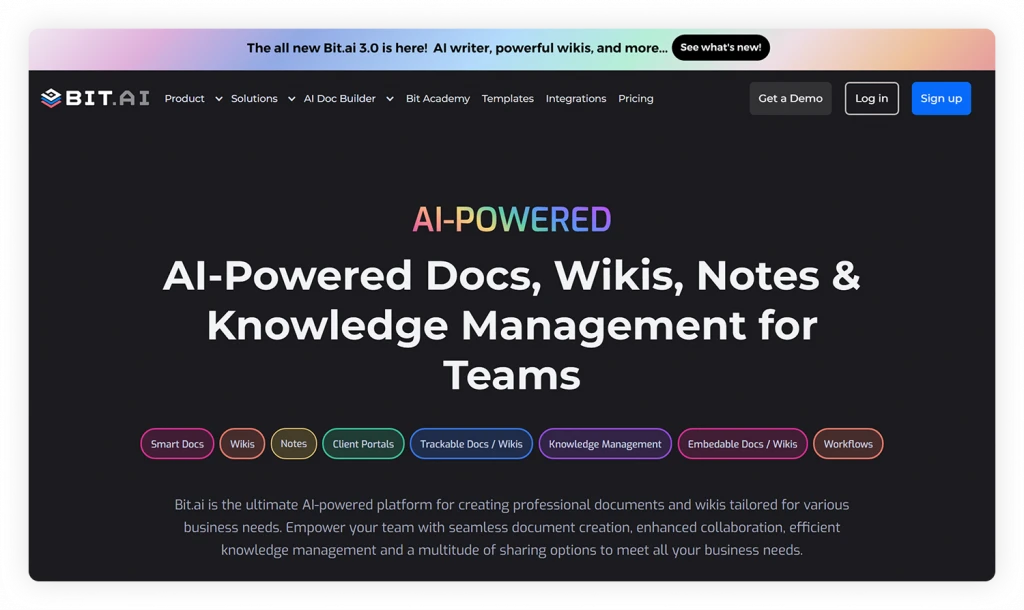
This is where Bit.ai fits into your workflow.
Bit.ai is an AI-powered docs, wikis, and knowledge management platform built for teams to create, organize, collaborate, and manage knowledge in one unified workspace.
You can use it to create documents, store project knowledge, organize resources, and collaborate with your team in real time. Instead of switching between tools or searching for information, everything stays structured and easy to access.
This becomes especially useful when multiple teams are involved, because everyone can work from the same set of documents and stay aligned without constant follow-ups.
Here are some of the most amazing features offered by Bit.ai, which make it the best collaboration tool for your team:
- Smart Docs with ability to embed links, files, and media in one place
- Real-time collaboration on documents
- Organized workspaces for projects and knowledge
- Version history to track changes over time
- AI Genius Writer to help create content faster
- AI Doc Builder for generating structured documents
- Multiple Sharing Options
Pricing: Free plan available, Paid plans start at $8/user/month.
Great projects run on great documentation:
2. Asana
When projects start involving multiple people and deadlines, it becomes harder to keep track of who is doing what and how everything is progressing.
That is where Asana helps. It gives you a clear view of tasks, timelines, and responsibilities in one place, so your team can stay organized without constant follow-ups.
You can break work into smaller tasks, assign them to team members, and track progress using lists, boards, or timelines. This makes it easier to manage both simple projects and more complex workflows without losing visibility.
Key Features:
- Multiple views of a project (board, list, timeline, and calendar).
- Monitoring of targets and OKR alignment.
- Time-saving automated workflows to reduce errors.
- Smooth integration ecosystem with over 200 apps.
Pricing: Free basic plan; Premium plans from $10.99/user/month.
3. Trello
If you like a more visual way to manage work, it helps to see tasks laid out clearly instead of going through long lists or detailed dashboards.
Trello works well in this case. It uses boards and cards to represent tasks, making it easier to understand what needs to be done and what is already completed.
You can move the tasks between the different phases, write comments or bullet lists, and work together with your team in a simple, well-organized manner. It works really well for smaller teams or projects where clarity and ease of use matter more than complex features.
Key Features:
- Task boards can be easily organized by dragging and dropping them.
- Google Drive, Slack, and other integration power-ups.
- Easy collaboration with checklists, attachments, and comments.
- Repetitive workflows automated by Butler.
Pricing: Forever free plan; Paid plans start at $5/user/month.
4. Slack
As teams grow, communication often becomes scattered across emails, meetings, and messaging apps, making collaboration slower and harder to manage.
To solve this, you can use Slack. It helps teams keep conversations, updates, files, and project discussions organized in one place. Instead of searching through endless email threads, team members can communicate in real time through channels, direct messages, and shared workspaces, making collaboration faster and more structured.
Key Features:
- Real-time team messaging and collaboration channels
- Audio and video calls with screen sharing
- File sharing and searchable conversation history
- Integrations with tools like Google Drive, Zoom, Trello, and Asana
Pricing: Free plan available; Paid plans start at around $7.25/user/month.
5. Monday.com
Not every team works the same way, and sometimes rigid tools make it harder to adapt your workflow to your needs. In situations like this, Monday.com gives you more flexibility. It allows you to build workflows that match how your team actually works, instead of forcing you into a fixed structure.
You can create custom boards, track progress visually, and automate repetitive updates. This flexibility makes it simpler to manage various project kinds while maintaining team alignment.
Key Features:
- Drag-and-drop configurable workflows.
- Dashboards for visual project tracking.
- Automating repetitive tasks can save time.
- Google Workspace, Teams, Slack, and other integrations.
Pricing: Free for 2 users; Paid plans from $9/user/month.
Once you have the right tools in place, collaboration becomes easier to manage and more consistent across your team.
Great Collaboration Starts With Great Documentation
Keep project plans, meeting notes, resources, and updates in one organized workspace. Bit.ai helps teams collaborate efficiently and move projects forward with confidence.
Free to start • Set up in minutes
Wrapping It Up
At the end of the day, project collaboration is not about adding more tools or processes. It is about making it easier for people to work together without confusion.
When your team can see updates clearly, share information in one place, and understand who is doing what, the entire workflow becomes easier to manage. You spend less time following up and more time actually moving the project forward.
You do not need to change everything at once. Start by improving how your team shares updates or manages documents, then build from there.
FAQs
1. What are the key steps to improve project collaboration?
Start by making communication clear and visible to everyone involved. Make sure to clearly set out roles so that each person is aware of their responsibilities and have a shared workspace where updates, as well as documents, can be accessed easily. After that, reconsider how your team is doing the work and make the necessary adjustments.
2. How is project collaboration different from project management?
Project management focuses on planning tasks, timelines, and resources. On the other hand, project collaboration is more about the ways the team talks, exchanges data, and stay aligned while performing the tasks. Each one is still very crucial but they address different issues.
3. How does collaboration improve project outcomes?
There are fewer miscommunications and delays when everyone has access to the same information and updates. Teams are better able to coordinate, make decisions more quickly, and avoid duplication of work, all of which contribute to more consistent outcomes.
4. What challenges do teams face with collaboration?
Using too many tools without a clear system, unclear responsibilities, and dispersed communication are common problems. These problems frequently slow down the progress and make it more difficult to maintain alignment.
5. What tools can help with project collaboration?
Tools like Bit.ai help you organize documents, knowledge, and team collaboration in one place. Platforms like Asana, Trello, and Monday.com help you manage tasks, track progress, and keep teams aligned.
About Our Editorial Team
Our Editorial Team researches, writes, and reviews every article to help ensure it is accurate, practical, and up to date. To learn more about our editorial standards, content review process, and official social media profiles, visit our Editorial Team page.
Why Trust This Article?
The information in this article is based on reputable and authoritative sources. We review our content periodically to keep it accurate and up to date.
Keep reading & learning: