Your team probably uses five or six different tools every day. One for documents, one for wikis, one for file sharing, and maybe a separate app just for client-facing work. But switching between all of them wastes a lot of time. It also makes it harder to keep track of where information actually lives.
An AI workspace fixes this. It brings your team’s documents, wikis, and files into one place and adds AI on top to help you write faster and stay organized without digging through folders.
In this blog, you’ll learn what an AI workspace is, how it’s different from the tools you already use, its main benefits, the features to look for, how to pick the right one for your team and how Bit.ai fits into the AI workspace category.
What Is an AI Workspace for Teams?
An AI workspace for teams is a shared digital space where teams can create documents, organize knowledge, and work together with AI-powered tools. Rather than using different applications for documents, wikis, and document sharing, everyone can work in a single integrated platform. AI helps with tasks like drafting content, suggesting text, and getting documents done without starting from a blank page.
In simple terms, an AI workspace combines two things:
- A shared workspace: docs, wikis, and files in one place
- AI assistance: writing help to draft and refine content faster
This combination is what makes AI workspaces different from traditional productivity tools. Let’s compare AI workspaces and regular workspaces to see how they differ and why an AI workspace can make team collaboration easier.

Not sure how knowledge management differs from simply managing documents?
What Makes an AI Workspace Different From a Traditional Workspace?
A traditional workspace provides tools for storing, creating, and managing files and documents, but many of these workflows still rely on users to create, organize, search, and manage content manually.
An AI workspace adds AI on top of that. It helps you write faster and turn scattered notes into structured, easy-to-navigate wikis, instead of leaving everything as scattered files.
Here’s a side-by-side comparison of AI workspace vs traditional workspace:
| Feature | Traditional Workspace | AI Workspace |
| Content creation | You write everything manually | AI helps draft and suggest content |
| Organization | Manual folders and tags | Structured wikis with AI assistance |
| Search | Basic keyword search | Smarter, more relevant search results |
| Collaboration | Real-time editing | Real-time editing + AI writing support |
| Document sharing | Basic links | Shareable links, embeds, and client portals |
| Setup time | Depends on manual structuring | Faster, with AI-assisted drafting |
In short, a traditional workspace relies more heavily on manual workflows, while an AI workspace adds AI assistance to help create, organize, and manage your work.
AI Workspace vs Other Productivity Tools
An AI workspace combines AI assistance, document creation, knowledge management, and team collaboration in one place. But how does it compare with other tools? The table below highlights the key differences.
| Tool Type | Primary Purpose | How It Differs From an AI Workspace |
| AI Assistant | Helps users complete tasks using AI | Focuses on task-based AI help, not a shared space for team documents and collaboration |
| Knowledge Base | Stores and organizes team information | Focuses on storing and retrieving information, not on creating or drafting new content |
| Collaboration Software | Helps teams communicate and work together | Focuses on communication and teamwork, without built-in AI to help create content |
| Traditional Workspace | Provides tools for documents, files, and team work | Relies on manual writing, organizing, and searching, with no AI support built in |
| AI Workspace | Brings documents, wikis, and files into one place, with built-in AI | Combines a shared workspace with AI assistance, helping teams create and organize content faster, not just store it |
Each tool above focuses primarily on a particular need: some help you complete tasks, some help you store information, and others help you collaborate.
But most teams end up needing all of that at once, which is exactly where an AI workspace comes in. It brings these needs into one connected platform, so teams can create documents, manage knowledge, and collaborate without jumping between multiple tools.
Looking beyond AI workspaces?
Explore team collaboration tools that help teams create, share, and work together more effectively →
Benefits of an AI Workspace for Teams
Here are the key benefits your team can expect from using an AI workspace:
1. Draft Documents Faster With AI Writing Assistance
Starting a document from a blank page is one of the most time-consuming task for teams. An AI workspace solves this with a built-in AI writing assistant that helps you draft content, suggest text, work from templates and use built-in prompts instead of starting from scratch.
This is especially useful for teams that regularly write reports, SOPs, proposals, or internal guides. Since the AI gives you a starting point, you just need to edit and refine the content instead of writing everything word by word.
2. Centralize Docs, Wikis, and Files in One Workspace
Instead of spreading content across email threads, shared drives, and multiple applications, an AI workspace keeps everything like documents, wikis, and files in one connected space. This reduces the time that teams spend switching between tools just to find or update something.
For growing teams, this document organization can make onboarding easier, since all reference material, project updates, and company information lives in one workspace instead of scattered folders.
Want to turn that scattered information into a structured knowledge hub?
3. Find Information Quickly With Built-In Search
Searching through folders one by one to find a single file is slow and honestly frustrating too. In an AI-powered workspace, there is a built-in search feature that will make your job easier to find the information you need, without needing to remember exactly where something was saved.
So, if your team handles a large volume of documentation, investing in an AI workspace can be beneficial, as manual tracking of file locations becomes unrealistic over time.
4. Track Document Activity for Accountability
Document tracking shows who viewed a file and how much time is spent reading. Since this tracking is provided by the same AI workspace where the document was created and shared, you don’t need a separate tool to check on it.
5. Share Work Easily, Inside and Outside Your Team
An AI-powered workspace helps in sharing the work effortlessly whether it is an internal collaboration or sharing with your clients. Teams can share documents through links, embed them into websites, or use a client portal for external sharing in a more controlled environment.
Need more flexible team and client collaboration?
See how document collaboration software handles sharing, feedback, and approvals →
6. Collaborate in Real Time Without Version Confusion
With the AI workspace, multiple team members can work on the same document at once, add @mentions, and see edits as they happen. This way, there is no need to send emails back and forth, checking which version of the document is right.
7. Connect Your Existing Tools With 100+ Integrations
Most teams use many applications in their day-to-day work for chat, designing, coding, file storage, or project tracking. An AI workspace with a wide range of integrations lets you connect those tools directly inside your docs instead of replacing your entire workflow overnight.
Who Should Use an AI Workspace?
An AI workspace is useful for teams that create documents, manage shared knowledge, and collaborate on projects. Here are some of the teams who benefit the most from a shared AI workspace:
- Startups and small teams: create documents and organize knowledge quickly without needing a dedicated documentation person
- Growing teams and scaling businesses: keep wikis and documents structured as headcount grows, so onboarding doesn’t mean digging through someone else’s old notes
- Remote and distributed teams: use a shared workspace as the single source of truth, keeping everyone aligned across time zones
- Client-facing teams: share polished documents through links and client portals instead of messy email attachments
- Knowledge-heavy teams (HR, operations, support): turn scattered SOPs and notes into an organized, easy-to-navigate knowledge base
If your team creates documents, needs a shared place for knowledge, or works with clients regularly, an AI workspace fits right into that workflow.
Key Features to Look for in an AI Workspace
When choosing an AI workspace for teams, focus on features that make it easier to create documents, organize knowledge, and collaborate. The right AI workspace features should help your team manage everyday work without adding more tools to the mix.
Let’s look at the key features to consider in an AI workspace.
| Key Feature | Why It Matters |
| AI Writing Assistance | Helps draft content faster instead of starting from a blank page |
| Centralized Docs & Wikis | Keeps all team knowledge organized in one place |
| Reliable Search | Saves time finding documents and information quickly |
| Document Tracking | Adds accountability by showing who viewed or time spent on the doc |
| Flexible Sharing Options | Enables easy internal and external collaboration |
| Real-Time Collaboration | Prevents version confusion during teamwork |
| Wide Range of Integrations | Fits into your team’s existing tools and workflow |
| Simple, Non-Technical Setup | Speeds up adoption across the whole team |

Useful Templates for Your Team
Turn your team’s everyday work into organized, reusable documents with these ready-made Bit.ai templates.
AI Workspace for Teams: Bit.ai
Bit.ai brings documents, wikis, and knowledge bases together in one workspace, with AI Genius, its built-in AI writing assistant, helping teams draft and organize content faster.
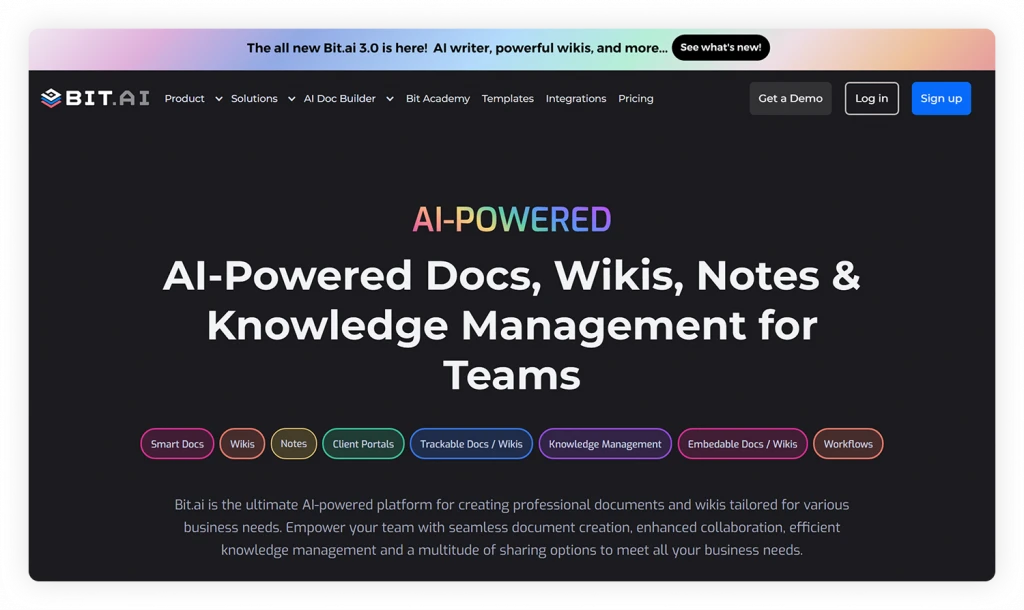
Here are some of the key features that make Bit.ai a strong choice for teams looking for an AI workspace
- AI Genius, Bit.ai’s built-in AI writing assistant: Helps teams create documents with built-in prompts, improve writing, brainstorm ideas, and generate content. It can also assist with research and translation.
- Smart Documents and Wikis: Create interactive documents and turn them into wikis with connected subpages. This makes it easier to organize guides, SOPs, training materials, and other team knowledge.
- Rich Media Embeds: Add videos, PDFs, spreadsheets, presentations, and other digital content to documents, so information is easier to understand and share.
- 100+ integrations: Connect Bit.ai with the tools your team already uses to add content directly inside your Bit docs.
- Real-Time Collaboration: Teams can work together on documents, add comments, and share feedback without creating separate versions.
- Knowledge Organization and Search: Use workspaces, folders, wikis, and smart search to organize and find documents and information.
- Sharing and Document Tracking: Share documents through live links, trackable links, or website embeds. Tracking helps you see how shared documents are being used.
- Pre-designed Templates: Use ready-made templates for various business needs, including project proposals, meeting notes, reports, knowledge bases, and many more.
Try These AI Prompts for Team Work
Need a starting point for your next document? These Bit.ai AI prompts can help you create common team documents faster.
Bit.ai Pricing
| Plan | Price | What You Get |
| Free | $0 | Up to 5 users, 50 documents, and basic features |
| Pro | From $8/user/month, billed annually | Unlimited documents, additional features, and 20K AI words |
| Business | From $15/user/month, billed annually | Advanced collaboration, tracking, and unlimited storage |
AI Genius is available as an add-on to paid plans, starting at $10 per 100K words per month.
For teams looking for an AI workspace that combines writing assistance, document organization, and collaboration in one place, Bit.ai brings these capabilities together in one platform.
How to Choose an AI Workspace for Your Team
Choosing the right AI workspace comes down to matching its features to your team’s actual needs, not just picking the tool with the longest feature list. Here’s what to look for in an AI workspace before making a decision:
- Pinpoint your team’s biggest pain point: is it writing, organizing documents, searching for information, or sharing work with clients?
- Check the depth of AI features: make sure it offers real AI writing assistance, not just basic templates
- Evaluate document and wiki organization: see how easily content can be structured to match your team’s needs
- Test the search functionality: upload real documents and check how quickly and accurately you can find them
- Review sharing and collaboration options: look for shareable links, embeds, real-time editing, and client-facing sharing
- Confirm integration support: make sure it connects smoothly with the tools your team already uses
- Assess ease of setup and adoption: have a non-technical team member try it first to gauge the learning curve
- Compare pricing against team size: check whether costs scale reasonably as your team grows
The right choice depends on your team’s workflows, content needs, collaboration requirements, and budget.
Conclusion
Managing team documents, wikis, and files shouldn’t mean juggling between five different platforms. An AI workspace brings it all together, helping your team write faster, stay organized, and collaborate without the usual back-and-forth emails.
If you’re ready to see what this combination of AI and docs looks like in practice, Bit.ai gives your team a single workspace for documents, wikis, and knowledge, backed by AI writing assistance to help you get started faster.

Ready to bring your team’s work into one place?
Try Bit.ai for free and see how much smoother teamwork can be.
Free to start • Set up in minutes
FAQs About AI Workspace
What is an AI workspace for teams?
An AI workspace is a shared digital space where teams create, organize, and manage documents and wikis, with AI built in to help with writing and content creation.
How does an AI workspace help teams?
An AI workspace helps teams write documents, organize knowledge, find information, and collaborate more efficiently. It reduces the need to switch between separate tools for everyday work.
Does Bit.ai offer AI writing assistance?
Yes, Bit.ai has its own AI writing assistant called AI Genius which helps teams in creating business documents by using built-in prompts, translation, research, and summarizing content.
Can I share documents outside my team with an AI workspace?
Yes, An AI workspace supports sharing of documents by shareable links, embeds, and a client portal, making it easy to share work with clients or external partners.
About Our Editorial Team
Our Editorial Team researches, writes, and reviews every article to help ensure it is accurate, practical, and up to date. To learn more about our editorial standards, content review process, and official social media profiles, visit our Editorial Team page.
Why Trust This Article?
The information in this article is based on reputable and authoritative sources. We review our content periodically to keep it accurate and up to date.