Ever opened your inbox, saw an e-mail of rejection, and felt your stomach do that little flip for that moment? It does happen to the best of us at some point during our careers. Interviewing can be lengthy and emotionally taxing, full of anticipation, and the final “curtain call” happens when you read those painful words: “we regret to inform you that you were not selected for the position.”
But here’s something that no one will tell you: the rejection email is not the conclusion of the chapter; it is often where a more impactful story truly begins.
How you respond means just as much as how you interview in today’s competitive job market. A thoughtful response will change the tone of the conversation, build your reputation, and may even open up a future opportunity. In fact, about 27 percent of recruiters also reconsider candidates who send a professional and polite response after being rejected, according to Jobvite’s Recruiting Benchmark Report.
This guide will walk you through the process of writing that response confidently, with clarity and poise, so you leave a lasting impression even when you do not get the role. Let’s start. ?
What a Rejection Email Really Means in the Interview Process
Getting an email rejection can feel, quite literally, like the lights coming down after you have given your best performance. For a moment, it stings, but behind those words is often much more than the message conveys. Hiring teams have to sort through hundreds of applications, juggle changing priorities, and make tight calls based on timing rather than talent. Most rejections are the result of circumstances, not shortcomings.
When you think of it, a rejection email is a sign that you actually made it far enough to be noticed: You were considered. You were seriously evaluated. You left a mark strong enough for the team to take the time to write back. That is not failure. That is proximity to an opportunity that almost became yours.
“A rejection isn’t the end. It’s proof you are reaching places others only dream of.”
Now, how do you respond in a way that will be remembered, considering your changed perspective? ?
How to Professionally Respond to a Rejection Email
Getting a rejection email? Your reply is your last chance to make a good impression. It shows what you’re like, beyond your resume and the interview. If you reply well, it tells them you’re mature, intelligent, and serious about your work.
The aim is simple: thank them genuinely, acknowledge the opportunity, and leave the conversation open without being perceived as forced. Your tone should be warm, calm, and confident. Short enough to show respect for their time; clear enough to remind them of why meeting you mattered. This is not about changing their decision. This is about shaping how they remember you.
A shining response also protects your reputation on the broader hiring ecosystem. Recruiters talk to each other. Hiring managers change companies. Today’s rejector may well be tomorrow’s champion-if your response shows them kindness, composure, and professionalism.
Having mastered the tone and purpose, let’s move to the next layer: responding confidently, even if the news is bad. ?
How to Respond to a Job Rejection Email with Confidence
Being confident after a job rejection doesn’t mean acting like it’s no big deal. Confidence means you chose to respond politely instead of being angry, and giving your response even if you really want to ignore them.
With such a confident response, you have shown the hiring team that your professionalism does not lie in the results. That shows emotional strength, self-awareness, and a particular kind of maturity that employers can appreciate long after the interview process is over.
Start by showing your gratitude, then reaffirm your interest in the company positively without giving the impression of desperation. One line of willingness to be considered for future opportunities could turn your letter from one of closure to one of possibility. Your tone should remain steady, positive, and look into the future. You are not writing as a person who has lost an opportunity; you are writing as a person who knows their worth and who’s keeping an open mind for the right fit.
Confidence in your response does something subtle, yet powerful: it reframes you in the eyes of the recruiter, it shows you can handle setbacks with poise, and it leaves a note of optimism that stays with them longer than you might expect.
Now, we’re going to share with you an array of ready-to-use e-mail template that allow you to implement these principles with less effort and more clarity. ?
Best E-mail Templates for Responding to a Rejection Email
A well-designed template can be the difference between responding with clarity, confidence, and grace when an adequate response does not come as easily. This set of responses will keep doors open, show your professionalism, and leave that positive impact long after the hiring process wraps up. Feel free to use them word for word or tailor them to fit your style and the tone of your prior conversations.
Now that you’ve dealt with the rejection responses, the last scenario you could potentially find yourself in is if you have to decline an offer yourself. ?
How to Decline a Job Offer Gracefully
Declining a job offer can be a delicate situation like responding to a rejection. The role may not be the perfect fit, but how you approach declining the job offer will inevitably shape the way that company remembers you. A considerable message is respectful of the time and effort the hiring team has invested in you, and will help you leave the door open to reconnect should circumstances change sometime later.
Begin by thanking them sincerely for the offer, then convey your decision clearly and briefly without elaborating too much. Your expression should be positive, not cluttered. Keep in mind you are not shutting a door but just picking the best path that suits your goals. A thoughtful no reflects clarity, professionalism and future thinking qualities that are admired by Employers.
Now that you’ve learned how to decline an offer with confidence, let’s see how to turn a simple rejection into a long-term networking opportunity.
How to Turn a Job Rejection Email into a Networking Opportunity
Consider a rejection email as simply the credits rolling on a scene, though not the movie. The story is not over. In many careers, the most meaningful opportunities are not the result of interviews you deemed flawless or resumes that were “perfect.” Instead, they come from the little relationships you built along the way. That hiring manager who couldn’t choose you today might remember your tone, your kindness, and your potential long after the inbox has been cleared.
When you respond with warmth and openness, you turn this tiny moment into a meaningful bridge. Let them know how much you enjoyed the process, indicate specifically what really struck a chord about the team, and let them know you’d love to stay in touch for future opportunities. This small act does something almost imperceptible: it changes you from yet another applicant to someone carrying presence, humility, and long-term vision.
Imagine this: months later, a new role opens, and the manager scrolls through old emails, sees your thoughtful reply, and thinks: “This person handled rejection better than many people handle success.” That single message becomes your introduction long before you type the next one.
Now that you understand how to shift rejection to connection, let’s learn about a tool that will help you create a professional, polished response quickly when it is needed. ?
Bit.ai Email Responder: Your Smart Companion to Create Professional Rejection Replies
AI-powered docs, wikis, and knowledge management platform built for teams in search of clarity, speed, and smart communication across each part of their workflow. When it comes to responding to a rejection email, Bit.ai gives you the support you need, precisely when words feel most difficult to find.
Having had to negotiate the emotional baggage associated with a rejection, sitting down to write a considerate response can be simply overwhelming. Right at that moment is when Bit.ai’s Email Responder comes to your aid.
Bit.ai’s Email Responder helps you turn a blank screen into a warm, polished message in seconds. You can copy the response directly into your email, or expand it into a formal document inside Bit.ai when you want to review, refine, or share it with others. Since AI understands tone, context, and intent, it makes your response feel human, respectful, and confident during high emotional moments.
Bit.ai will help you compose a response, whether it is saying thanks or asking someone to give you feedback, or keeping the possibility of future opportunities open. Having access to Bit.ai allows you to be less stressed and more focused on responding during uncertain, difficult, or emotional times in the inbox.
Key Features:
- AI Email Responder
Generates custom, professional rejection responses in an instant. You choose the tone, intention, and style, and Bit.ai creates a message that feels warm, polished, and completely natural. It’s a perfect guide for whenever you need the right words at the right time.
- Real-time Collaboration
Review and refine your response together with mentors, coaches, or teammates after converting it into a Bit document. Before the sending or saving of the final version, co-edit, comment, and collaboratively improve the wording.
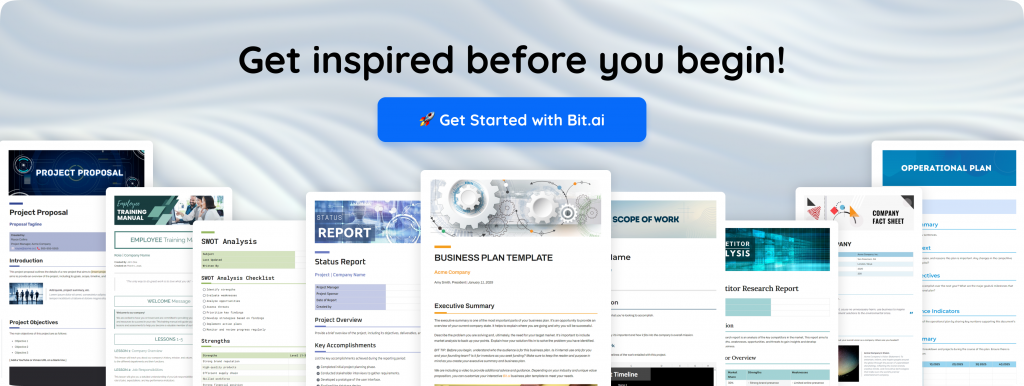
- Rich Media Support
When drafting or refining your response inside a Bit document, you can embed supporting materials such as portfolios, PDFs, feedback notes, or reference files. This keeps all related context organized in one place for easy access and revision.
- Trackable Shareable Links
If you choose to share your response or related documents as a Bit link, you can see when they are opened and viewed. This is helpful in the case of sharing formal replies, portfolios, or materials for follow-up that go beyond email communication.
- Permissions Based on Role
Control who has permission to view, comment, or edit each document. Excellent for confidential communications, private notes, and files that you would like to share only with certain people during your job search.
- Document Version History
View past versions of your notes or drafts and restore or compare them. It is very helpful when you are changing your CVs, replies, or when you want to make your communication clearer without giving up the former thoughts.
Pricing:
Bit.ai has a free plan available with core features, but paid plans start at $8 per member per month.
With this mindset, templates, and the right tool in place, let’s wrap up with one final reflection to remind you of why thoughtful communication matters, even when the answer is no.
How to Use Bit.ai Email Responder: Step By Step Guide
To quickly generate professional email responses using the Bit.ai Email Responder, follow the steps below.
Step 1: Open you a blank document
First, open your Bit.ai dashboard and create a new document. This is where you’ll generate and store your email responses. You can also share the document with colleagues or mentors for review.
Step 2: Open Email Responder Prompt
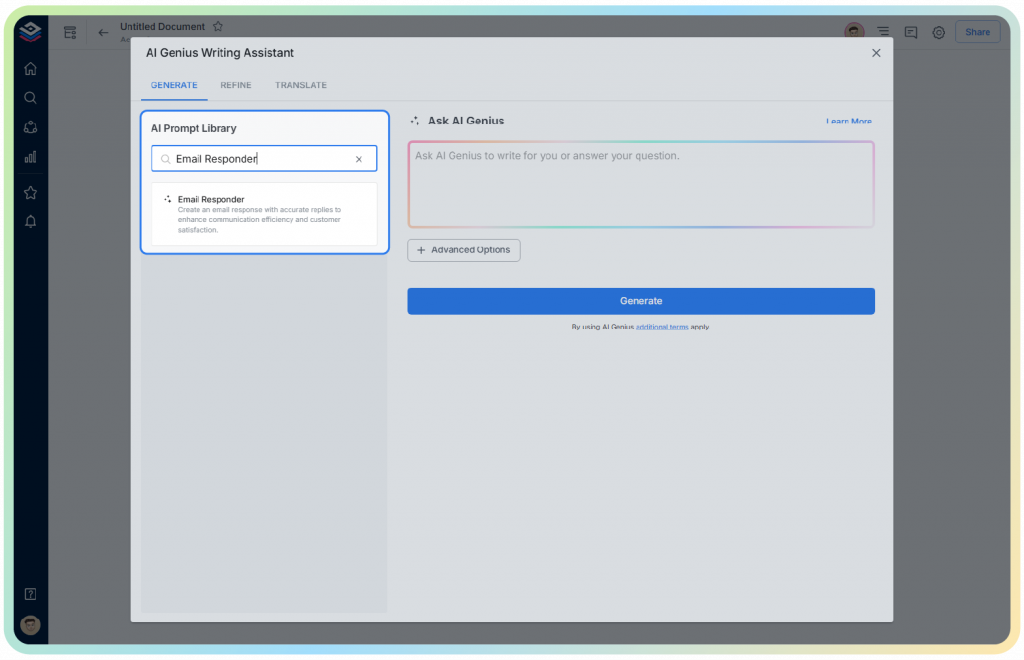
To access Email Responder prompt, you can either start by opening bit.ai AI Genius Writer or typing “@” on an empty document. This opens the AI Prompt Library. Search for “Email Responder” and select the prompt.
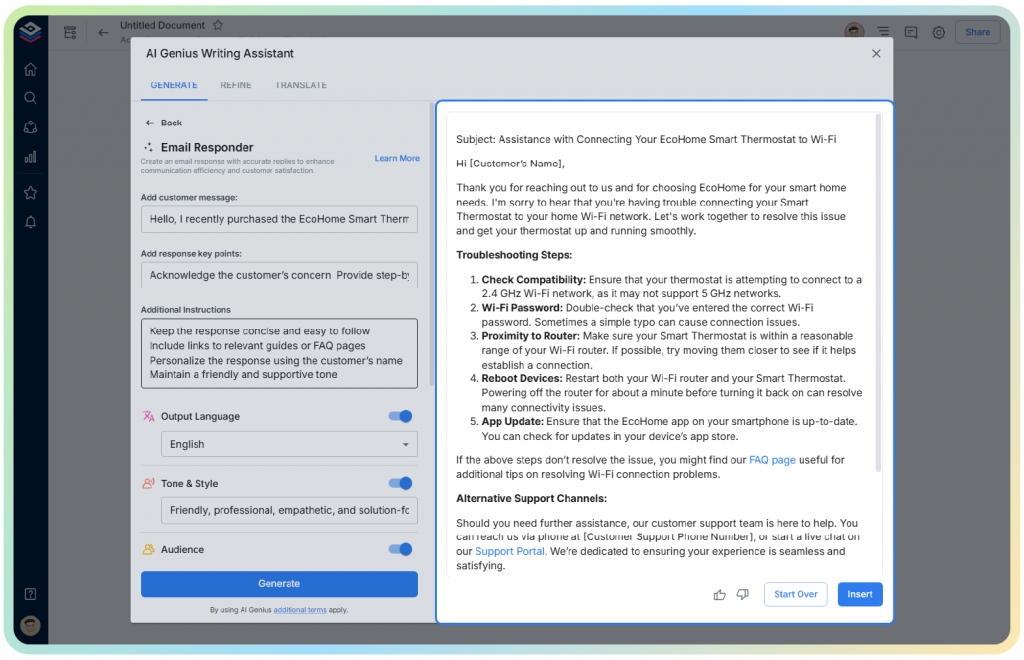
Step 3: Answer Basic Questions
Now, you just have to answer a few basic questions regarding what kind of email you are writing, response intent, any information needed before responding and additional instructions.
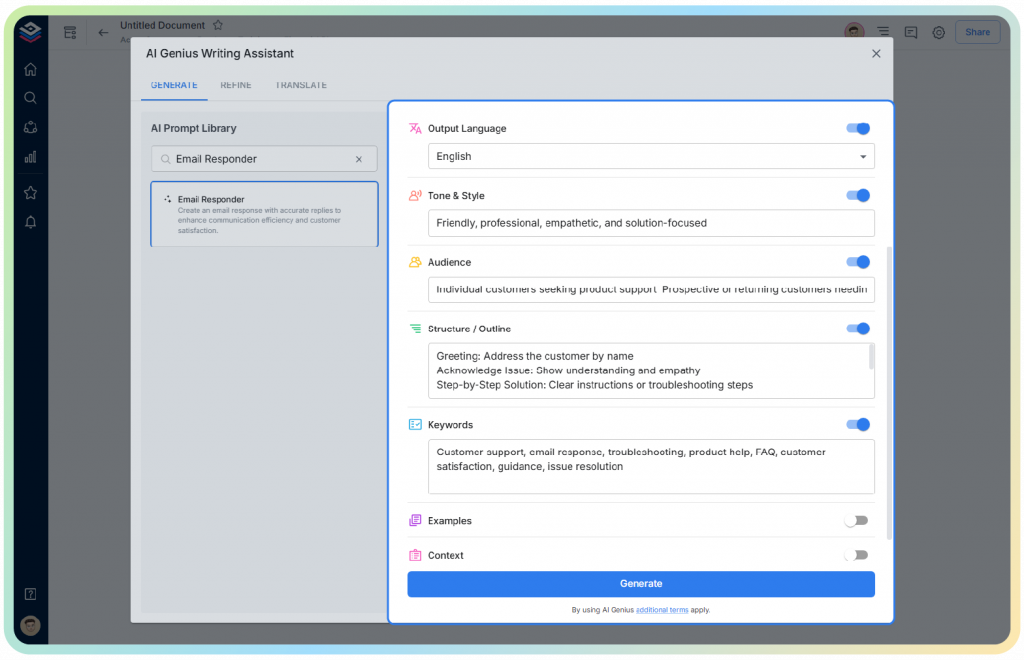
Step 4: Use Advanced Options (Optional)
For a more personalized and better response, click on the advanced options button and fill in some more instruction. This may include output language, tone & style, audience, keywords, context, examples etc.
This helps the AI better understand your expectations and generate a more accurate response.
Step 5: Review and Adjust
Now, you click on the generate button and your response will be ready in a matter of seconds.
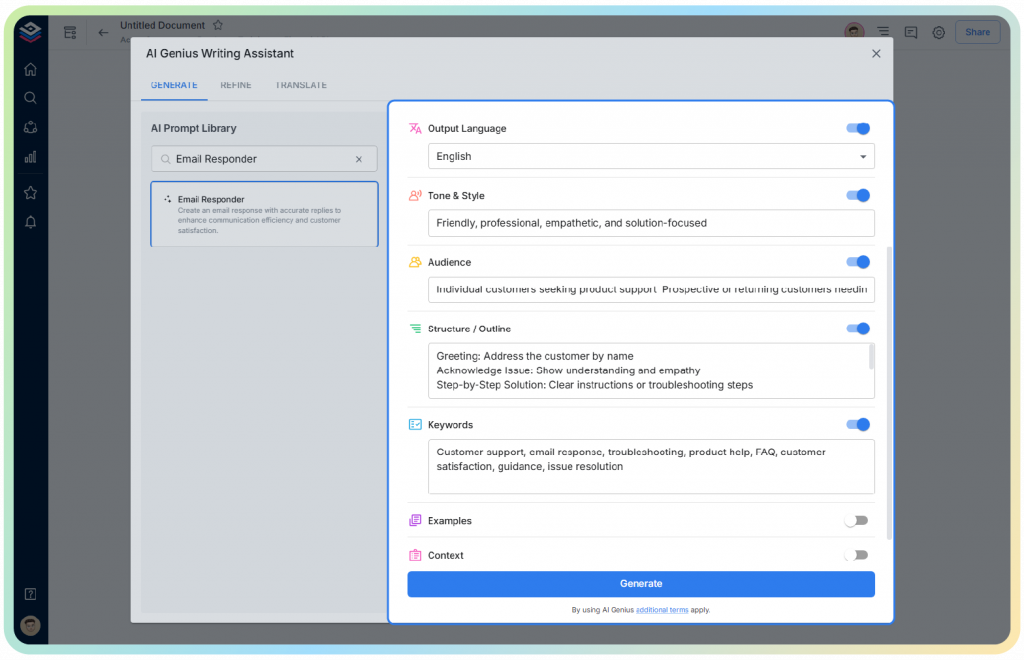
This is the part where you review the content carefully and make any adjustments to ensure it matches your requirements before using it.
Wrapping It Up
Rejection isn’t the end of the world. It’s just a break, a little detour, or a quiet moment. You can actually learn more from it than from getting a yes.
Every professional that you look up to has stood precisely where you are now, staring at an email they wished had gone differently. What shaped their journey wasn’t the rejection in and of itself but the way they responded to it.
The thoughtful reply is a character-driven response; it’s a mature one. It evidences that you conduct yourself with grace even when the verdict has not gone your way. Small moments add up and shape who you are at work. They’re like hidden strings that can lead to cool stuff later on.
With tools such as Bit.ai helping you communicate, you can handle changes smoothly and feel sure of yourself. Just remember, hearing no now might be a step toward the yes you’re looking for. So, keep showing up, make your point clearer, and keep going.
FAQs
- How to respond professionally to a rejection email?
Professional correspondence should be truthful, brief, and appreciative. Thank them for their time by telling them how much you value it, and let them know it was nice connecting with them. Also, let them know your intention to connect again if other openings come up. Keep the response warm but respectful; there is no need for it to sound sad or defensive.
- Are there any responses to rejection emails that lead to jobs in the future?
Yes, many recruiters keep positive and memorable candidates. Such a thoughtful response shows emotional maturity and professionalism, which could position you for future openings, referrals, or reconsideration when similar openings come up.
- How soon should one respond to a rejection email?
The best approach is to respond within 24 to 48 hours. This way, you would show respect for the time of the hiring team and maintain a good impression. A prompt and composed response is indicative of good communication etiquette.
- How does Bit.ai help in responding professionally to a rejection email?
Bit.ai’s Email Responder can help you write nice and professional replies to rejection emails really fast. The AI creates messages that sound like you and say what you mean. This helps you thank people, ask for their thoughts, or say you’d like to work together later. It saves you time, makes things less stressful, and keeps your emails clear and professional