Have you ever sent an email thinking it was clear only to find yourself replying again, and again, and again?
At first, replying to an email feels normal. A quick clarification here. A follow-up there. Maybe one more message to “just confirm.” But before you realize it, a simple conversation has turned into a long thread of back-and-forth emails that eats up your time and breaks your focus.
You’ve probably seen this in your own work. A task that should take 10 minutes stretches into hours. Decisions slow down. People get confused. And instead of moving work forward, you spend more time explaining what should have been clear from the start.
Well, back-and-forth emails are one of the biggest hidden drains on productivity, especially when your team relies heavily on email for everyday communication and collaboration.
That’s why learning how to reduce back-and-forth emails is so important for improving workplace productivity and team collaboration. So, in this blog, you’ll find out why back-and-forth emails happen, how they hurt productivity, and practical ways to reduce unnecessary email conversations at work. Let’s start the blog with some basics.
What are Back-and-Forth Emails?
You’ve probably seen this. One email turns into a long thread of replies just to clarify something simple.
It usually starts with missing details. Someone asks a question. You reply. Then another question comes in. And the cycle continues.
Back-and-forth emails are these repeated message threads where information is unclear, incomplete, or scattered, forcing multiple replies just to move one task forward.
The main problem doesn’t really lie with the quantity of emails alone. What complicates decision-making and taking actions is the way the information is fragmented and spread over different messages.
And once you see how quickly this builds up, the real question becomes, what are these back-and-forth emails actually costing you? Let’s find out why such emails are hidden productivity killers.
Why Back-and-Forth Emails are a Problem
At first, a few extra email replies may not seem like a big issue. But when these repeated email exchanges happen throughout the day, they begin to create unnecessary delays, confusion, and distractions. Conversations become harder to track, decisions take longer, and simple tasks require far more communication than necessary.
Instead of helping work move faster, excessive back-and-forth emails often slow productivity, interrupt focus, and make collaboration less efficient.
Here’s how back-and-forth emails start affecting your work:
1. Back-and-Forth Emails Waste Valuable Time
You send an email hoping for a quick response, but instead the conversation keeps going back and forth with follow-ups, clarifications, and repeated explanations.
At first, each reply feels minor. But over time, these small interruptions start consuming a significant part of the workday. A task that should have taken a few minutes stretches into hours or even days because people keep returning to the same email thread instead of completing the actual work.
In fact, a McKinsey Global Institute study found that employees spend nearly 28% of their workweek reading and responding to emails.
This constant cycle of waiting, replying, and rechecking information quietly reduces productivity and makes even simple communication feel exhausting.
2. Lead to Miscommunication
When details are spread across multiple replies, it becomes harder to keep track of what was actually said. You might assume something based on one message, while someone else is working off a different interpretation.
As more replies come in, clarity does not improve; it often gets worse. Important points get buried in the thread, and you end up spending time correcting misunderstandings instead of moving forward.

Keep knowledge accessible, not buried in inboxes:
Knowledge Sharing at the Workplace for Enhancing Productivity→
3. They Reduce Productivity
Every time a new email comes in, your attention shifts. You pause your current work, read the message, think about the context, and respond. Then you go back to your task, only to repeat the same cycle again.
While each interruption may seem small, but constant switching between tasks makes it harder to stay focused and maintain momentum. Deep work becomes difficult when your attention is repeatedly divided between tasks and ongoing email conversations.
Research from the University of California, Irvine found that it can take an average of 23 minutes and 15 seconds to regain focus after an interruption. (Source) Over time, this repeated cycle of checking, replying, and refocusing reduces overall productivity.
4. They Frustrate Everyone Involved
Long email threads slowly become exhausting to follow. You open a conversation and see multiple replies, each adding a bit more context but not always making things clearer. At some point, people start skimming instead of reading carefully. Responses become shorter, details get missed, and frustration begins to build across the team.
And when communication itself starts feeling like effort, it becomes clear that something needs to change in how you handle these email threads.
So, in the next section, we’ll look at some practical ways to overcome unnecessary back-and-forth emails, improve email communication, and create a more productive workflow for your team.
7 Best Practices to Reduce Back-and-Forth Emails
Once you start noticing how much time these email loops consume, replying faster or writing shorter messages does not really fix the problem. You are still working within the same system that caused the issue in the first place.
What actually works is changing how you communicate from the start. These small email productivity tips may seem simple, but they significantly reduce unnecessary back-and-forth over time. When your emails are structured with clarity and intent, you reduce the need for follow-ups before they even begin.
Here are practical ways you can do that.
1. Include All Important Details in the First Email
Before you hit send, pause for a moment and look at your message from the other person’s perspective. If they read it once, will they clearly understand what the task is and what is expected next?
Most back-and-forth starts because something small is missing. It could be context, a file, a link, or even the reason behind the request. That missing piece forces another reply, which then leads to another.
When you include all the important details upfront, you reduce uncertainty. The conversation becomes more complete from the beginning, which naturally cuts down unnecessary replies.
2. Clearly State What You Want the Other Person to Do
One of the biggest reasons for back-and-forth emails is unclear communication. Many emails provide context, updates, or information, but fail to clearly explain what action is actually expected from the recipient.
To avoid this, always state your intent clearly. Let the recipient know whether you need feedback, approval, a decision, suggestions, confirmation, or simply acknowledgment. Clear action-oriented emails reduce confusion, improve response time, and make workplace communication far more efficient.
This small habit can significantly reduce unnecessary email replies and help teams collaborate with greater clarity and productivity.
3. Mention Deadlines and Expectations Clearly
When timelines are not clearly defined, people respond based on their own assumptions. What feels urgent to you might not be urgent to someone else, and this difference in perception is what causes delays, reminders, follow-ups, etc., which in turn, slow down the whole process.
By setting clear deadlines and expectations in your email, you create shared understanding from the start. The other person will be able to correctly prioritize their tasks and get back to you within the specified period of time, hence minimizing the situations when you have to remind them to send you the updates.
4. Organize Your Email So It’s Easy to Read
Think about how you read emails yourself. When a message is long and unstructured, you do not read every line carefully. You scan, skip, and try to pick out what matters.
The same thing happens when others read your emails. If important details are buried in a block of text, they are more likely to be missed, which leads to clarification emails that could have been avoided.
When you break your message into clear sections, short paragraphs, or bullet points, it becomes easier to understand in one pass. That clarity directly reduces the chances of follow-up questions.
Turn scattered information into your biggest advantage:
How to Build a Personal Knowledge Base That Powers Your Productivity→
5. Attach Files and Links Before Sending the Email
Missing attachments are another of those minor errors that silently cause unnecessary email back and forth. You send the message, realize something is missing, and either send a follow-up or wait for someone to ask for it. This breaks the flow of communication and adds extra steps that should not exist. When you make it a habit to double-check files, links, and references before sending, you prevent these interruptions from happening in the first place.
It also shows that your communication is complete and reliable, which builds trust over time. These small checks may feel minor, but they significantly reduce avoidable back-and-forth across your inbox.
6. Switch to a Call or Chat When Emails Go Too Long
There is a point where email stops being efficient, and instead, it only slows things down. You realize it when the thread keeps extending, and each response contains more explanation than clarity.
At that stage, continuing over email only stretches the conversation further. What could have been resolved in a few minutes turns into a long chain of messages.
Switching to a quick call or real-time chat helps you clear confusion immediately. It brings the conversation to a close faster and prevents unnecessary email loops from continuing.
7. Use AI-Powered Collaboration Tools to Minimize Email Dependency
At some point, you realize the issue is not just how emails are written, but how much of your work depends on them. When tasks involve shared documents, multiple contributors, ongoing feedback, and version updates, email becomes a fragmented way to manage all of it.
This is where communication and collaboration platforms start to change how work happens. Instead to having conversations scattered in multiple threads, the idea is to have everything in one shared space where the context, content, and communication are all connected. Tools like Bit.ai follow this technique, helping teams move their work from disconnected email chains to a more organized setting.
In the next section, we’re going to give a complete solution tool, Bit.ai, to end your long email threads and start collaborating more smoothly.
Create repeatable processes that reduce unnecessary emails:
Standard Operating Procedure (SOP): Complete Guide + Free Template →
How the AI-Powered Workspace of Bit.ai Helps Eliminate Back-and-Forth Emails
Email was never built for real-time collaboration. Conversations happen in one place, files are shared somewhere else, and approvals get buried inside long email threads. And in the end, teams waste time switching between messages, attachments, comments, and document versions just to keep work moving forward.
That’s why teams are moving toward AI-powered collaborative workspaces like Bit.ai.
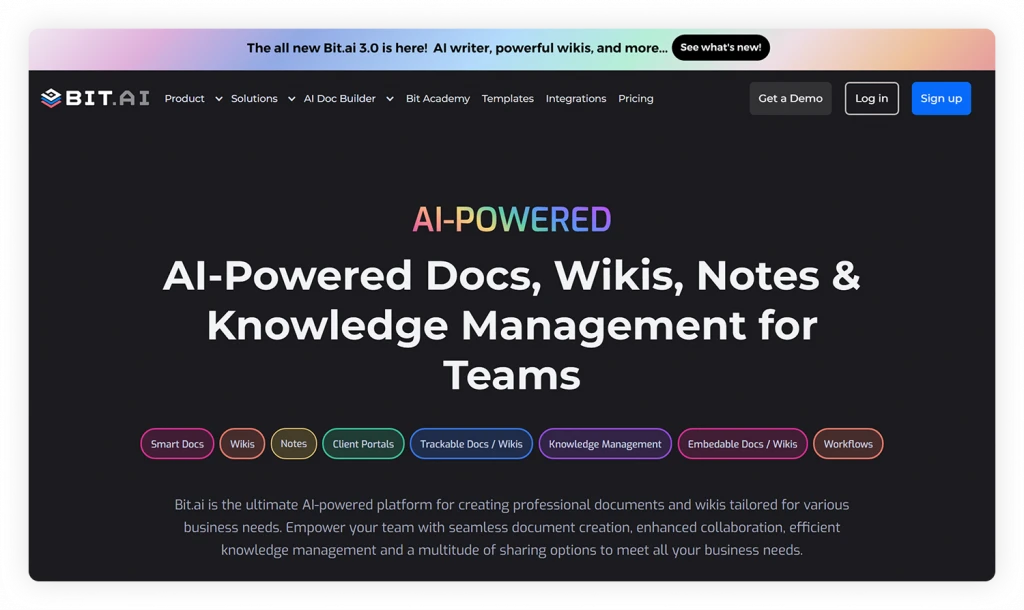
Bit.ai is an AI-powered docs, wikis, and knowledge management platform built for teams to create, organize, collaborate, and manage knowledge in one unified workspace. Instead of discussing work separately through endless emails, teams can collaborate directly inside smart documents, leave contextual comments, share feedback instantly, and manage approvals faster in real time all along ai assistance.
With Bit.ai, communication and work stay connected in one centralized environment, making collaboration faster, clearer, and far less dependent on email.
Here are some AI-powered features of Bit.ai that can help reduce back-and-forth emails in a practical way:
1. AI-Powered Document Creation
Bit.ai comes with AI-powered documents that help teams draft, refine, summarize, and improve content directly inside their workspace with the help of AI Genius Writer. Instead of sending multiple emails asking for edits, suggestions, or rewrites, teams can use AI assistance to create polished documents much faster.
Bit.ai also offers an AI Doc Builder that helps generate structured, professional documents in minutes. Simply answer a few prompts, and the platform creates ready-to-use docs without long content discussions happening over email.
2. Rich Embeds for Centralized Information
Bit.ai allows users to embed rich media and workplace content directly inside documents.
Teams can embed spreadsheets, PDFs, videos, presentations, cloud files, Figma designs, and hundreds of other tools into one interactive document. Instead of emailing multiple attachments and links separately, everything stays organized in a single shared workspace.
3. Real-Time Collaboration on Documents
You and your team members can collaborate simultaneously on the same document by adding inline comments. You don’t have to keep sending the different versions to each other or wait for someone to share the updates. All the changes are displayed immediately, which helps eliminate misunderstandings and decreases the number of email exchanges.
Create Knowledge Base & Centralize information so answers are always within reach:
4. AI-Powered Shared Workspaces & Knowledge Management
Bit.ai helps teams create organized AI-powered workspaces where documents, notes, SOPs, project resources, and company knowledge stay centralized and easily searchable.
Rather than asking repetitive questions through email or searching through old message threads, team members can quickly access the latest information whenever they need it.
5. Multiple Sharing Methods for Faster Communication
One major reason teams rely on endless email threads is because information gets scattered across attachments, links, versions, and separate conversations. Instead of everyone working from one updated source, people keep emailing files back and forth to stay aligned.
With Bit.ai, teams can share documents through live links, PDFs, embeds, trackable links, password protection,and link expiration without sending endless email attachments back and forth. Bit.ai also makes client collaboration easier with guest access and in-document comments. Clients can review files, leave feedback, and suggest changes directly inside the document, helping teams avoid long email threads and keep communication organized in one place.
And once your communication, content, and collaboration start living in one place, you naturally rely less on email, which is where the real shift begins.
Collaborate Without the Email Chaos
Replace endless email chains with collaborative documents, comments, and shared workspaces in Bit.ai. Work faster with your team.
Free to start • Set up in minutes
Wrap Up
Email replies pile up gradually through additional replies, little explanations, and repetitive follow-ups that seem totally fine at the time.
However, after you take a break and think about it, you see all the time and energy that is being wasted in discussions that could have easily been avoided. The issue is not just how emails are written; it is how much your work depends on them in the first place.
When you start improving how you communicate, things get better. Fewer gaps, clearer expectations, and more structured emails reduce a lot of unnecessary back-and-forth.
But the real shift happens when your team moves beyond email as the primary way of working. When communication, content, and collaboration happen in one place, work becomes easier to follow, faster to complete, and far less repetitive.
And once that shift happens, back-and-forth emails stop being a daily frustration and start becoming the exception.
FAQs
How can teams improve communication without constant emails?
You start by making communication more structured and intentional. Clear expectations, complete information, and well-organized messages reduce unnecessary replies. But beyond that, moving conversations into shared workspaces where everyone can collaborate in real time will improve things a lot.
How do back-and-forth emails hurt productivity?
They slow everything down in small but consistent ways. Every response introduces a delay, interrupts the focus, and pushes you to do the same task again and again. Gradually, this not only reduces your deep working time, but also changes your main focus from doing productive work to just handling the ongoing conversations.
What tools help reduce unnecessary email conversations?
Real-time collaboration and knowledge management solutions such as Bit.ai are able to lessen the volume of emails because work, feedback, and documents are all centralized in one place. The teams do not have to wait for replies to see the progress immediately.
How do real-time collaboration platforms improve team communication?
They always associate chats with the specific content, show the progress, and let the teams work together more quickly but still with the full context. Thus, the team forms clearer ownership and stronger alignment.
About Our Editorial Team
Our Editorial Team researches, writes, and reviews every article to help ensure it is accurate, practical, and up to date. To learn more about our editorial standards, content review process, and official social media profiles, visit our Editorial Team page.
Why Trust This Article?
The information in this article is based on reputable and authoritative sources. We review our content periodically to keep it accurate and up to date.