Ever feel like your day is gone before you’ve done anything?
Between meetings, tasks, updates, and the constant flow of messages, it can feel like your attention is being pulled in every direction. The truth is, most teams today aren’t struggling because they’re unproductive. They’re struggling because there’s simply too much information competing for their time.
That’s exactly where AI-powered time tools make a real difference. They’re not just smarter calendars or digital to-do lists. They understand patterns, automate repetitive work, and help you stay focused on what actually moves your projects forward.
Imagine a workday in which you are not juggling schedules, following up on reminders, or organizing a never-ending list of tasks. Rather, those are handled discreetly behind the scenes by your AI assistant. You approach your day with clarity, work together smoothly, and advance more quickly than before. That’s the true benefit of AI time optimization it gives you back your time.
So if you’ve ever wondered how some teams stay organized, meet deadlines, and still have breathing room…
It’s not a secret. It’s strategy powered by AI.
➡️ Now let’s break down what makes the best AI time management tools so effective, and how they’re reshaping the way teams plan, prioritize, and get work done.
What Makes the Best AI Time Management Tools Stand Out
Imagine this — you start your day, open your workspace, and everything’s already sorted. Your meetings are auto-prioritized, your tasks are neatly grouped, and your focus time is blocked off without you lifting a finger. Sounds futuristic? Nope, it’s happening right now.
The best AI time management tools don’t just track your time; they understand it. They analyze how you work, when you’re most productive, and what slows you down. Instead of being another app you have to manage, they quietly optimize your workflow in the background.
Unlike traditional tools that just record hours, AI-powered solutions learn patterns. They help teams predict deadlines, reduce scheduling chaos, and even recommend when to take breaks to avoid burnout.
In short, these tools act like personal assistants that never sleep, making sure you always stay one step ahead of the clock.

The next time you’re comparing tools, look beyond features like timers or reminders. Instead, ask — does it make my team smarter about how we spend our time?
➡️ Next up: Let’s meet the 10 best AI time management tools for teams that are changing the way the world works — one smart schedule at a time.
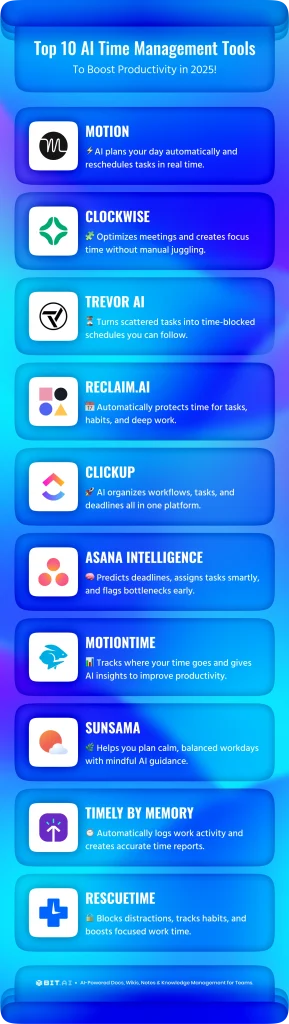
10 Best AI Time Management Tools for Teams
Alright, time to meet the real game-changers.
They aren’t merely apps — they’re your AI-enabled productivity assistants, designed to assist worldwide teams to optimize schedules, automate repetitive tasks, and recover lost hours. Whether you’re running a startup or overseeing a cross-continent project team, these resources will make “time management” seem effortless.
Here are our best selections ?
1. Motion
You know those days when your calendar looks like a battlefield — meetings crammed back-to-back, deadlines chasing you, and no room to breathe? That’s where Motion steps in. It doesn’t just organize your time; it orchestrates it.
This AI time management tool studies your tasks, priorities, and deadlines, then automatically builds your perfect schedule. If something changes, Motion instantly reshuffles your entire day to keep you on track — no manual juggling needed. It’s like having an invisible time strategist that ensures every minute counts.
Key Features:
- AI auto-scheduling that adjusts in real-time
- Smart task prioritization based on urgency
- Team calendar optimization for collaboration
Pricing: Starts at $19/month per user
2. Clockwise
Imagine if your calendar could think for you. Clockwise is the AI-powered calendar optimizer that brings sanity to chaotic schedules. It understands your habits, automatically rearranges meetings, and creates deep-focus windows so your brain gets time to breathe.
For global teams, it’s a blessing — Clockwise aligns everyone across time zones and avoids overlapping chaos. It can also integrate perfectly with Slack, allowing colleagues to see you in focus mode. No scheduling, no burnout, just clarity.
Key Features:
- AI-based optimization of meetings and focus time
- Smart Slack and Google Calendar integration
- Team analytics dashboard for visibility to workload
- Auto-adjusting to work across multiple time zones
Pricing: Free plan; paid plans from $6.75/month
3. Trevor AI
Feeling buried under endless to-dos and deadlines? Trevor AI transforms your scattered task list into a smooth, time-blocked plan. It connects your task manager with your calendar and intelligently allocates time to each task based on how you work.
It doesn’t just remind you — it teaches you when to work on what. Trevor AI gets how you work every day, so you won’t get too busy or forget what’s most important. It’s like having a smart calendar assistant.
Key Features:
- Task-to-calendar synchronization
- AI-driven focus-time recommendations
- Real-time productivity insights
- Deep integration with Google Tasks and Todoist
Pricing: Free plan; Premium from $3.99/month
4. Reclaim.ai
Imagine never double-booking yourself again — or scrambling for time to actually do the work after meetings. Reclaim.ai makes that possible. It automatically finds time in your calendar for tasks, breaks, and personal focus sessions without you lifting a finger.
Reclaim syncs across your entire team, learning when you’re most productive and reshuffling priorities if emergencies pop up. Whether you’re working solo or managing a hybrid team, it keeps your day structured yet flexible — just like a human assistant would.
Key Features:
- Dynamic AI time blocking
- Automated task and habit scheduling
- Smart work-life balance controls
- Integration with Google Workspace
Pricing: Free plan; paid plans from $8/month
5. ClickUp
ClickUp feels like your team’s personal command center. It’s not just about tracking work — it’s about automating it. With its built-in AI assistant, ClickUp helps you write better task descriptions, summarize project updates, and even set realistic deadlines based on your workload trends.
Whether you’re a remote startup or a global enterprise, ClickUp adapts to your workflow style. Its visual dashboards, docs, and integrations make managing everything — from brainstorming to execution — smoother than ever.
Key Features:
- AI assistant for writing and task insights
- Advanced workflow automation
- Multi-view dashboards (List, Kanban, Calendar)
- Built-in docs and whiteboards
Pricing: Free plan; paid plans from $10/month
6. Asana Intelligence
Asana Intelligence brings structure, clarity, and automation into your team’s day like a silent co-pilot guiding every move. It helps you break down complex work, manage timelines, and predict bottlenecks before they hit.
It turns scattered to-dos into clear time-blocked plans, suggests deadlines based on effort and patterns, and keeps every project aligned. Asana Intelligence helps you stay ahead rather than catch up, whether you’re overseeing global team operations, product sprints, or marketing launches.
Key Features:
- AI task recommendations and deadline forecasts
- Automated workload distribution among teams
- Intelligent project insights for early risk identification
- Several views for clarity, such as the Board, Calendar, and Timeline
Pricing: Free plan; paid plans from $10.99/month per user.
7. MotionTime
Ever wondered where your hours actually go? MotionTime quietly tracks your digital footprint — meetings, apps, focus sessions — and delivers laser-sharp insights about your time patterns. Instead of guessing, you get data-driven clarity.
It doesn’t just measure time; it helps you improve it. With AI analytics and smart reminders, MotionTime shows when your productivity peaks and when you should take a breather. It’s time tracking without the guilt trip.
Key Features:
- AI tracks your time and focus.
- Get custom tips to be more productive.
- Smart rest and work balance notifications
- Weekly performance snapshots
Pricing: Starts at $15/month
8. Sunsama
Sunsama is what happens when mindfulness meets productivity. Each morning, it gently guides you to plan a day you can actually complete — not one that overwhelms you. Instead of pushing hustle culture, it promotes balance and intention.
With AI assistance, Sunsama helps you set achievable goals, prioritize the right work, and reflect daily. Every team needs this productivity ritual in order to remain focused and productive.
Key Features:
- AI reflection prompts for daily planning guidance
- Connectivity with ClickUp, Asana, Jira, and Trello
- Tracking focus and timeboxing
- Analytics for end-of-day journaling
Pricing: Starts at $16/month
9. Timely by Memory
If manual time tracking makes you cringe, Timely will change your mind. Using AI, it automatically logs everything — meetings, emails, and projects — without invading your privacy. You get a full picture of your day, hands-free.
It’s perfect for freelancers and teams who bill clients or want transparency without micromanagement. Timely’s reports are beautifully simple and surprisingly accurate, helping you optimize effort and eliminate wasted hours.
Key Features:
- Fully automatic time tracking via AI
- Real-time project cost and progress tracking
- Privacy-first design
- Integration with 100+ business tools
Pricing: Starts at $11/month
10. RescueTime
If productivity had a conscience, it would be called RescueTime. It runs quietly in the background, monitoring your habits, identifying distractions, and offering insights into how to reclaim your focus.
It’s not about working longer — it’s about working smarter. RescueTime can help you stay balanced and avoid burnout with weekly reports, focus sessions, and nudges when you need them.
Key Features:
- It tracks what you’re focusing on and blocks distractions as they happen.
- You’ll get a breakdown of how you did each week.
- It gives you coaching to help you reach your goals.
- It tells you when it’s time to get into deep work.
Pricing: Free plan; Premium at $12/month
And now, it’s time for the grand reveal — the one AI tool that redefines how modern teams document, collaborate, and save time like never before.
➡️ Next up: Bonus Tool – Bit.ai: The Ultimate Time-Saver for Modern Teams.
Bonus Tool: Bit.ai – The Ultimate Time-Saver for Modern Teams
Imagine this: your team is in five different time zones, juggling project docs, client updates, and meeting notes — and somehow, everyone’s still perfectly in sync.
That’s not a dream. That’s Bit.ai, your team’s AI-powered workspace that turns scattered information into streamlined productivity.

AI-powered docs, wikis, and a knowledge management platform built for modern teams who want to save time, reduce chaos, and collaborate like never before. Bit.ai brings everything — documents, projects, and people — into one intelligent space. Instead of wasting hours searching for files or rewriting the same content, you and your team can instantly find, create, and share information that’s always up to date.
It’s more than just a documentation tool — it’s your digital headquarters. Bit.ai’s AI features help you draft content faster, summarize long texts, and even translate across languages. You can assign tasks, add comments, embed visuals, or connect project data — all without leaving the platform.
Whether you’re managing product roadmaps, client proposals, or internal wikis, Bit.ai ensures your team’s knowledge stays organized and accessible. Every second saved from switching between apps goes straight back into creative, meaningful work.
Key Features:
AI Genius Writer: Change the way you write with Bit.ai’s AI Genius Writer. It helps you draft reports, sum up research, or come up with new ideas. It gets what you want to say and the tone you’re going for, and then it gives you clear, well-written content fast. You can save time and put your energy into planning, while the AI handles the writing.
Smart Search: Say goodbye to endless scrolling. Bit.ai’s Smart Search finds what you need — instantly. It understands context, not just keywords, helping you locate documents, notes, or even snippets of text across your entire workspace in seconds.
Real-Time Collaboration: Work together like never before. Co-edit documents, tag teammates, leave comments, and track updates — all in real time. With transparent communication and live feedback, your team moves faster, stays aligned, and avoids email overload.
Centralized Knowledge Hub: Create a single source of truth for your organization. Build internal wikis, SOPs, client documentation, and training guides — all version-controlled, searchable, and easy to update. Bit.ai keeps your collective knowledge accessible and beautifully organized.
Rich Media Embedding: Make your documents come alive. Embed rich media from over 100+ tools including Google Drive, Figma, YouTube, and Trello. Turn plain text into interactive, visual documents that engage, inform, and inspire.
Smart Document Management: Stay effortlessly organized. Bit.ai helps you structure projects, update files, and track progress without juggling multiple apps. From creation to completion, every document stays connected, current, and easy to manage.
Multiple Sharing Methods: Share your work your way. Bit.ai lets you share documents through live or trackable links, manage access permissions, and invite guests — all with advanced security controls. Decide who can view, comment, or edit, and share confidently, whether it’s an internal project or a client deliverable.
Pricing: Free plan available; Business plans start at $8 per member/month
Bit.ai isn’t just another productivity tool — it’s the engine behind modern teamwork. When every document, idea, and update lives in one place, your team doesn’t just save time — it creates more of it.
➡️ Next up: Let’s explore how AI time management tools transform team productivity — and why combining them with Bit.ai unlocks your full potential.
How AI Time Management Tools Transform Team Productivity
What if you could make every hour of your day work for you? ⏰
That’s the promise of AI time management tools — turning ordinary workdays into effortless, high-impact ones.
These tools don’t just track tasks; they understand your workflow. They learn when you’re most focused, automate low-value chores, and suggest smarter ways to plan your day. Instead of chasing deadlines, you start leading them.
AI can act like a helpful assistant for your team. It keeps everyone on schedule, cuts down on too many meetings, and can even spot when a project might be late. This means less stuff to distract you, quicker choices, and a workday that flows better.
Pair that with Bit.ai’s collaborative workspace, and your entire workflow becomes frictionless — from documentation to scheduling and reporting. Your team stays aligned, informed, and ahead of time.
According to Boston Consulting Group’s 2024 “AI at Work” report, about half of employees save at least five hours a week by using generative AI tools at work.
AI isn’t replacing human focus. It’s enhancing it — giving you the freedom to create, plan, and perform without the constant drag of micromanagement.
➡️ Next up: Let’s wrap things up and explore how you can make every minute count with the best AI time management tools of 2026.
Wrapping Up: Make Every Minute Count with the Best AI Time Management Tools
Every minute you waste is a story untold, a project delayed, or an idea unexplored.
But with the right AI tools by your side, every minute can work harder for you. These apps do more than just plan your work. They’re smart and figure out how you do things, get used to your pace, and keep everyone on your team on the same page easily.
From auto scheduling to guessing what’s next, AI is changing how teams get stuff done all over. And when you use them with tools like Bit.ai, you’ll see a big change.
You’re no longer juggling tools, threads, or files — everything lives in one place, organized, intelligent, and accessible whenever you need it.
According to Boston Consulting Group’s AI at Work 2024 report, nearly 50% of professionals save at least five hours a week using AI to automate repetitive tasks. That’s five extra hours to create, plan, or just breathe.
So, if you’ve been searching for ways to work smarter, collaborate better, and reclaim your time — the future is already here. It’s powered by AI.
Start exploring the best AI time management tools of today.
And if you’re ready to take the next leap, try Bit.ai — where every document, task, and idea works together to save your team hours every single week.
FAQs
Q1. What are the best AI tools for time management?
Some of the best AI tools for time management include Motion, Clockwise, Reclaim.ai, Notion AI, ClickUp, and of course, Bit.ai. Each of these helps you save time in different ways — from automating scheduling to simplifying project collaboration. The best one depends on your workflow, team size, and goals.
Q2. What is the best AI scheduling tool?
If scheduling chaos is your biggest issue, then Motion and Clockwise are the best tools, because both will automatically organize meetings and tasks based on your calendar, giving you more focus time, without continuously rescheduling. If you’re a hybrid team, I would also recommend Reclaim.ai; it is like having a personal assistant that organizes your day for you.
Q3. How does AI help improve team productivity and time tracking?
AI assists teams in becoming smarter by automating repetitive coordination, prioritizing work, and analyzing work patterns. For example, Timely by Memory and MotionTime are time tracking tools that automatically track time, while Bit.ai centralizes documentation and collaborative knowledge to keep teams aligned and informed. Together, these tools eliminate friction, decrease confusion, and allow teams to spend more time on meaningful work.
Q4. What’s the difference between traditional time tracking tools and AI-powered ones?
Traditional tools simply record what you do. AI-powered tools analyze it. They learn from your behavior, suggest improvements, and automate scheduling or reporting. Instead of you managing the system, the system manages itself — helping you save time and optimize productivity automatically.
Q5. How to Save Time Using Bit.ai?
With Bit.ai, you can cut down hours of repetitive work every week. Its AI Genius Writer helps you draft, summarize, and brainstorm instantly, while its smart search and collaboration features ensure your team always finds what they need, when they need it. By keeping your docs, projects, and communication in one intelligent space, Bit.ai gives your team back their most valuable resource — time

Keep reading & learning: