A 20-page project proposal can contain pricing, timelines, and project details, but the client still has to open a separate tab to watch a product demo, spreadsheet, or ask for clarification about the next steps. But what if all these elements can be added into that same proposal doc?
Interactive documents make this possible. They let you combine written content with clickable links, videos, forms, and other interactive elements, so readers can explore information and take action without leaving the document. So, the project proposal that we are talking about can contain product demo videos, related data charts, contact form, all in one interactive document.
If you’re new to interactive documents, just wait till the end. In this guide, we’ll explain what interactive documents are, how they work, their benefits and key features, and how to create one.
What Are Interactive Documents?
Interactive documents are digital documents that let readers click links, watch videos, explore embedded content, fill out forms, and navigate between sections through a table of contents, all from the same doc without opening multiple tabs.
They combine written information in a document with interactive elements to make content easier to access and use. But traditional documents can also include images, videos, and links, so what actually makes interactive documents different? Let’s find out the key features of interactive documents!
What Are the Key Features of Interactive Documents?
Interactive documents bring different types of content together, so readers can access information, explore details, and take action from one place. Here are the key features that make them useful for businesses:
| Feature | Why It Matters |
| Embedded multimedia (video, audio, images) | Readers get their answer immediately instead of switching tabs and losing focus |
| Clickable navigation (menus, tabs, table of contents) | Saves time and stops readers from scrolling a long document out of frustration |
| Forms and data capture fields | Turns a document into a lead or response, instead of just something that was “sent” |
| Real-time personalization | One template can serve every client without looking generic |
| Analytics and document tracking | Tells you exactly what’s working and what to fix, instead of guessing |
| E-signature integration | Cuts out the back-and-forth of printing, signing, and emailing back a scanned copy |
| Live content updates | You never have to resend a corrected version or worry about someone reading an outdated file |
| Rich embed integrations | Keeps all relevant content in one place instead of scattered across different apps |
| Content integration from other platforms | Pulls in live content from tools like Google Sheets, Figma, GitHub, or many platforms directly into the document |

Templates for Creating Interactive Documents
Start building interactive documents with ready-made structures for proposals, reports, manuals, and other business documents.
What Are the Benefits of Interactive Documents?
Interactive documents help teams present information, share resources, and guide readers through important tasks in one place. Instead of sending a document along with separate files, links, and forms, you can bring related content together and make it easier to use.

Building documents across different teams and workflows?
Explore Bit.ai’s documentation resources for guides, templates, and best practices. →
Apart from these, the following are some of the other benefits of interactive documents.
1. Interactive Documents Increase Reader Engagement
When charts, data, videos, and supporting data are all present in one document, it gets read all the way through, instead of getting scanned once and forgotten. Through clickable navigation, embedded media, and organized sections, it is easier for readers to move through an interactive document and find what they need.
2. Interactive Documents Improve Conversion Rates
Interactive documents can make it easier for readers to move from reviewing information to taking some form of action. Forms, calls to action, and e-signatures can be embedded right into the document, allowing readers to take some kind of action without having to exit the page.
At the end of the day, every extra step a reader has to take like opening an app, hunting for an email, finding a contact form, is a chance for them to lose interest and move on. By bringing relevant information and action options together, interactive documents can make the process easier and help more readers follow through.
3. Shared Documents Stay Up to Date Automatically
All edits made to the original document are automatically updated wherever it is shared. You can be sure that no one is seeing an out-of-date version of the doc, and you don’t need to send out a revised copy again.
4. Interactive Documents Reduce Scattered Information
The interactive documents unite the information, which helps readers to access everything in one place without having to search the information in emails, folders, and files separately. They make it easier to access important resources, follow the flow of information, and find what is needed without switching between multiple platforms.
5. Make Complex Information Easier to Understand
There is some information that cannot be expressed in writing alone. The use of interactive documents allows the reader to present the information in varied formats, thus simplifying complex issues. Videos can demonstrate a process, charts can show how numbers compare, and embedded resources can provide more detail without interrupting the explanation.
6. Interactive Documents Create a Stronger First Impression
A polished, well-organized document can make your business look more professional from the very beginning. Instead of presenting readers with a plain PDF or Word file, you can use videos, images, clickable links, and interactive elements to create a more engaging experience.
Creating documents for clients?
Learn how to make client-facing documents more professional, engaging, and easier to work with. →
A strong first impression can build trust, keep readers interested, and make your document more memorable.
Interactive Documents vs. Traditional Documents
Interactive documents and traditional documents may look similar at first, but the way readers use them is very different.
The table below highlights the key differences between interactive documents vs. traditional documents.
| Feature | Traditional Documents | Interactive Documents |
| Content | Mainly text, images, and basic formatting. | Text, images, videos, links, forms, and embedded content. |
| Navigation | Readers usually scroll through pages to find information. | Clickable sections and table of content help readers reach information faster. |
| Supporting Resources | Often shared as separate files or links. | Can be embedded or connected within the document. |
| Reader Experience | Mainly focused on reading and reviewing. | Lets readers explore content and take action. |
| Collaboration | May require separate tools for feedback and editing. | Can include built-in collaboration features, depending on the platform. |
| Updates | Changes may require sharing a new version. | Some platforms let teams update content in one place. |
| Sharing | Often shared as downloadable files or attachments. | Can be shared through links with access controls, depending on the platform. |
The main difference is how readers interact with the information. Traditional documents present content, while interactive documents connect that content with useful resources and actions. This makes interactive docs especially useful for proposals, reports, training materials, and other documents that need more than text and images.
Looking for a better way to create, share, and work on documents with your team and clients?
Interactive Documents vs. Other Digital Content Formats
Interactive documents are often confused with other digital content formats, but they serve different purposes. A PDF, presentation, or webpage can include interactive elements too. The key difference is how the content is organized and how readers use it.
The table below highlights the key differences between interactive documents vs. other digital content formats.
| Content Format | What It Does | How Interactive Documents Differ |
| Traditional Documents | Present information through text, images, and formatting. | Combine information with interactive features that help readers explore and use the content. |
| PDFs | Preserve document formatting for reading, sharing, and printing. | Can include interactive elements, but interactive documents may offer more connected content and collaboration features. |
| Presentations | Present information through slides, often for an audience. | Let readers explore content at their own pace instead of following a fixed slide sequence. |
| Webpages | Share information online through a browser. | Can bring related resources, collaboration, and document content together in one workspace. |
| Digital Forms | Collect information through fields and submissions. | Combine forms with explanations, supporting content, and other interactive elements. |
| Interactive Documents | Combine written content with links, media, navigation, and other features. | Help readers access information, explore details, and take action from the same document. |
Create Interactive Documents with Bit.ai
Bit.ai is an AI-powered document collaboration and knowledge management platform that helps teams create, organize, and share content in one place. Its interactive living documents allow users to combine written content with videos, images, links, charts, forms, cloud files, and other digital resources.
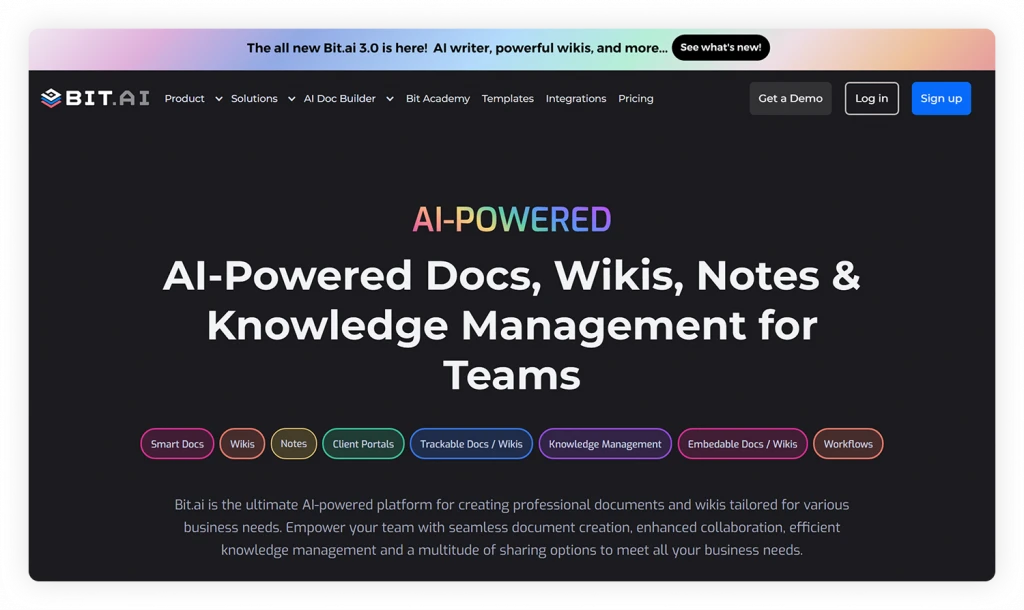
Let’s explore the key features provided by Bit.ai that make it useful for creating interactive documents:
- Rich media embeds: Add videos, presentations, spreadsheets, surveys, diagrams, and other content directly to a document.
- 100+ integrations: Bring content from tools such as Google Sheets, Dropbox, Figma, and other applications into one document.
- Clickable navigation: Organize content with workspace, folders, and wiki subpages so readers can find information quickly.
- Real-time collaboration: Allow team members, clients, and guests to edit documents, leave inline comments, and work together.
- Smart sharing: Share documents through live links, trackable links, or website embeds. You can also add password protection, access permissions, and expiration dates.
- Document tracking: Monitor how readers interact with shared documents, including viewing activity and engagement.
- AI Genius Writer: Use AI assistance to create outlines, improve content, generate templates, and organize information more efficiently.
Now that you know what Bit.ai offers, let’s look at how to create an interactive document step by step.
How to Create an Interactive Document With Bit.ai
Bit.ai helps you create interactive documents by combining text, videos, links, files, and other digital content in one organized workspace.
Here is a step-by-step guide to help you create an interactive document from scratch with Bit.ai.
Step 1: Decide What the Document Should Achieve
Start by deciding what you want readers to do after reading the document. For example, a project proposal may aim to help a client understand the project and request a meeting.
Your goal will guide the content and interactive elements you add.
Bit.ai’s AI Interactive Document Generator
Need a starting point for your interactive document? Use Bit.ai’s AI Interactive Document Generator to outline the content, sections, and interactive elements based on your goal.
Step 2: Sign Up to Bit.ai and Create a New Workspace
Log in or sign up to Bit.ai and create a new workspace. Open the workspace, click Create New, and choose Document.
You can start with a blank document or select a template that matches your needs.
Step 3: Add and Organize Your Content
Insert your title, headings, text, images, and all other important content in the doc itself. Also, you can add subpages for organizing longer documents like proposals, training material, or a knowledge base.
Want to see how to create and build a document in Bit.ai?
Follow this step-by-step guide to creating, editing, and sharing a doc.→
Step 4: Add Interactive Elements
Use Bit.ai’s rich media features to add content from 100+ tools, including:
- Videos and presentations
- PDFs and spreadsheets
- Images, charts, and links
- Forms, surveys, and other digital resources
These elements help readers explore information without opening multiple files or tabs.
Step 5: Collaborate and Review
Invite team members to edit the document, leave comments, and suggest changes. Before sharing, review the content and test all links, videos, files, and forms to make sure everything works properly.
Step 7: Share and Update
Share the document with your team, clients, or other readers using Bit.ai’s sharing options. You can also use access controls, trackable links, or embed the document on a website.
Update the document whenever the information changes so readers always have access to the latest version.
That’s it! Your interactive document is ready to share.
Conclusion: Create Interactive Documents for Better Engagement
Interactive documents combine text, videos, links, and forms, making information more accessible and easier to act upon. Whether they’re for your project proposals or onboarding, they’ll allow the user to find the information and take action without having to open several other documents.
Want to create your own interactive documents? You can create, manage, and share all your documents through one collaborative workspace, Bit.ai. Check out Bit.ai today!
Frequently Asked Questions About Interactive Documents
What is an interactive document?
An interactive document is a digital document that lets readers engage with content through clickable links, media, forms, navigation, and other interactive elements.
What is the difference between interactive and static documents?
The static documents contain information that can be read, whereas the interactive documents provide opportunities for users to interact with the information within the document by clicking on links, watching videos, and responding to forms. Interactive documents can also include rich media, making them more engaging and easier to use.
What are the benefits of interactive documents?
The use of interactive documents can increase engagement, make information more understandable, support collaboration, and help in searching for the needed information.
What can interactive documents be used for?
There are many uses for interactive documents including proposals, reports, presentations, training material, onboarding manuals, product manuals, and knowledge bases.
Can I create interactive documents without coding?
Yes, there are many document collaboration tools like Bit.ai where you can create interactive documents without any coding.
About Our Editorial Team
Our Editorial Team researches, writes, and reviews every article to help ensure it is accurate, practical, and up to date. To learn more about our editorial standards, content review process, and official social media profiles, visit our Editorial Team page.
Why Trust This Article?
The information in this article is based on reputable and authoritative sources. We review our content periodically to keep it accurate and up to date.