Writing business documents consumes an enormous amount of time. Maybe a proposal, a report, a contract – you’re often starting from a blank page even though you’ve written something similar before.
That’s when you need an AI document generator, a tool that uses AI to write documents for you. You give it a prompt or fill in a few details on an already-fed prompt, and it writes a complete, structured first draft of your document in minutes. You just need to edit it a little bit, add your details, and send it.
It doesn’t replace your writing. It just removes the blank page part and writer’s block.
So, in this guide, we’ll cover what these AI document generators are, why businesses are adopting them, and Bit.ai, a workspace with multiple AI generators built for businesses that create and manage content.
What Is an AI Document Generator for Business?
An AI document generator for business is a tool that uses AI to create documents like proposals, reports, contracts, SOPs, and so much more. You tell it what you need, for example, “write a proposal for a web design project, $5,000 budget, 6-week timeline” and it creates a ready-to-use document with structured headings and content in minutes.
Rather than starting from a blank page, you start with a draft that already has the right structure and content. You just review it, edit what’s needed, and it’s ready to send.
But how does an AI document generator actually turn a few details into a complete document? Let’s find out!

AI can do more than write from scratch, it can help teams build better documentation. See how AI is changing document creation →
How Does an AI Document Generator Work?
The working of AI document generators involves a simple three-step process:
1. Provide Details to the AI Generator
First, select an AI generator depending on the type of document you want to create. Then, you need to fill in a short prompt or a form like client name, project scope, budget, deadline, whatever the document needs.
Not sure what to include in your prompt? Learn how to ask AI the right questions for better results →
2. AI Generates a Structured Draft
Now, every AI generator works with either a ready-made template or a smart prompt structure for that document type. Once you submit your details, the AI takes this structure and writes the actual content like headings, sections, and body text, filling it in with your details in natural, ready-to-use language.
3. Review and Finalize the Document
The draft is ready almost instantly. You can edit the wording, fix anything that’s off, add specifics only you’d know, and it’s ready to go.
And that’s how your document is ready just in minutes!
Why Are Businesses Using AI for Document Creation?
Creating business documents can take up a surprising amount of time, especially when teams are constantly working on proposals, reports, contracts, and other repetitive paperwork. AI document generators are changing this by taking over much of the initial writing and structuring work.
Here are some of the biggest reasons businesses are making the switch to AI document creation.
Save Time on Repetitive Document Creation
A proposal that used to take two hours now takes fifteen minutes to draft and review with AI document generators. Now, just multiply the effect across a sales team sending ten proposals a week. Well, you and your team can save days with AI generators in creating such documents, not minutes.
Reduce Repetitive Errors and Inconsistencies
AI document generators cut down on mistakes. Copy-pasting from the old documents means old client names, old pricing, or old terms slip through while editing.
On the other hand, an AI generator builds each document fresh from what you enter, so there’s less chance of accidental carryover from the last doc.
Scale Document Creation Across Teams
Without AI, only a few strong writers on a team can be trusted to draft client-ready documents and everyone else either waits on them or produces inconsistent work.
With an AI generator, whether it’s a new hire or someone from sales, support, or ops, anyone can generate a professional, on-brand document in minutes. This means the whole team can produce documents at scale, without bottlenecking on one or two people.
Reduce Drafting and Editing Costs
AI document generators can reduce the amount of time employees spend drafting, formatting, and editing routine documents. For example, instead of a team member spending an afternoon writing an SOP, they generate it with AI and just spend twenty minutes reviewing an AI-generated one.
When these time savings add up across dozens of documents, businesses can reduce the overall cost of document creation without compromising on quality.
What Features Should You Look for in an AI Document Generator?
While looking for an AI document generator for your business, you need to find some additional features besides AI writing. Here are some of the main features that should be taken into consideration:
- Ready-made prompts for real business documents: Look for pre-built prompts for real business documents, such as proposals, SOPs, contracts, reports, and meeting notes. This saves you from starting with a generic prompt every time.
- Real-time collaboration: If two people need to edit the same proposal, they should be able to do it together, live, with comments and version history.
- Integration with the tools you already use: A document generator that connects to your CRM, cloud storage, or project management tool means data flows in automatically instead of you copying and pasting client details every time.
- Tone and brand voice control: A contract should not read like an email from a marketing campaign. With effective tools, you can configure your tone to be formal, informal, or brand-specific tone so every document sounds consistent, no matter who generated it.
- Easy export and sharing: Once a document is done, you need to share it as a PDF, a shareable link, or synced to Google Drive, without extra formatting work on your end.
- Edit history and permissions: For contracts and internal docs especially, you want to see who changed what, and control who can view or edit each document. So, version history and access control are important.
These features can make a big difference when choosing an AI document generator for business. The right tool can fit into your workflow, reduce repetitive work, and make business document creation much easier.
What Can You Create With an AI Document Generator?
AI document generators can support a wide range of business use cases, helping teams create different types of documents for sales, operations, marketing, HR, and other day-to-day needs. Here are some of the most common ones.
Proposals and Pitch Documents
Sales teams often need to send proposals quickly, especially when a potential client is comparing multiple options. An AI generator can take the basics like client name, project scope, pricing, and timeline and produce a structured proposal in minutes. Instead of rewriting the same sections and formatting everything from scratch, sales teams can start with a complete draft and focus on tailoring it to the client.
Need to turn that AI-generated draft into a client-ready proposal? Start with our business proposal template →
SOPs and Internal Documentation
Most companies have processes that live in someone’s head, not on paper. AI document generators make it easier to actually get that knowledge written down: you describe the process, and the tool builds a clear, step-by-step SOP. When paired with a wiki feature, teams can keep these documents organized and searchable instead of buried in random folders.
Contracts and Business Reports
Contracts and reports follow a fixed structure most of the time like the details change a little but the format remains same. AI document generators can create a structured first draft with the relevant sections, terms, and information, giving legal, finance, or operations teams a starting point to review and refine instead of creating every document from scratch.

Working on a business report? Start with a structured report template instead of a blank page →
Marketing Documents and Collateral
The marketing team often needs to create one-pagers, case studies, briefs, product descriptions, and many more marketing documents in a very limited time. With the help of an AI document generation system, these marketing documents can be created based on the needed tone and guidelines. Thus, the marketing team gets a starting point to work from, which already sounds like the brand.
So, from sales and operations to marketing and internal documentation, AI document generators can handle a wide range of business use cases.
Bit.ai AI Writing Assistant For Document Generation
Let’s now introduce you to an AI document generator built right into Bit.ai: AI Doc Builder.
Bit.ai is an AI-powered workspace that helps teams create, organize, and share documents and knowledge in one place. It brings document creation, collaboration, templates, and AI-powered tools together, making it easier for teams to work on business content without jumping between multiple platforms.
Bit.ai includes AI writing assistance that makes document creation and content writing easier:
- AI Genius Writer: Helps you generate, rewrite, summarize, translate, and improve content directly within your documents.
- AI Doc Builder: Here you’ll get ready-to-use prompts for specific types of business documents. You just need to fill out a short form with your document’s key details, and it builds a complete, structured document from that input in minutes.
Here are some of the AI document generators you’ll find in Bit.ai, designed to help you create different types of business documents faster:
- AI Business Plan Generator: Generate AI-powered plans for businesses, markets, strategies, and growth.
- AI Project Proposal Generator: Create polished project proposals with AI-guided objectives, scope, and deliverables.
- AI Report Generator: Turn information into clear, structured, AI-generated business reports.
- AI Marketing Plan Generator: Develop AI-assisted marketing strategies, campaigns, audiences, and measurable goals.
- AI Process Documentation Generator: Document workflows and procedures with AI-powered structure and clarity.
- AI User Manual Generator: Build easy-to-follow user manuals from product or process information.
- AI Requirements Specification Document Generator: Convert project needs into detailed, structured requirements specifications.
- AI Training Manual Generator: Develop comprehensive training materials tailored to teams, roles, and processes.
- AI Business Continuity Plan Generator: Create AI-assisted continuity plans for disruptions, recovery, and operations.
- AI Risk Management Plan Generator: Identify risks and develop structured mitigation plans with AI assistance.
Now that you’ve seen what Bit.ai’s AI generators offer, let’s walk through how you can use them to create a business document from scratch.
How to Create a Business Document With Bit.ai’s AI Writing Assistance
Here’s how you can use Bit.ai’s AI generator to create your next business document, without starting from scratch.
Step 1: Open a new document in Bit.ai.
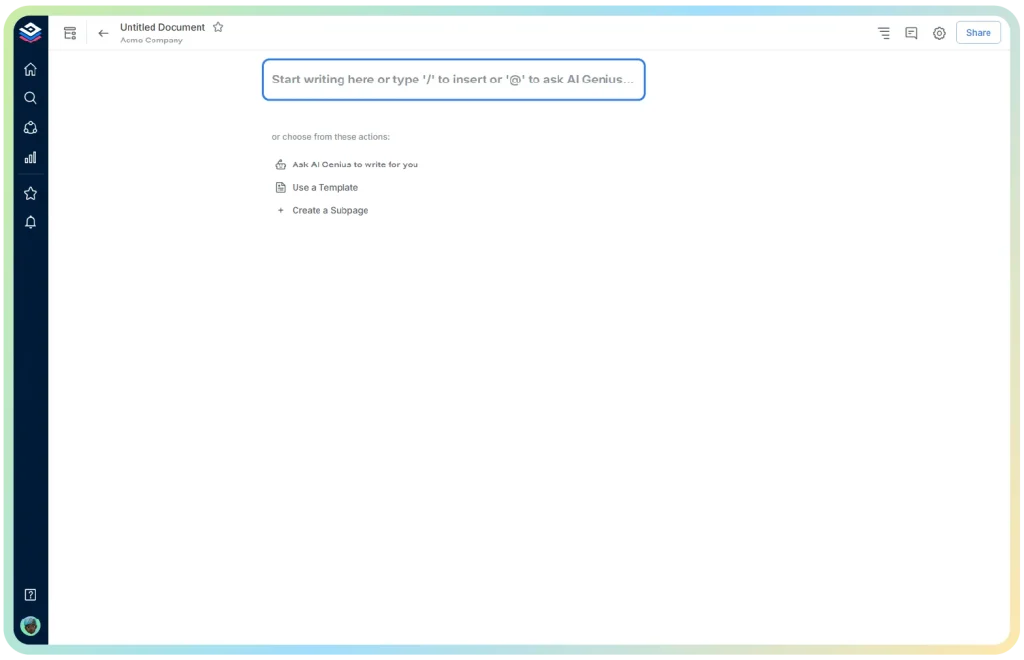
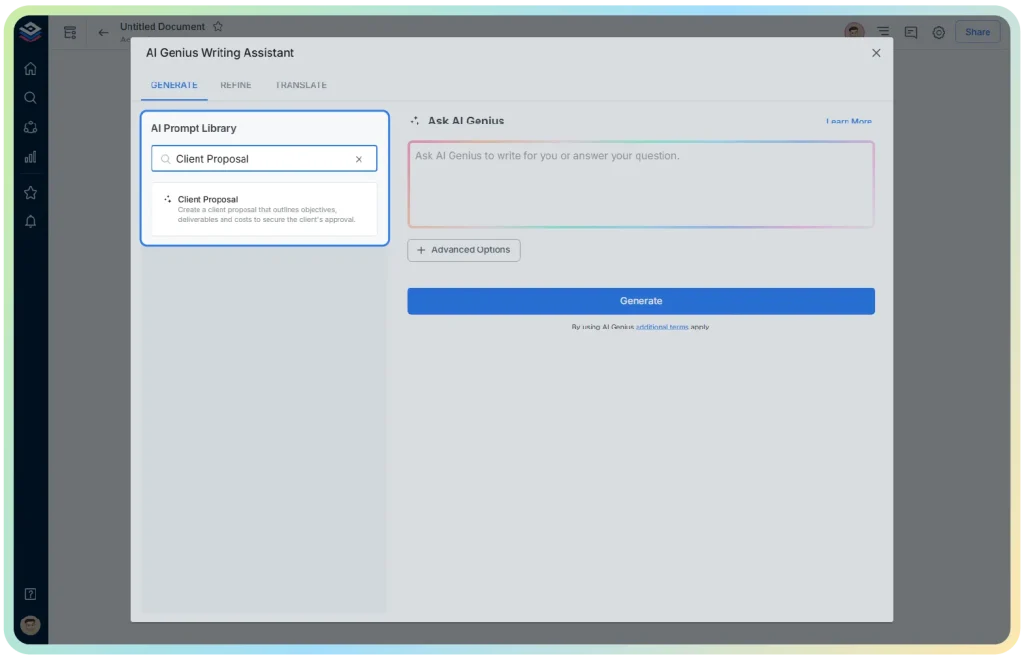
Step 2: Type @ on a blank line to open the AI Writing Assistant.
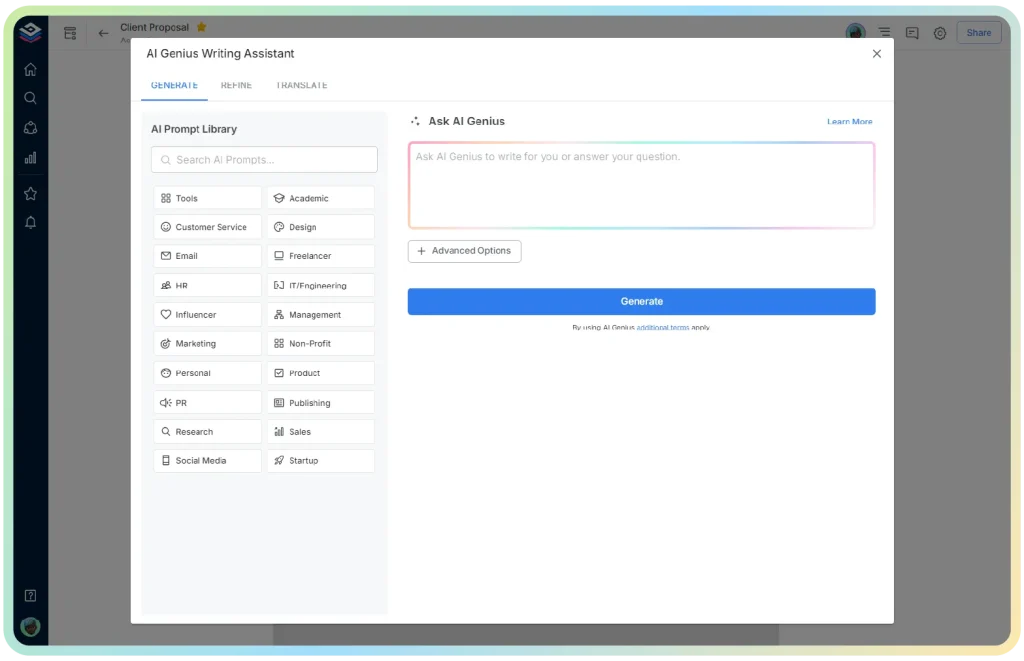
Step 3: Use a relevant keyword and search for the specific type of document, e.g. “Client Proposal” to find the right AI generator.
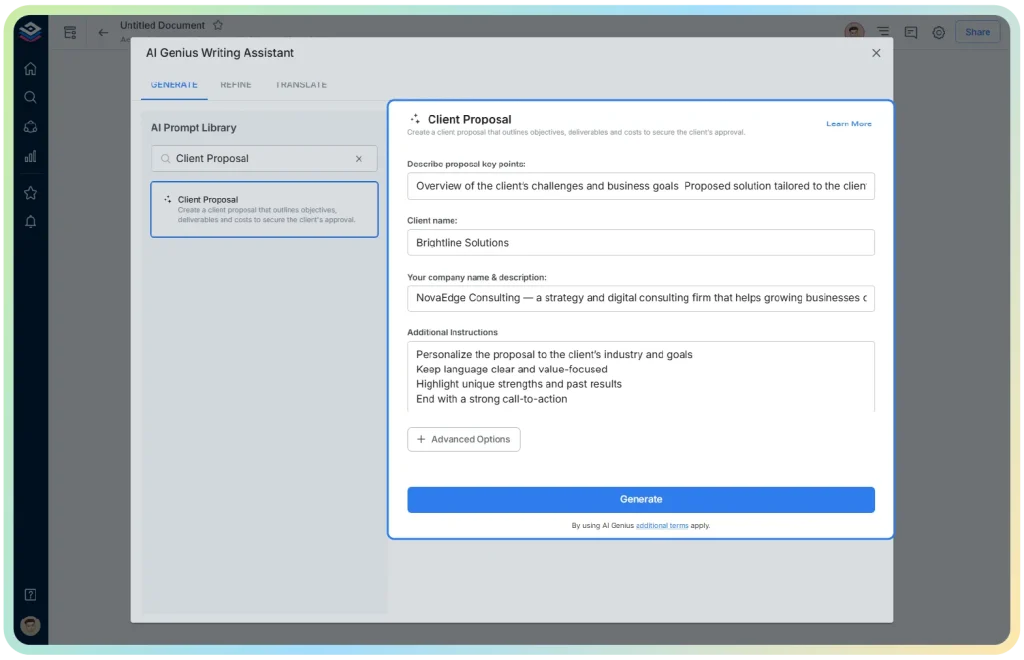
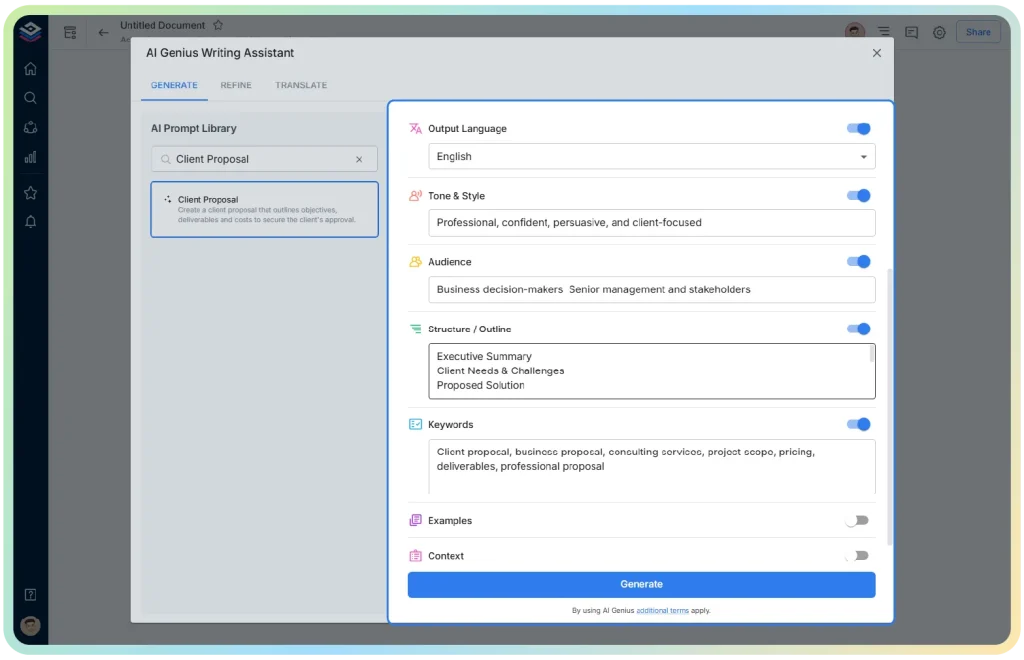
Step 4: Fill out the quick form with your details, like client name, purpose, or key points the document needs.
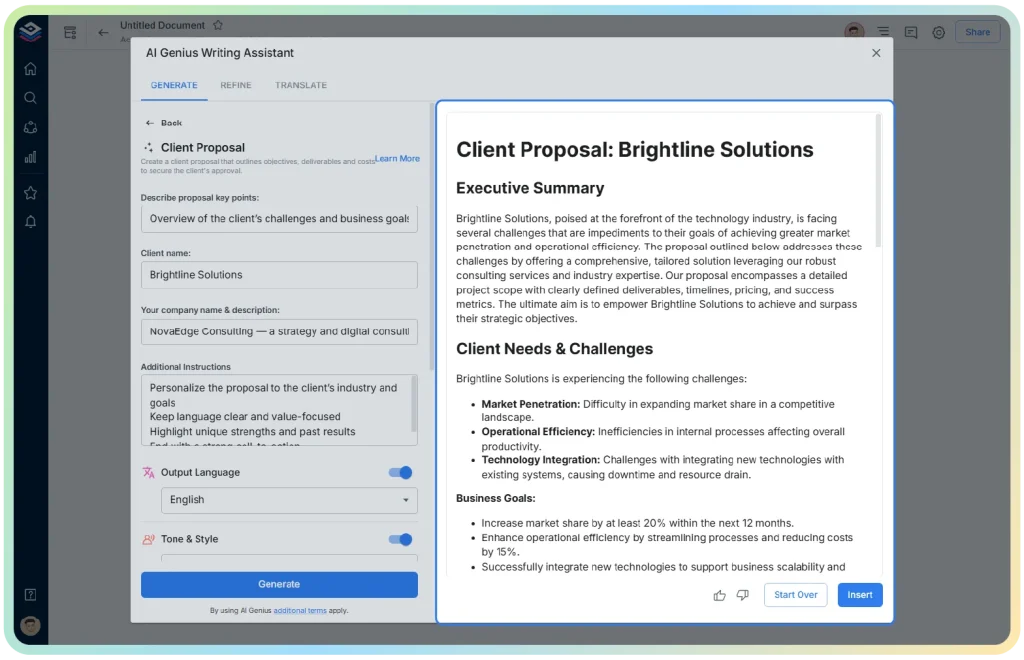
Step 5: Bit.ai will generate a customized draft based on what you entered.
Step 6: Review the draft and click “Insert” to finalize your document, ready for sharing or sending.
And that’s it! With Bit.ai, you can create a structured business document in minutes, customize it to your needs, and collaborate with your team, all from one workspace.
Conclusion
An AI document generator gives your team an amazing starting point for the documents you write most for your business, like proposals, SOPs, reports, and contracts. Instead of starting from a blank page, you start from a draft that already has the right structure, and you spend your time on the parts that actually need a person’s judgment.
And if your team writes a lot of these documents, AI generators can save a lot of time. Tools like Bit.ai make it easy to start with built-in AI generators, ready-made templates, and a workspace where the whole team can collaborate on documents in real time.
The best way to know if Bit.ai fits your workflow is to try it on one document you write often. Start with one, see how much time you save, and take it from there.

Business Document Templates
Need a ready-made starting point for your next business document? Explore Bit.ai’s templates to create structured, professional documents faster and keep everything organized in one workspace.
Frequently Asked Questions About AI Document Generators
What is an AI document generator?
An AI document generator is software that uses AI to create business documents such as proposals, reports, contracts, and SOPs. You provide relevant information, and it generates a structured first draft within minutes.
Is AI document generation accurate enough for business use?
Yes, for most of the common documents like proposals, reports, and SOPs. AI generators work effectively in case of repetitive and structured content; however, always proofread your document before sending it, especially in case of any contract or document containing figures and legal terminology.
Can AI document generators handle contracts and legal documents?
Yes, they will generate a good rough draft with proper formatting and standard legal clauses, but still, you need to have qualified person go through those legal documents before using them. Use the AI-written contract as a draft only.
Can AI generate different types of business documents?
Yes, AI document generators can support many business use cases, including business plans, proposals, reports, marketing plans, process documentation, user manuals, requirements documents, training manuals, business continuity plans and many more. The quality of the output depends on the information and instructions provided.
About Our Editorial Team
Our Editorial Team researches, writes, and reviews every article to help ensure it is accurate, practical, and up to date. To learn more about our editorial standards, content review process, and official social media profiles, visit our Editorial Team page.
Why Trust This Article?
The information in this article is based on reputable and authoritative sources. We review our content periodically to keep it accurate and up to date.