Be very honest to answer this: how many times have you sat through an all-hands meeting, camera on, nodding along, while secretly wondering if this meeting could’ve just been an email? Well, don’t worry, you are not the only one suffering from this feeling.
Remote all-hands meetings are actually too long, too one-sided, where half the team has mentally checked out, and the other half is replying to messages.
But these meetings don’t have to be that way.
When done right, an all-hands meeting is genuinely one of the most powerful tools a remote team has. It’s the rare moment where everyone, across time zones, departments, and job titles, is in the same (virtual) room.
So, whether your all-hands meetings are already decent and you want to make them great, or they’re a complete mess and you’re desperate for help, this blog is definitely for you. Let’s talk about what an all-hands meeting actually is.
What is an All-Hands Meeting?
All-Hands Meeting is a company-wide meeting where everyone joins in. From leadership to interns, the entire team comes together to hear updates, celebrate progress, and understand what is coming next.
The term comes from the phrase “all hands on deck,” which simply means everyone is present and involved.
With a hybrid or remote-first setup, all-hands meetings are typically conducted as virtual meetings to bring together workers from various locations. Now that the foundation is clear, let’s look at what you actually gain from running these all-hands meetings regularly.
Major Benefits of Holding Remote All-Hands Meetings
When all-hands meetings are conducted properly, they can completely change how your team communicates, collaborates, and feels about their work.
Here are some of the major benefits that your company can get from all-hands meetings.
1. Everyone Gets on the Same Page – At the Same Time
Remote work can quietly create silos. One team knows something, another team does not, and suddenly everyone is working with slightly different information.
All-hands meetings fix that.
When the whole company hears the same message, from the same source, at the same time, you eliminate a surprising amount of confusion, miscommunication, and those awkward “wait, nobody told me about that” moments.
2. It Puts a Human Face on Leadership
CEO emails typically get ignored or forgotten by employees, but having a live conversation (in person or virtually) allows employees to really ‘see’ and ‘hear’ leadership talk about where the company is headed, what’s working, what isn’t, and what comes next.
It builds a level of trust that no memo ever could. People want to know that there are real humans steering the ship, not just a signature at the bottom of a company update.

Must know these:
10 Essential Virtual Meeting Etiquette Rules for Professionals →
3. It Strengthens Company Culture Across Distance
Remote teams miss many everyday office moments that naturally build relationships among employees. So, regular all-hands meetings give employees a shared space to connect, celebrate wins, hear company updates, and feel part of the same mission, even when everyone works from different locations.
Even a strong culture also improves employee engagement. According to Gallup, highly engaged teams show 23% higher profitability and better workplace participation which shows how important connection and communication are in remote teams.
4. It Gives Employees a Voice
Great all-hands meetings should feel like two-way conversations, not one-sided presentations.
When employees can ask questions, share feedback, join live polls, or speak openly during discussions, people feel heard. And feeling heard is one of the most underrated drivers of employee satisfaction and retention.
5. It Boosts Motivation and Morale
There’s something quietly powerful about a team coming together and being reminded of the wins, no matter whether its big or small. Celebrating milestones, recognizing individual contributions, and sharing progress toward company goals gives people a reason to feel proud of what they’re doing.
And when people see that their work matters and contributes to company goals, it creates a stronger sense of pride, energy, and team spirit.
Now, we’ll look at practical ideas that make all-hands meetings more engaging and productive.
Make Meetings More Engaging:
How to Make Remote All-Hands Meetings More Productive
How do you make sure your all-hands meeting is not just informative, but actually engaging and worth everyone’s time?
The secret lies in going beyond delivering updates in a monologue style and opening up for interaction. Engaging employees in discussions makes them attentive, active contributors, and they also remember more of what was covered.
Here are practical ideas you can implement to make your remote all-hands meeting more productive:
1. Start With a Clear Meeting Agenda
Employees should know exactly what will be discussed before the meeting starts, like what topics will be covered, who will speak, and how long each section will take.
And a structured meeting agenda keeps discussions organized and prevents meetings from going off track.
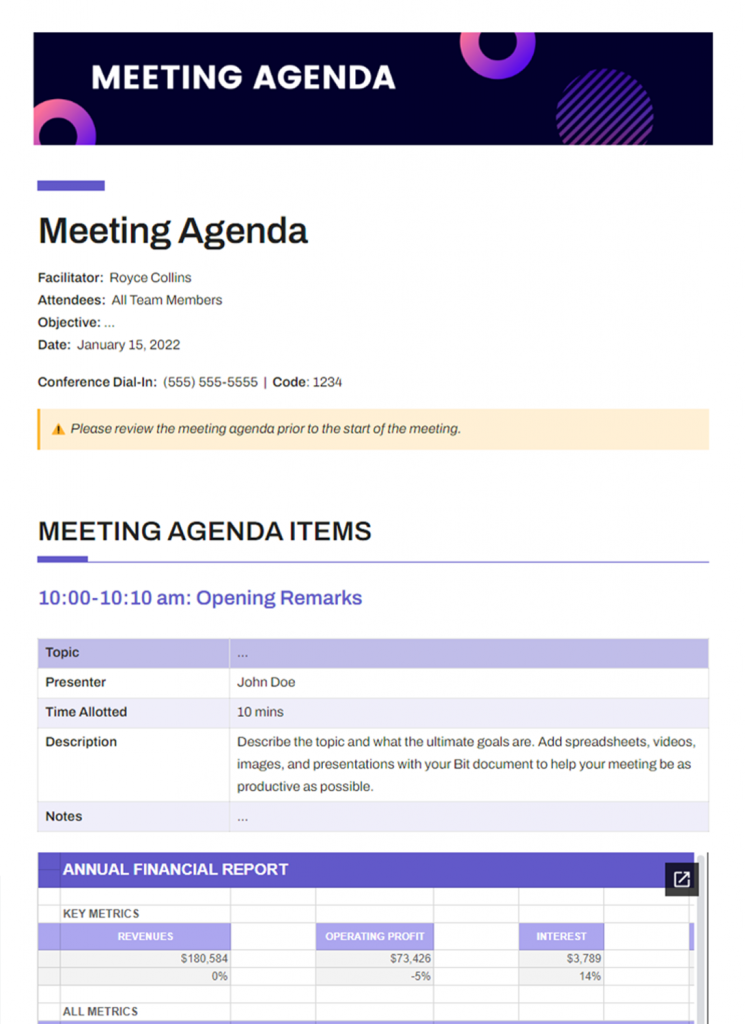
Teams can use “Bit.ai Meeting Agenda Template” to organize discussion topics, meeting timelines, action items, speaker notes, and follow-up tasks in one shared document.
FREE TEMPLATE
The Meeting Agenda Template Teams Actually Use
Includes objectives, discussion topics, time allocations, action items, and follow-ups.
✔ Ready-to-use meeting structure
✔ Keep discussions focused and productive
✔ Managers, Team Leads & Remote Teams
Takes under 1 minute • Trusted by teams at startups & enterprises
2. Use AI to Summarize Key Discussions
One of the biggest challenges in remote meetings is information overload. AI meeting assistants can automatically generate summaries, highlight important decisions, and capture action items during the session.
AI meeting assistants reduces manual note-taking and help employees focus more on the conversation instead of constantly writing things down.
3. Recognize Achievements and Celebrate Wins
Dedicate some time during the meeting to draw attention to achievements of the team or individuals. These might be reaching of project goals, high performance, or other positive impacts made by the person or the team. Complimenting others not only supports their good behavior but also strengthens the feeling of togetherness in the team.
4. Record and Share Smart Meeting Recaps
Remote employees may work across different time zones or schedules. So, recording meetings and sharing AI-generated summaries allows everyone to stay updated without watching the entire session again.
Quick recaps, searchable transcripts, and automated highlights make information easier to access later. So, yes that’s also a good take to make your all-hands meetings more productive.
Create Clarity After Every Meeting:
How To Write an Effective Meeting Recap with a Summary? (Steps) →
5. End With Actionable Takeaways
Every productive all-hands meeting should end with clear next steps. Employees should leave knowing what decisions were made, what tasks need attention, and what goals the company is focusing on next.
You can use AI-powered task management tools that automatically turn meeting discussions into reminders, assignments, and follow-up workflows, helping teams move faster after the meeting ends.
Now, in the next section, we’ll introduce you to some of the best AI-powered tools that you can use to support and scale your all-hands meetings effectively.
Best AI-Powered Tools for Remote All-Hands Meetings
Using the right tool can make or break your virtual all-hands meetings. From collaboration to documentation, these tools keep your team on track, aligned, and productive. Let us discuss some of the top tools.
1. Bit.ai – AI-Powered Knowledge Management & Team Collaboration
By the time your all-hands meeting ends, one question always remains: Where does everything that you have noted or documented go next?
Updates were shared in the meetings, decisions were made, and ideas were discussed. But without a central place to capture and organize all of this information, it quickly gets lost across chats, emails, and random folders.

This is where a smart AI-Powered documentation system becomes essential.
Bit.ai is an AI-powered docs, wikis, and knowledge management platformbuilt for teams to create, organize, collaborate, and manage knowledge in one unified workspace.
Instead of using many different tools or having long email conversations, you can put down meeting notes, decisions, and action items into one shared document. This way your whole team will always have access to important info and your all-hands meetings will not simply be one-time discussions but will live on as organized, interactive document.
Here are amazing AI -powered features of Bit.ai that you are going to love while documenting your meeting notes:
- AI-powered document creation: Instantly create meeting agendas, summaries, MOMs, reports, brainstorming docs, and follow-up notes with Bit.ai’s built-in AI writing assistant, AI Genius Writer. Simply answer a few prompts, and Bit.ai automatically builds complete documents for you.
- Rich media embeds: Embed videos, presentations, spreadsheets, dashboards, PDFs, recordings, and more directly inside your meeting notes for better context and collaboration.
- Real-time collaboration: Team members can edit, comment, and update meeting notes together in real time, ensuring everyone stays aligned during and after meetings.
- Centralized AI-powered workspace: Keep all meeting notes, discussions, documents, and resources organized in one collaborative workspace, making information easy to find anytime.
- Smart meeting templates: Use professionally designed templates for meeting agendas, meeting notes, meeting minutes templates to save time and maintain consistency.
- Multiple Sharing Methods: Teams can share meeting notes instantly using live trackable links, password-protected documents, guest access, and customizable permission controls. Collaborate seamlessly with internal teams, clients, and external stakeholders in real time, and you can even embed interactive Bit.ai docs directly into websites or portals using smart embeds.
Pricing:
Bit.ai offers a Free plan perfect for individuals and small teams. Paid plans start at $8/member/month.
2. Zoom – Reliable Video Conferencing
Zoom is an elite video conferencing tool designed to enable seamless virtual meetings. It features breakout rooms, live polls, Q&A, and recording capabilities, which enable all-hands meetings to be engaging and productive.
Regardless of the geographical or temporal spread of your team, Zoom allows any participant to connect and remain engaged in a meeting. With easy controls and seamless integration with collaboration tools, Zoom helps to keep meetings organized, efficient, and democratic—allowing teams to converge on updates, goals, and feedback in real time.
Key Features:
- High-definition video and audio meetings
- Breakout sessions for group discussions
- Polling and Q&A capabilities for engagement
- Meeting recording and cloud storage
Pricing:
Zoom offers a Free plan with a 40-minute meeting time limit. Paid plans starts at $14.99 monthly per user.
Build a More Engaged Workforce:
50 Team Building Activities for Work (Free, Virtual, Indoor & Outdoor Ideas) →
3. Miro – Visual Collaboration Whiteboard
Miro is an interactive whiteboard that is web-based, which makes all-hands meetings co-working and visually engaging. All-hands meetings are conducted in real-time by teams with participants anywhere globally. Pre-built templates, sticky notes, polls, and voting features help everyone contribute ideas effectively. Concepts and feedback are visualized during meetings with Miro to make sessions interactive, productive, and enjoyable and help leadership capture insights and track engagement more efficiently.
Key Features:
- Brainstorming interactive whiteboards
- Reusable meeting and workshop templates
- Sticky notes, polls, and votes for engagement
- Slack, Zoom, and Asana integration
Pricing:
Miro has a Free plan with 3 editable boards. Paid plans start at $10 per member/month.
Simplify Meeting Documentation and Team Collaboration
Create meeting agendas, capture notes, generate AI summaries, and manage action items in one smart workspace designed for modern teams.
Free to start • Set up in minutes
4. Fireflies.ai
Fireflies.ai is an AI-powered meeting assistant that helps remote teams automatically record, transcribe, summarize, and organize meetings. It integrates with popular platforms like Zoom, Google Meet, Microsoft Teams, and Slack, making it easier for teams to capture discussions, track action items, and improve collaboration during remote all-hands meetings.
Key Features:
- AI-powered meeting transcription and recording
- Automatic meeting summaries and action items
- Smart search across meeting conversations
- Integrations with Zoom, Google Meet, Slack, Teams, Salesforce, and more
- Collaboration tools for comments, reactions, and highlights
- Shareable meeting notes and searchable knowledge base
Pricing: Free plan available; paid plans start at around $10/user/month.
Now, in the end, let’s see some of the more tips to make your remote all-hands meetings more productive.
Tips for Making Your Remote All-Hands Meetings More Productive
Do you want to ensure that your all-hands meetings are engaging, efficient, and not a waste of anyone’s time? Here are some suggestions:
- Outline a clear agenda: Clearly outline updates, discussion topics, and anticipated outcomes upfront so that the meeting is well-structured and purposeful.
- Make it time-bound: Spare the time of the participants, especially over locations, by setting a specific start and end time.
- Use interactive elements: Incorporate polls, Q&A, or break-out discussions to ensure active participation.
- Use visuals: Slides, charts, or live demonstrations make complex concepts understandable and ensure high concentration.
- Celebrate wins: Acknowledge team successes and milestones to heighten employee engagement and motivation.
- Document and keep track of follow-ups: Utilize tools like Bit.ai to document meeting notes, follow up on tasks, and have results easily accessible.

Pro Tip
Ensure leadership actively respond to questions and comments during the meeting. It fosters transparency and drives trust within your team.
👉 Now, you are good to go to run remote all-hands meetings that are effective, productive, and engaging. So, let’s finish with a wrapping up section.
Wrapping Up: Optimizing Your Remote All-Hands Meetings
Conducting a productive all-hands meeting doesn’t necessarily have to be daunting. Through the use of clear agendas, interactive features, and proper follow-up, each session can be productive, enjoyable, and worthwhile for your employees.
Using tools like Bit.ai simplifies centralizing meeting notes, tracking tasks, and creating transparency, so post-meeting work becomes effortless.
Keep in mind that the focus is not only on broadcasting information, but on improving employee engagement, collaboration, and trust across your organization.
👉 On that note, let’s answer some common questions regarding remote all-hands meetings to help you implement them in an even better way.
FAQs
Q1. How do you increase the productivity of virtual meetings?
To increase the productivity of virtual meetings, make a plan before scheduling, keep meetings short and focused, encourage people to participate by using polls/Q&A, and use collaboration tools for tracking progress on projects, recording notes during meetings and providing follow-up documentation that is easily accessible to all participants.
Q2. What is the best way to have a virtual all-hands meeting?
Start with a formal agenda, include department news, recognize and celebrate successes. Provide time for feedback and have employees actively engaged by conducting breakout discussions, instant polling, and having interactive Q&A sessions for engagement across all global offices.
Q3. What are the tools that can enhance productivity in remote all-hands meetings?
Incorporating tools like Bit.ai for documentation and task management; Zoom for video calls; and Miro for visual planning can all help make all-hands meetings more engaging, accountable, and accessible across time zones.
Q4. Why is an all-hands meeting necessary?
The all-hands meeting fulfils the purpose of putting the whole company on the same page of goals, making announcements, improving employee engagement, encouraging open communication, and establishing transparency and trust among groups, onsite or offsite.