Have you ever found yourself sitting in front of your inbox, cloud drive, chat conversations, and project management apps, only to realize your information is spread all over?
Information management is now less of a storage function for information. Information management involves making information accessible, understandable, and actionable. A lack of a system in a team results in lost knowledge, lost context, and a negative impact on productivity.
A good information management system can take everyday information and make it a collective asset in a team, which is a catalyst for clarity, collaboration, and confident decisions. If you’re tired of your team struggling to find files and relying on reconstructing knowledge that already exists in your organization, you’re in luck because this is where you need to be.
Now, let’s walk through an explanation of how to better manage information for your team or business by first dealing with the problem that’s increasingly developing in today’s work environments.
What is Information Management?
Information management is the process of collecting, organizing, storing, maintaining, and sharing information so teams can easily access and use it when needed.
Why Information Management Matters for Modern Teams
Nowadays, teams have to deal with a never-ending dosing of tools in order to accomplish their work. Emails for communications, chat apps for updates, cloud drives for storage, project management apps for executions, and important documents scattered all over these apps. Every tool is meant to address a small problem, but it leads to a larger problem in totality. The information and context get scattered, and no one really knows where the latest copy resides.
Recent workplace studies from organizations like Microsoft and Gallup show that employees spend increasing amounts of time searching for information across disconnected tools and systems.
As teams grow in size and work increasingly gets distributed, the volume of information accelerates. More meetings translate to more notes being taken, more projects translate to more files being produced and also, more collaborations mean more people editing and sharing their knowledge. An increasing volume of information, if not organized, is hard to manage, not to mention utilize.
According to IDC, employees spend nearly 30% of their workday searching for information they need to do their jobs.
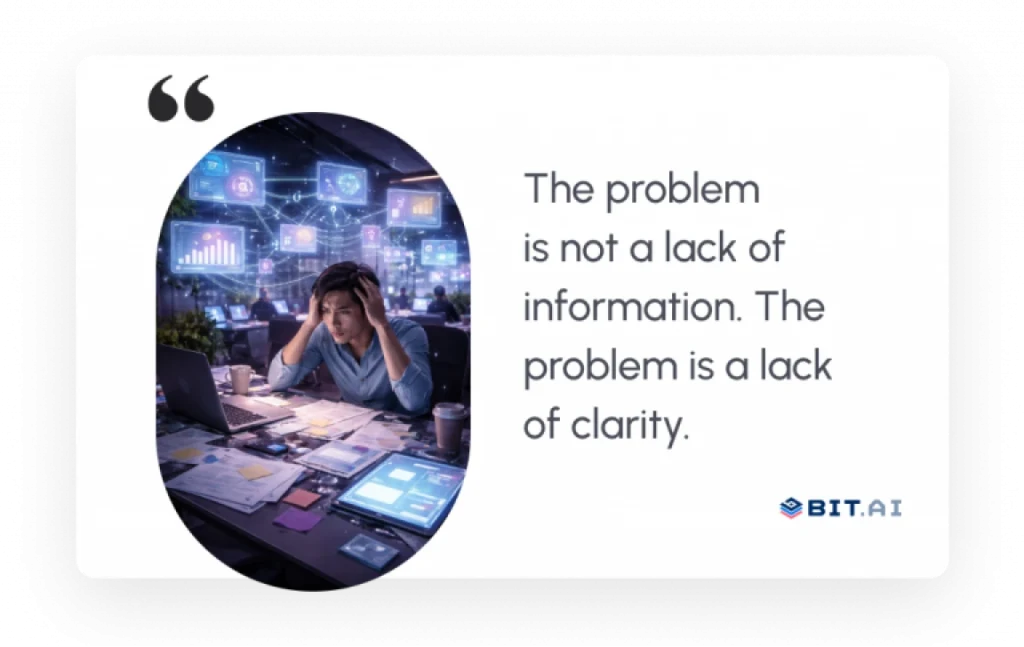
When a team lacks access to information, decisions become slower, errors become more common, and teamwork can lose faith in a common knowledge base.
And when this clarity fades, the cracks become evident in all kinds of ways, leading us into the realities of life when dealing with fragmented information across teams.

Know the Differences:
Common Information Management Challenges Teams Face
Have you ever had five different tools open, knowing a file existed, but unable to locate it?
Research from McKinsey found that employees spend almost 20% of their workweek searching for internal information or locating colleagues who can help with specific tasks.
But this is not an uncommon moment. This is everyday life in a modern team.

1. Information is present everywhere and nowhere simultaneously.
A proposal begins with an email, progresses with an edit in a document, a chat about a chat, and approval in a meeting. Weeks later, no one can recall where this information actually resides. The information is present, but it sometimes feels lost.
2. Getting information is like a detective’s task.
You search, scroll, click, and second-guess. Is it from last week or last month? Is it in a message or a folder? When searching for answers takes longer than taking action, momentum shifts away.
3. The team’s knowledge gets stuck in silos.
Every team creates a mini-library of information. Marketing has information that sales never gets to see. The product decisions exist in a private doc. With time, information ceases to flow, and teamwork begins to fall apart.
Know the Differences:
4. Versions multiply, and trust fades.
Copies are uncertain, small modifications, and a lack of context make a team unsure of when to share information because they don’t know which copy holds complete information. A lack of confidence lurks in the background.
5. Time gets away unnoticed.
A few minutes in this place. A search in another. At the end of the week, hours disappear. Not because work is hard, but because information is hard to reach.
Pro Tip: Final documents matter, but the reasoning behind decisions is often more valuable. Capturing context inside your documentation helps future team members understand the why, not just the what.
Types of Information Management Systems
Different organizations use different information management systems depending on how they store, organize, and share information. Here are the most common types:
1. Document Management Systems (DMS)
Document management systems help teams store, organize, and retrieve files from a central location. They also improve version control and reduce document duplication.
2. Knowledge Management Systems (KMS)
Knowledge management systems capture and organize company knowledge, including processes, best practices, guides, and documentation, making it easier for teams to share expertise.
3. Content Management Systems (CMS)
Content management systems help businesses create, manage, and publish digital content such as websites, blogs, and online resources.
4. Enterprise Information Management (EIM) Systems
Enterprise information management systems bring together documents, data, records, and workflows across departments, helping organizations improve accessibility and governance.
5. Collaborative Workspaces
Collaborative workspaces combine documents, knowledge sharing, communication, and real-time collaboration in one place, helping teams stay aligned and work more efficiently.
Pro Tip: Modern teams often prefer collaborative workspaces because they combine document management, knowledge management, and collaboration capabilities within a single platform.
Benefits of Effective Information Management
Ever thought about why some teams can move quickly while other teams are always stuck?
The difference can be all about information flow. When information management is done well, everything feels easier and gets done faster.
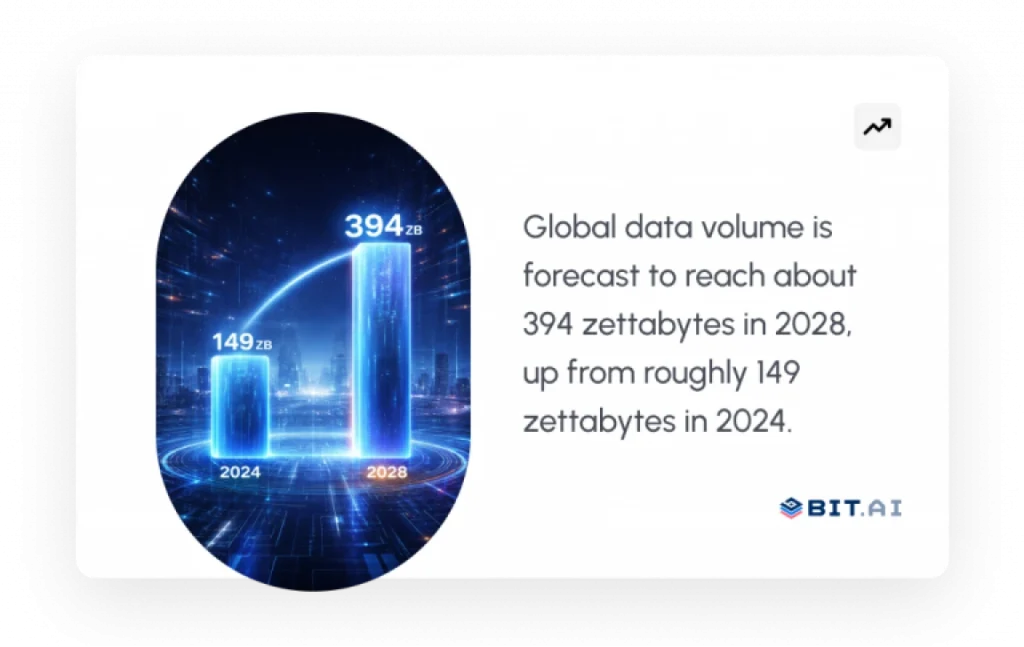
Global data creation is expected to exceed 394 zettabytes by 2028, making information organization more important than ever.
Here are a bunch of reasons why information management is non-negotiable in a team.
1. Better decision-making with quick and accurate information.
Being able to easily access the right information removes the burden from decisions. Teams don’t have to put their meetings on hold to search for documents or check information. They have everything they need right in front of them.
Such clarity eliminates hesitation. Rather than considering different versions or asking additional follow-up, such teams make decisions with conviction. Decision-making quickly leads to immediate implementations because of this speed.
2. Increased teamwork and role integration.
Great teamwork requires common understanding. When information is fragmented, teams work in parallel without coordination, sometimes duplicating work to solve the same problem.
Information management brings all team members onto the same page. Information in a team gets updated with Team Knowledge, and a team remains updated with Team Discourse.
3. Fewer errors and more consistent results.
Errors rarely occur because people lack skill. They occur because people work with outdated information.
With accurate and current information, costly mistakes can be avoided. Having good information documented in an accessible way leads to predictable results and prevents costly rework.
4. Knowledge that grows rather than diminishes.
A lack of systems leads to knowledge degradation over time. Crucial information is lost when people move jobs or leave a team.
With good information management, knowledge grows. Every project is an asset, every update builds context, and collective team knowledge is an asset over the long haul rather than a brittle resource.
5. A foundation that scales with your business.
Growth leads to more people, more projects, and more information. Chaos ensues if everything remains unstructured.
A good information management system will scale with your team. A good information management system will manage all complexity and keep everything simple and straightforward in your business.
As soon as you are able to understand why information management is such a critical passion, a natural follow-up question emerges. How do you integrate all of this into one spot without increasing your tech stack?
Bit.ai: The Best Information Management Software for Teams
Most teams don’t lack tools. They struggle with scattered information. One document lives in a folder, conversations happen in chat apps, and important knowledge slowly gets lost over time. That’s where the smartest document collaboration tool, Bit.ai, comes in.

Bit.ai helps bring this information together in one connected workspace, so content stays organized, searchable, and easy to collaborate on as teams grow.
AI-powered docs, wikis, and a knowledge management platform built for modern teams, Bit.ai gives your team a centralized collaborative workspace to organize, search, share, and collaborate on information in real time. Instead of jumping between emails, folders, and multiple tools, everything lives in one connected environment where context stays intact.
Whether it is business documents and SOPs or project notes and collective team knowledge, information remains organized, up-to-date, and readily accessible as your organization expands.
Key Features:
Smart documents and wikis
Bit.ai enables teams to create engaging documents and wikis with support for rich media content, embeds, and organized content. Such information is more relevant and understandable, and thus much more helpful compared to information in folders in static files.
Real-time collaboration & version control
Collaborate with your team on documents simultaneously, make comments, and follow changes without worrying about overwriting information. Anyone can access updated versions at all times, thus no confusion arises.
AI Genius writing assistant for quick content generation and organization
AI Genius assists teams in generating, editing, and summarizing information faster. It can help document information, refine knowledge bases, and organize disorganized notes with ease.
Effective search on team knowledge
With an increasing amount of information available, it can be very hard to find relevant content. Bit.ai’s advanced search functionality makes it easy for teams to find documents, pointers to documents, and collective knowledge in an instant.
Multiple sharing methods and access controls
Bit.ai offers adaptable access controls. This means teams can control access to viewing, commenting, or editing information. You can choose to share information internally, via guest access, or a shareable link, trackable link, password protection, set expiration dates, etc.
Pricing
- ai offers a Free plan for personal and small-team use.
- The Pro Plan starts at $8 per user per month and includes enhanced collaboration, AI capabilities, and integration features.
With Bit.ai, information management ceases to be an end-of-day ordeal and becomes a competitive advantage.
Let’s dive in and learn how Bit.ai enhances information management for teams within operational environments.
Templates That Help Teams Manage Information Better
Information Sheet/ Fact Sheet Template – for summarizing key details
Process Documentation Template – to record step-by-step workflow
How Bit.ai Improves Information Management
Have you ever stopped to think about what exactly happens when all your information is in one place?
Bit.ai’s impact, though, appears in day-to-day work. Not in broad claims but in small ways where things simply work better. Here is how Bit.ai ends up making a difference in information management in small steps.
1. Information organization using smart documents and workspaces
Rather than just dropping files into folders, Bit.ai assists teams in organizing information using structured documents and workspaces. A workspace can represent a team, project, or function, making it easy to keep related information together.
With this structure, information is clear from the outset. Team members have a clear idea of where they need to create, collaborate, update information, and search for information.
2. Consolidating team knowledge in a single source of truth
Scattered information erodes trust. Bit.ai removes this problem by providing a single source of truth where all team knowledge can be found.
This leads to fewer document duplicates, fewer question repeats, and a stronger connection among teams. Knowledge remains accessible and up to date.
3. Providing easy access to information through smart search
Browsing through folders and conversations can be a tiresome task. Bit.ai’s search function alleviates this problem altogether and gives you exactly what you need when you need it.
Whether it be a document, an article, or a piece of collective knowledge, teams search less and do more.
4. Working in real time without losing context
Collaboration can sometimes destroy context when comments and feedback are in other systems. Bit.ai comments, edits, and conversations are all in documents.
As a result, conversations will remain relevant to content, misunderstandings will be avoided, and all decisions will be informed by accurate information.
5. Updating and securing information with growing teams
With increasing team sizes, access and update management becomes an essential task. Bit.ai assists you in managing permissions, sharing content safely, and helpy you to update information.
This ensures that the right people have access at the right time without negatively impacting either clarity or security.
Having achieved such a degree of clarity and control in teams, the next step is self-evident. How does an organization make information management a habitual practice?
Read more:
Information Management Best Practices
Have you ever observed how even the most excellent tools don’t work when there is no systematic approach to them?
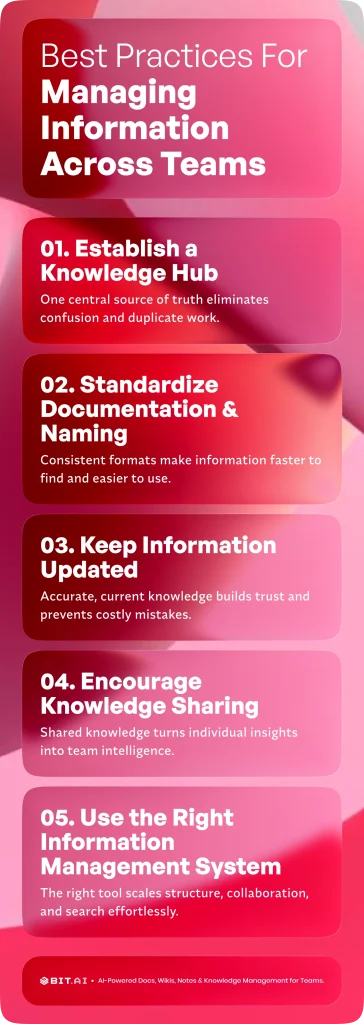
Technology by itself will not resolve information chaos. To effectively improve information management, teams require efficient habits and practices to maintain the usability of important information beyond creation time. Here are some information management best practices to keep information organized, accessible, and useful.
1. Establish a knowledge hub
With information in one place, confusion begins to melt away. A common knowledge location provides a place for teams to put, update, and access information without wondering where things are.
This prevents replication and ensures all team members share information based on a common source of truth, particularly when team knowledge escalates.
2. Documentation and naming standardization
Variations in a standard format make it more difficult to locate information. A standard presentation with headings will make information accessible immediately.
When everyone adheres to a standard convention, search will be faster, and information will be easier to browse.
3. Update information and make it relevant
Outdated information is sometimes more problematic than information not available. Teams need to update important information to make sure it remains accurate.
The above instils confidence in communal knowledge and protects against errors based on former context.
4. Encourage team-wide knowledge sharing
Knowledge sharing in the workplace enhances information management. Sharing information encourages teamwork in documenting decisions and knowledge gained rather than being secretive.
Such a culture leads to individual knowledge being shared with all team members.
5. Adopt the proper information management system
Manual systems don’t scale with team growth. A good information management system will not introduce complexity when it comes to structure, collaboration, and searching.
Information Management Statistics
- Employees spend nearly 20% of their workweek searching for internal information or colleagues who can help with specific tasks.
- Workers spend approximately 30% of their time searching for information needed to perform their jobs.
- Global data creation is projected to exceed 394 zettabytes by 2028, highlighting the growing need for effective information management.
- Organizations with strong knowledge-sharing practices make faster decisions and experience higher productivity.
- Poor information management often leads to duplicated work, communication gaps, and lost organizational knowledge.
Conclusion: Turning Information Into a Business Asset
Do you know what your team might accomplish if information were working with you instead of against you?
Well-managed information can transform from noise into leverage. Teams move faster, decisions feel clearer, and collaboration becomes effortless. Instead of wasting time searching, clarifying, or recreating work, your team can focus on what actually drives progress.
A good information management system is not measured by how much information it can store, but by how much clarity it provides and how well it scales with your business. With a good information management system in place and a tool such as Bit.ai, information can be systematic, retrievable, and ready to inform all decisions.
With information turned into an asset, work suddenly feels easier, alignment feels effortless, and growth feels feasible. And this is when teams stop managing information and instead leverage it to move ahead with their eyes wide open.
FAQs About Information Management
1. How can information management be improved?
Information management can benefit from team members sharing their documents and knowledge in a centralized manner rather than being scattered through emails and other tools. Organizing information effectively and ensuring team members document their work consistently will go a long way toward building confidence in the information they retrieve and taking immediate action.
2. What are the main information management challenges?
Some of the most common challenges include scattered information, where documents, talks, and updates can be found in different places. Such information can lead to knowledge silos, confusion with versions, outdated documents, and wasted time searching for information.
3. In what way does Bit.ai assist in searching for information?
Bit.ai integrates all documents, wikis, and team knowledge into a single connected workspace with support for smart search functionality. With this, teams can easily access specific information without searching through folders because all information is organized in a structured and contextual manner.
4. What is the significance of information management in teams?
A good information management system can keep your team in sync, make decisions quicker, and work with confidence towards a common goal. When all team members access information from a common place, you will see reduced errors, increased productivity, and your team’s knowledge will become an asset rather than a liability.
5. What are the 5 stages of information management?
Collection, organization, storage, maintenance, and sharing.
6. What is an information management system?
An information management system is a structured platform that helps organizations store, organize, manage, and retrieve information efficiently.
7. What is the difference between information management and knowledge management?
Information management focuses on organizing data and content, while knowledge management focuses on capturing and sharing expertise, experiences, and organizational knowledge.
If this was useful, read this…
Knowledge Sharing Platform vs Knowledge Base: The Key Differences! →
Top Real-Time Document Collaboration Tools for Team Productivity →