Still taking notes by hand?
Think about this: you’re brainstorming, ideas are coming fast, and you’re writing like crazy to keep up. When you are done, most of your notes are messy, unfinished, or even lost. Does that sound familiar? ?
Now, let’s flip that around: you hit record, allow AI to capture everything, and in an instant get clean, organized, and searchable notes ready to share with your team. That is exactly what an AI Notes Generator is capable of doing. It takes the chaos out of note-taking and makes the whole process effortless and productive
AI tools that can sum up meetings, point out main ideas, and even find new stuff in talks are all over the place now. It doesn’t matter if you’re a student, boss, or artist; these cool tools are like a second brain.
Ever wanted your notes to write themselves? Well, now you can see how it’s done.
Let’s talk about AI Notes Generators and why they’re changing how people work all over.
What is an AI Notes Generator and Why Does it Matter?
Have you ever wanted to sit through a meeting, a lecture, or a brainstorming session and not worry about missing even a single detail? What if your notes could magically appear – organized, summarized, and shareable – before you even hit “Save”? ✨
That is just what an AI Notes Generator does. This AI-powered tool is pretty cool. It listens, learns, and helps you write. Instead of typing everything yourself, it records chats, finds the important stuff, and makes notes or summaries super fast.
Whether it’s remote work calls in New York or classroom lectures in Tokyo, the silent revolution of AI note-taking is reshaping how people capture and distribute ideas. They let you focus on what really matters: listening, understanding, and collaboration, not endless typing.
Since AI is doing the hard work, your notes are not only quicker to make but also more intelligent: searchable, categorized, and synced across your workspace.
Want to see behind the scenes and find out how these tools are actually doing their magic? ?
Let’s explore how AI Notes Generators work behind the scenes and why they’re the silent productivity engine powering modern teams.
How AI Notes Generators Work Behind the Scenes
Ever wondered how your AI Notes Generator seems to “get you”? How does it listen, process, and turn chaos into clarity, all before you’ve even finished your meeting?
Just imagine it as a mighty engine that is continuously running and using machine learning, NLP, and speech-to-text intelligence to comprehend, organize, and polish everything you have taken down. Let’s explore further so you can witness the magic at work.
Step 1: Speech or Text Recognition
It starts right from the moment you start speaking or typing. The AI uses ASR, which is a technique to convert spoken words into clean, editable text, with noise reduction, basic correction support, and even identifying different speakers. Whether you are attending a virtual meeting or recording a classroom lecture, it captures your words accurately and in real time.
Step 2: Context Understanding
Next is the “thinking” phase. Using NLP, AI tries to understand the meaning of your words: it figures out who said what, what is important, and what has to be done. The machine can decide if the sentence is a question, a decision, or an action item.
Just imagine yourself saying, “Let’s finish the campaign by Friday, ” and your AI tool would automatically recognize that as a deadline. This is how context intelligence works.
Step 3: Summarization
Where context is clear, the AI summarizes everything: finds patterns, removes redundancies, and builds a structured summary of your key discussion points. Whether it’s a one-hour client meeting or a five-page brainstorm, the AI document summarizers break down everything in small, bite-sized, digestible notes ready for sharing, storage, or revisiting later.
Step 4: Organization and Tagging
Eventually, your notes receive labels and categories without any manual intervention. The AI determines the content of your notes, for instance, Marketing, Budget, or Design Review, and organizes them in the appropriate folders or adds tags. Some apps even sync those notes with project tools, so you can connect every convo to something you need to do.
AI-powered Notes Generators don’t just take notes; they think with you to help capture insights, not just information.
Types of AI Notes Generators
If you have ever searched for “AI Notes Generators,” you might have noticed something interesting: not every tool does the same thing. They may all fall under the same category, but they serve very different purposes. So before you choose one, it helps to understand the kinds of AI note tools that exist and what each of them is truly built for.
We can dissect them so that you get to choose the one that suits your working style best.
1. Voice to Notes AI
This is the AI that listens.
Think meetings, lectures, brainstorming sessions, podcasts, interviews, or any moment where ideas are spoken faster than they can be written.
You simply speak or record the session, and the AI takes care of the rest. It converts your speech into accurate text, removes filler words, separates different speakers, and turns everyday conversations into clear, usable written notes.
This makes the tool especially useful for remote teams, students, interviewers, and founders or managers who move quickly between meetings and calls.
Instead of scribbling frantically, you stay present in the conversation while AI handles the capture.
2. Video to Notes AI
This is the AI built for the video world.
Webinars, recorded meetings, online classes, YouTube tutorials, product demos. Instead of rewatching hours of footage, AI pulls the essence out for you.
These tools can write notes directly from video content, extract important highlights, create time-stamped insights, and summarize the key takeaways so you do not have to rewatch long recordings again and again.
It is the ultimate companion for learners, marketers, trainers, creators, and busy professionals who cannot afford to hit rewind again and again.
3. Transcript and Notes Refinement AI
This is where the magic of clarity truly happens.
Sometimes you already have notes. They might be rough, messy, unstructured, or simply too long to be useful. Or maybe you already have a transcript from Zoom, Meet, Teams, or a recording tool, but it is raw text without meaning.
These AI systems take unorganized conversations and turn them into clear, structured content. They clean up transcripts, organize fragmented thoughts, summarize lengthy discussions, and surface the most important decisions and action items in a format that is easy to read and understand.
Instead of just “capturing” information, these tools help you think better with your notes.
And this is where the real game-changer emerges.
Voice and video tools help capture information.
But transcript and refinement tools help you use it, understand it, and turn it into something valuable for your team.
This third category is exactly where Bit.ai shines, because it does not just store information. It helps you transform it into organized, intelligent, living knowledge that grows with your work.
Next, let’s see how these tools show up in your daily workflow and how they make real work easier.
How AI Notes Generators Can Help You Daily
Now that you have seen the different kinds of AI Notes Generators, the real question becomes simple: how do they actually fit into your everyday work or study life?
Whether you are capturing conversations, reviewing videos, or refining transcripts into something meaningful, AI note tools quietly become the invisible engine powering your productivity.
Ideas move at a rapid pace. The work environment continues to change even faster. But these are the tools that assist you in remaining calm, organized, and having complete control over the situation. Here is what that looks like in real life.
1. Brainstorming Sessions
The most brilliant ideas of yours are likely to come up at the most unexpected times: a team meeting, a workshop session, or a chat during the night. AI Note tools can automatically record, organize, and recap your brainstorming meetings so you don’t lose any good ideas in the creative rush.
Just imagine that you have conducted a 20-minute brainstorming session and then, suddenly, you have a perfect summary of ideas, suggestions, and tasks that are ready to be sent to your colleagues.
2. Meeting Notes and Follow-ups
No more messy notes or forgotten tasks. During video or in-person meetings, AI Notes Generators capture key points, highlight action items and responsibilities in real time. It’s like having an AI personal assistant who never misses a thing.
These summaries can instantly be synchronized with tools such as Slack, Trello, or Google Drive to keep all the team members aligned.
3. Study, Research, and Learning
AI note-takers are like smart study partners for students, researchers, or anyone eager to learn.
They grab the main points from lectures, figure out the insights from long articles, and convert messy data into neat notes, thereby making the process of reviewing more efficient than it has ever been.
4. Team Collaboration and Knowledge Sharing
Distributed teams across time zones struggle to stay on the same page. AI Notes Generators solve this by creating shared, searchable records of meetings and discussions. There won’t be any more “Who said that? ” or “Where’s the doc? ” type of situations; every team member can get the context and the clarification right away.
Whether you’re brainstorming, learning, or collaborating, AI Notes Generators will turn your daily information flow into a library of ready-to-use knowledge. And if you are looking for the most powerful way to refine, organize, and elevate your notes into meaningful knowledge, this is exactly where Bit.ai fits in.
Next: Let’s take a look at a real example in the form of a tool that’s changing how teams create and share notes together.
Bit.ai: Your Smart Partner for Efficient Note Taking
By now, it is clear that voice and video tools help you capture information. But real productivity happens when that raw information turns into something meaningful, organized, and ready for action. That is where Bit.ai steps in.
In a working world where information is everywhere, and deadlines never slow down, Bit.ai acts as the intelligent system that does more than just “take notes.” It helps you refine them, structure them, and transform them into knowledge that your entire team can actually use.
Bit.ai is an AI-powered docs, wikis, and knowledge management platform built for teams that do not just want to store information, they want to think better with it.
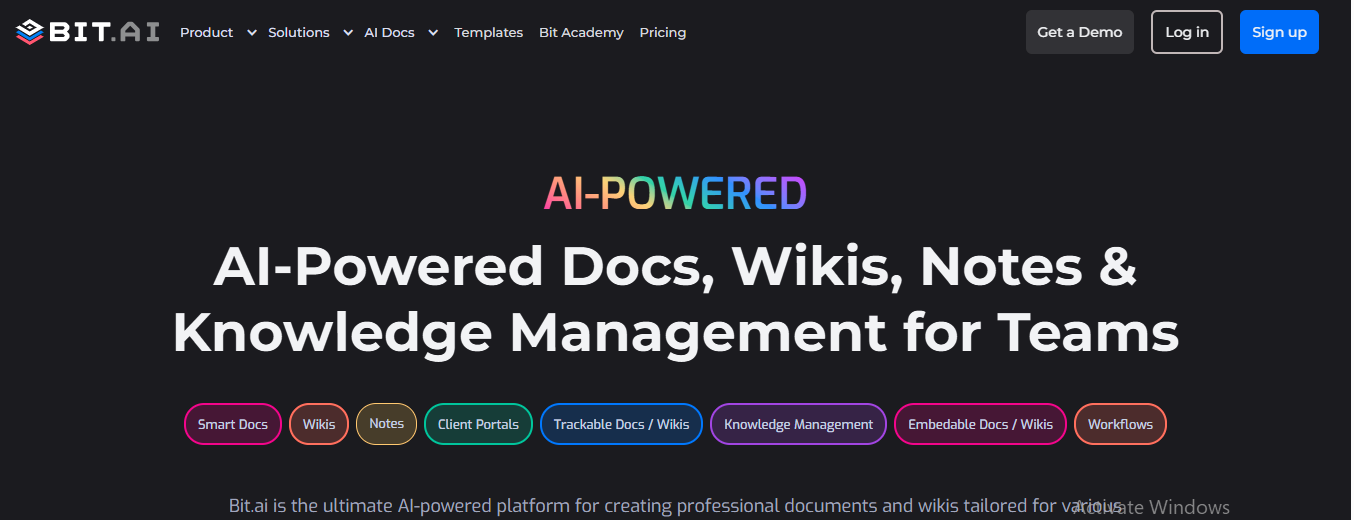
From brainstorming and documentation to collaboration and knowledge sharing, Bit.ai becomes the place where your ideas grow, evolve, and stay accessible.
Powered by AI, Bit.ai reduces chaos and builds clarity. It recognizes the context, rewords the content in a smart way, beautifies the information arrangement, and enables teams to work in a more efficient way when documenting.
Whether you are a startup planning your next launch or an enterprise managing complex knowledge across departments, Bit connects creativity with structure and turns notes into intelligence.
AI-Driven Features You Can Rely On
AI Notes Generator: Convert meetings, lectures, or brainstorming sessions into clean and structured notes using AI-powered summarization, all in a matter of seconds.
AI Genius Writer: Draft, rewrite, and summarize any content instantly. Whether it’s a project proposal, an internal memo, or product documentation, your AI co-writer keeps the ideas flowing without breaking focus.
Smart Workspaces & Wikis: Turn every team, project, or department into a dynamic knowledge hub. Store documents, wikis, and notes together in one place: organized, searchable, beautiful.
Real-Time Collaboration: Work together live. Add comments, tag teammates, and share instant feedback without version chaos or endless email threads.
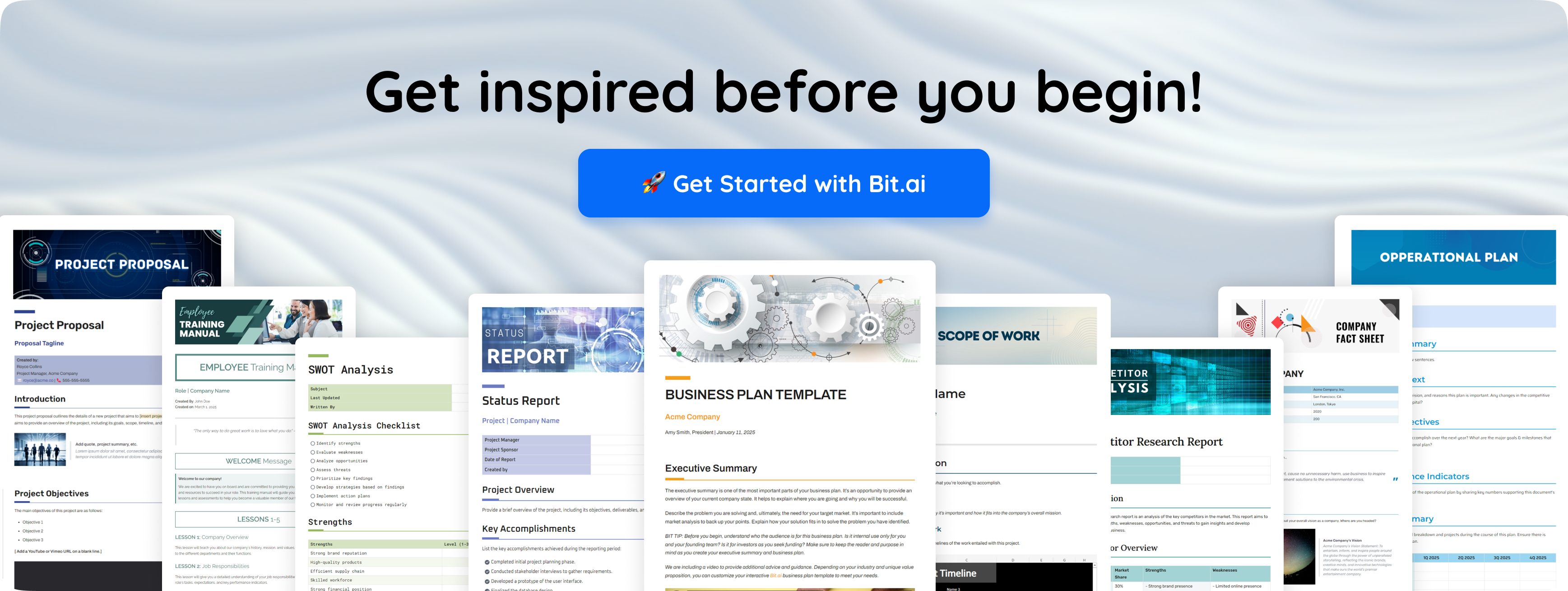
Rich Media & Integrations: Embed YouTube videos, charts and spreadsheets, Figma designs, and more than 100 other tools right into your documents, because your work is more than just words.
Advanced Sharing & Insights: Share with live links; track engagement; permissions control. See who viewed your content, and for how long.
? Pricing at a Glance
Free Plan: Up to 5 members and 50 documents, perfect for small teams just getting started.
Pro Plan: $12 per user/month, billed monthly-for advanced AI features and customization.
Business Plan: $20 user/month, billed monthly, perfect for larger teams that need even more control, security, and scalability.
When you bring Bit.ai into your workflow, you don’t just take notes-you create intelligence.
Next, let’s take a step-by-step walkthrough of exactly how to use Bit.ai’s AI Notes Generator to transform your words into organized, actionable insights.
How to Use Bit.ai’s AI Notes Generator
You’re about to see how simple and powerful Bit.ai’s AI-driven note-taking experience really is. These steps walk you through everything you can actually do today based on Bit.ai’s confirmed features and workflows.
Step 1: Log in and Open a New Document
Start by logging into your Bit.ai dashboard and creating a new document inside your workspace. This document becomes the central place where your notes, wikis, and project content are organized by team, topic, or client.
Once the document opens, you will see Bit.ai’s clean editor where all your content is created and managed.
Step 2: Access the AI Notes Generator
Inside the document, click on the “Ask AI Genius to write for you“ option or type “@”. This will open the AI Genius writer. Here, you will find the AI Notes Generator, which is designed specifically for fast and structured note creation.
With just one click, you can start generating organized notes from meetings, lectures, or discussions using Bit.ai’s AI assistance.
Step 3: Add Your Content or Describe What You Need
You are allowed to enter text in the document, put in meeting notes, or just outline what type of notes you want to be made. For instance:
For example:
“Create meeting notes from this text…
“Summarize these bullet points…”
Organize these topics into structured notes:
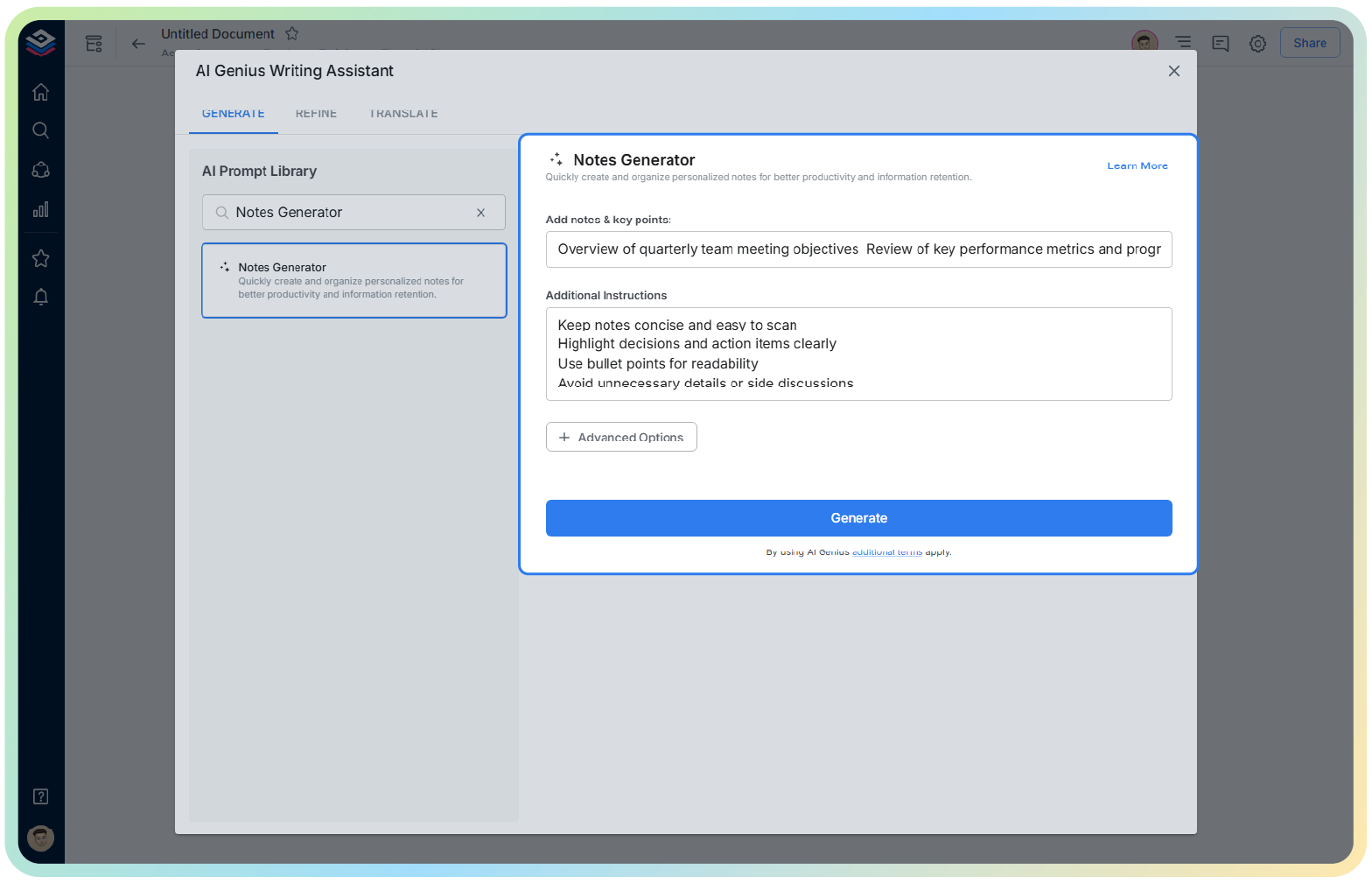
Bit.ai’s AI Notes Generator and AI Genius Writer allow you to provide input, after which an outline, summary, or detailed notes will be generated based on your prompt.
Step 4: Create, Edit, and Refine Your Notes
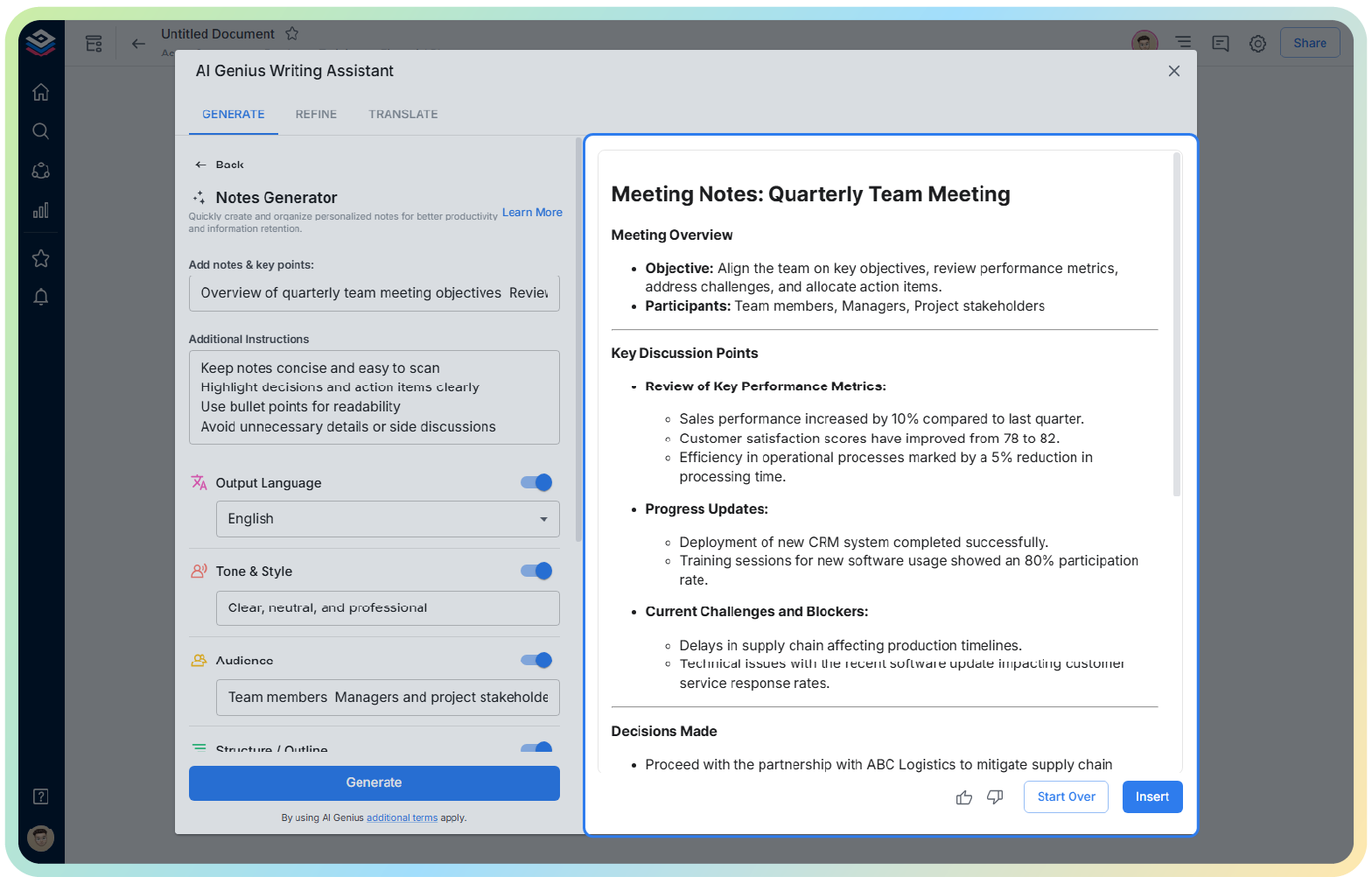
Bit.ai’s AI will produce clean, organized notes with just one click. You can then edit, expand, or refine these using additional prompts.
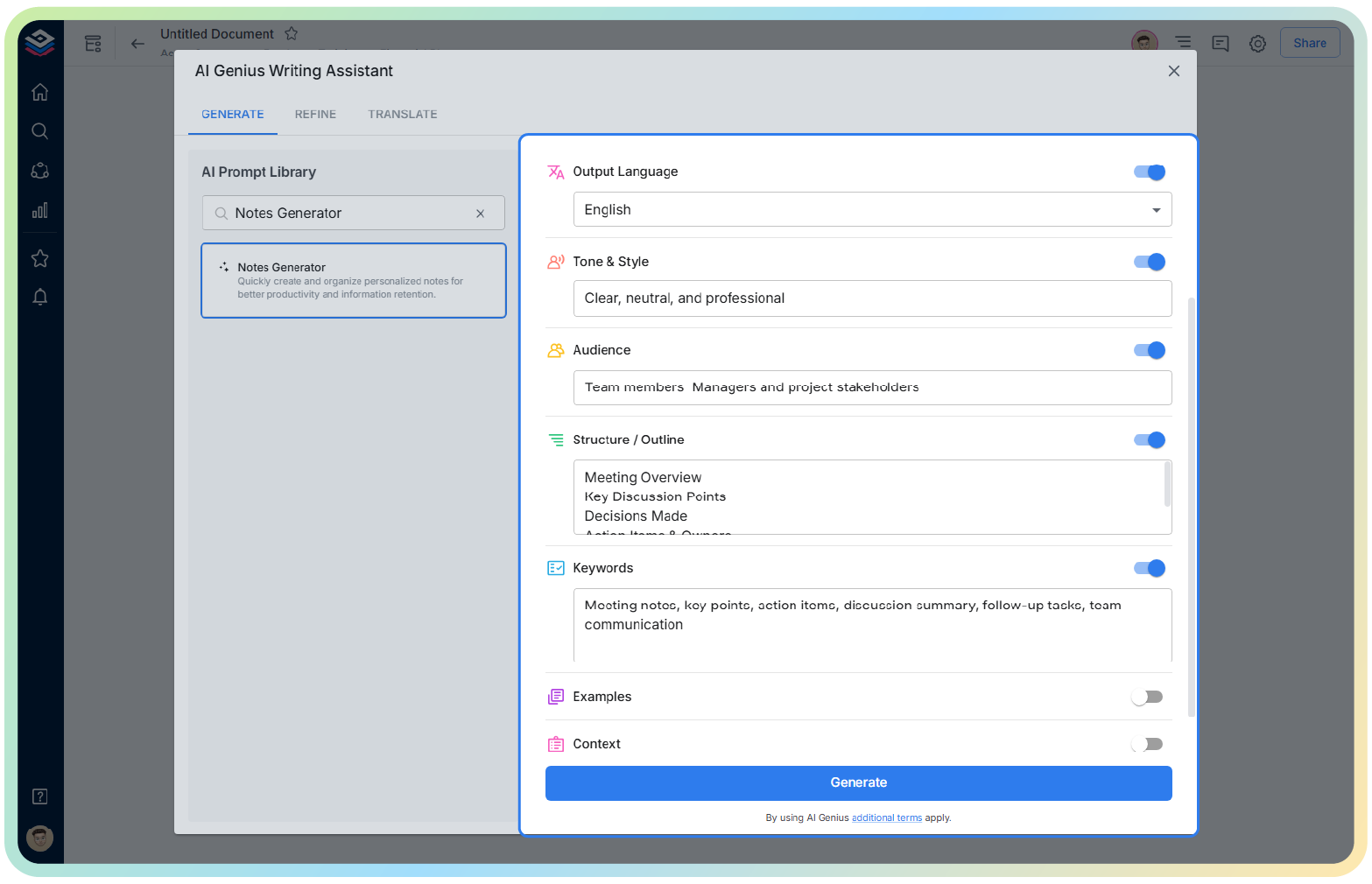
Need more lucid bullets? A shorter summary? An explanation longer?
Just tell the AI, and it will rewrite it at once.
Next, you can make your notes more appealing by adding rich media:
- ? Links
- ? Charts
- ? Videos
- ? Files
- ? Embeds from 100+ integrations
- Your notes become interactive visual documents, not just plain text.
Step 5: Organize, Collaborate, and Share
Prepare your notes and place them in the right Workspace so that your team can easily find them without wasting any time. Make it a habit of getting people to give comments, co-edit, or evaluating the work at the same time and directly within the document.
If sharing is your next step, pick the option that suits you best:
- Live shared link
- Guest access
- PDF export
- Web page embed
You can also manage permissions to include view, comment, or edit, as well as track engagement where supported.
Your scattered thoughts become structured, intelligent notes in just a few steps – ready to share and store, to build upon.
Next, let’s tie everything together and see how AI Note Generators are reshaping productivity and collaboration at a global level.
Wrapping Up: Work Smarter, Not Harder, with AI Notes Generators
At this point, you’ve seen how an AI Notes Generator can completely change the way that you create, organize, and share knowledge; rather than struggling with disorganized notes or searching through endless files, you receive organized, intelligent summaries that help keep your thoughts prepped and primed for action.
Whether leading global teams, studying across continents or managing complex project workflows, AI-powered note-taking lets you stay focused on what matters most: thinking, creating and collaborating. The heavy lifting? The AI will handle that.
Tools like Bit.ai make this shift even more powerful, allowing you a unified workspace for writing, knowledge sharing, and documentation. Your notes don’t just sit in folders; instead, they become living, searchable, connected knowledge that your entire team can build on.
If you’re ready to move beyond traditional note-taking, AI tools are your next significant upgrade, and Bit.ai gives you the smartest place to start.
Next, let’s get the questions people ask most before getting started out of the way.
FAQs
1. How to Use AI to Generate Notes
Using AI to create notes is easy: just give your content via text, meeting highlights, or a brief of what you need, and the AI transforms it into structured notes. Today, natural language processing in tools grabs the main points, finds action items, and organizes the data for you. So, you can write less and be more engaged with the conversation.
2. How does Bit.ai make note-taking smarter?
Bit.ai makes note-taking better with some advanced AI capabilities, like the AI Notes Generator and AI Genius Writer. These tools assist you in shortening long pieces of writing, arranging your thoughts, making changes to what you’ve written, and fixing up notes really fast. Additionally, with Bit.ai, you can embed media, collaborate in real time, and store everything within organized workspaces so your notes remain connected and easy to find.
3. How does Bit.ai help teams collaborate on notes in real time?
Bit.ai enables real-time co-editing, inline comments, mentions and provides sharing options that are secure. To review notes, suggest edits and contribute, invite your team members to your workspace. Updates are visible to all in real-time, thus, you can be sure that your teams are aligned regardless of the different time zones and devices they use.
4. Who can benefit from using an AI Notes Generator?
It helps anyone who wants to swiftly capture and organize information. Students, managers, creators, and consultants alike, as well as researchers and distributed teams from around the world, use AI note-taking tools for saving time by reducing manual work and keeping their knowledge structured. Whether you are in education, tech, business, or creative fields, AI notes help you work faster and smarter