Have you ever been in a situation where you are trying to keep track of a dozen different thoughts at once — remembering passwords, managing assignments, responding to emails, and still trying to think creatively? It feels like you have too many tabs open in your brain’s browser, doesn’t it?
In today’s fast world, we expect our minds to store everything: deadlines, data, meeting notes, and even the random sparks of inspiration that pop up at 2 AM. But the truth is, your brain was never designed to hold it all. It was designed to think, not to store.
That’s where the magic of cognitive offloading comes in. Imagine taking that heavy mental load and moving it into tools, systems, or even sticky notes so your mind can focus on what truly matters: thinking better, creating more, and feeling less stressed.
Cognitive offloading isn’t about working less; it’s about working more smartly. It’s the art of using technology, notes, or digital systems to free up your working memory, helping you focus on meaningful work instead of drowning in mental clutter.
So, ready to learn how offloading your thoughts can help you perform better, stress less, and think more creatively? Let’s begin with what cognitive offloading actually is, and how it fits into your life.
Next up: What is cognitive offloading and why does it matter in today’s digital world?
What Exactly Is Cognitive Offloading? Let’s Unpack It Together
So, let’s take a minute- have you ever written down a list of groceries just so you won’t forget things? Or put that reminder on your phone about the meeting you know you’d miss otherwise? Congrats! You’ve been offloading your brain without even realizing it!
Basically, cognitive offloading just means using tools or systems to keep track of stuff so your brain doesn’t have to. Think of it as outsourcing your memory to things like tech, notes, or even just setting reminders using locations as memory triggers.
It’s not just about convenience; rather, it concerns efficiency. You are giving your brain space to think, create, and analyze rather than getting lost in details.
Think about it this way:
- Writing notes at a meeting.
- Using Google Calendar to plan your week.
- Saving articles or ideas on Bit.ai or Notion.
- Setting reminders for calls or tasks.
All these are simple, everyday forms of cognitive offloading that reduce your mental load and prevent burnout.
Living in a world where information overflows, cognitive offloading isn’t a luxury but rather a necessity. It allows you to function at your best without feeling overwhelmed by the volume of things you have to remember or process daily.

Pro Tip:
Your brain can hold only about 7 pieces of information at once in working memory. Offload the rest — that’s how you think better and stress less.
Now that you understand what cognitive offloading is and why it’s important, let’s explore in greater detail why your working memory needs a helping hand in the first place.
More on this below: Why your working memory isn’t designed to remember it all – and how offloading helps take you back in charge.
Why Your Working Memory Needs a Helping Hand?
The human brain is a true marvel, powerful and complex, but, ironically, fragile when it comes to handling too much at once. Visualize yourself jumping between e-mails, meetings, and project notes, and all of a sudden, your head is foggy, as if too many tabs were opened on your laptop. That’s not a lack of focus; that’s your working memory’s limitation.
Working memory is your brain’s notepad, holding information momentarily while you’re processing, reasoning, or planning. But even this remarkable system has its limits. Cognitive researchers have found that the average person can retain only 5–9 chunks of information at a time before things start to slip.
But when that limit is crossed, the brain goes into overload. You forget simple details, you miss steps, or you feel mentally drained. That’s the price of keeping everything in your head.
Cognitive offloading changes that. By transferring tasks, ideas, or reminders to an external tool, you allow your brain to focus on higher-level thinking instead of basic recall. It’s not about doing less — it’s about thinking better.
Pro Tip:
Learners who received integrated visuals and text (reducing extraneous cognitive load) performed significantly better on comprehension tasks than learners who had to integrate separate sources of information mentally.
Want to know how offloading helps you think clearly, make smarter decisions and regain your creative flow? let’s explore about it in the next section.
How Cognitive Offloading Helps You Think Smarter and Decide Better
Something magical happens when your brain isn’t overwhelmed by reminders, open tabs, and stray thoughts: clarity ensues. That’s the real strength of cognitive offloading: It enables your brain to do what it does best, which is to think, create, and connect ideas.
Consider your brain as a control center, not a storage unit. It was never designed to remember everything; it was designed to make sense of what matters. When you offload information, you give your mind the breathing room to function at its best.
Let’s unpack how that works?
1. Reduces Mental Load for Sharper Focus
Every mental note you keep, whether it’s a pending deadline, a task waiting for action, or a new idea, takes up a small portion of your working memory. The moment that information is transferred into external systems, such as digital notes or a task manager, you immediately free up brainpower.
The result? Better attention, stronger concentration, and more meaningful work. You stop multitasking and start focusing deeply — something our distracted world rarely allows.
2. Boosts Creativity and Innovative Thinking
When your brain isn’t juggling details, it can wander — and that’s a good thing. Free mental space encourages what psychologists call “associative thinking”: connecting unrelated ideas to form creative insights.
Offloading ideas into a digital whiteboard, notes, or concept maps can help creatives free their minds. Designers, writers, and entrepreneurs often do it to clear up space in their brains so inspiration and original thought come through.
“The mind is like water. When it is turbulent, it’s hard to see. But when it is calm, everything becomes clear.”
3. Enables Faster and Smarter Decisions
Decision-making suffers when your brain is cluttered with too much data. Offloading information into organized systems allows you to analyze situations cool-headedly and without emotional overload.
Whether you’re running a business meeting or planning your next move, externalizing the details lets you see the big picture. You stop reacting — and start strategizing.
4. Improves Memory Retention and Recall
It may seem counterintuitive, but writing things down actually fortifies memory. When you store thoughts externally — in notes, apps, or visual dashboards — you lessen the strain on your brain’s short-term memory and reinforce retention over the long term.
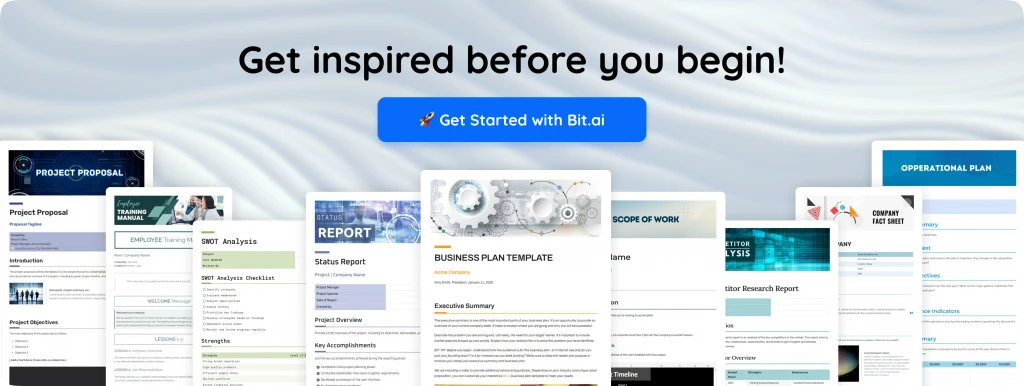
5. Improves Emotional Balance and Cognitive Control
Offloading is not only smart; it also provides peace of mind. The more you offload, the more settled and in control your brain feels; your mental clutter decreases naturally, which helps with anxiety, and enables you to remain engaged and grounded— even on the most hectic of days.
Pro Tip:
The idea of freeing your mind from clutter isn’t about forgetfulness; it’s actually a strategy toward clarity, creativity, and confidence.
Next, let’s discuss how this principle of offloading your thoughts and worries can, in fact, lower stress levels and support overall mental well-being.
How Cognitive Offloading Helps You Stay Calm and Mentally Balanced?
You know that feeling when your brain simply won’t stop racing, ideas and tasks and worries all hollering for attention at once? That’s mental overload. And it doesn’t just drain your focus; it drains your peace.
Cognitive offloading is more than a productivity trick; it’s a stress management technique masquerading as an organization. Far from running away from responsibility by offloading your thoughts, you are merely giving your mind the structure it needs to rest.
Every time you write something down, capture an idea, or organize your day digitally, you’re taking pressure off of your working memory. That small act tells your brain, “You don’t have to hold it all anymore.” And that’s when real calm begins.
Getting stuff out of your head can really help you think straight and feel relaxed. It stops you from worrying too much, take a breath, and just be in the now. Doing this regularly can calm your nerves, help you sleep better, and make you better at handling everyday stress.

Stats:
According to a meta-analysis of 31 studies published in Frontiers in Psychology (2023), expressive writing — a common form of cognitive offloading — led to an average 16% improvement in emotional well-being and a measurable reduction in stress-related symptoms.
Next up: Meet the tool that gives your brain a breath of fresh air in the form of Bit.ai, the AI-powered workspace where cognitive offloading becomes the ultimate creative superpower.
Meet Bit.ai — Your AI Workspace for Effortless Cognitive Offloading
Imagine this: Your desk is clear, your mind is calm, and the ideas are flowing. No scattered notes, no endless searching. Just focus and flow.
That’s the magic of Bit.ai.
AI-powered docs, wikis, and knowledge management platform built for modern teams who want to think less about managing information and more about creating it.

Bit.ai acts as your second brain in a world overbrimming with information. It helps you capture knowledge in a snap, structure your work really beautifully, and collaborate seamlessly so that your mind stays light and focused on the things that truly matter.
Here’s how Bit.ai helps you master cognitive offloading ?
1. Store and Organize Ideas Effortlessly
Bit.ai provides a single intelligent hub for your notes, links, and documents. All categorized, searchable, and instantly accessible, so your thoughts are always at your fingertips, not buried in some tab or folder. The intelligent workspace design helps you offload ideas and retrieve them at the exact moment you need them.
2. Collaborate Without the Cognitive Chaos
Team projects create information overload: an endless number of emails, version mismatches, and scattered updates. Bit.ai eliminates that clutter by letting your team co-edit in real time, leave contextual comments, and share documents effortlessly. It turns teamwork into a well-choreographed exercise that frees up more time and reduces stress.
3. AI Genius Writer for Instant Cognitive Relief
Need a little help with your writing? Check out Bit.ai’s AI Genius Writer. It can help you write reports, sum up what you’ve researched, or change how you talk about ideas. It works with you as you write. Think of it as an AI helper that can take care of the boring writing tasks, so you can put more thought into being creative and strategic.
4. Converting Knowledge to Actionable Insights
Instead of juggling a lot of disconnected files and resources, Bit.ai connects everything in one structured ecosystem. You can embed videos, charts, and docs to turn stale information into interactive knowledge hotspots. This is quite a potent way to convert stored content into usable and shareable intelligence across your organization.
5. Manage Projects and Track Progress Intuitively
Bit.ai isn’t just about the notes; it is about execution. Create project docs, assign tasks, track milestones, and keep everyone aligned without switching tools. With its built-in task tracking, smart document sharing, and version history, Bit keeps your project transparent and organized so that your workflow runs seamlessly from start to finish.
Pricing
Bit.ai has a free plan available that includes some basic features, and premium plans begin at $8/user/month for powerful AI tools, automation, and collaboration options for growing teams.
Next up: Let’s see how you could put cognitive offloading into practice in your everyday life, step by step.

Read more:
How to Integrate Cognitive Offloading Into Your Daily Workflow
Now that you understand what cognitive offloading can do for your mind and how Bit.ai helps in making it effortless, let’s get into action.
Think of this section as your offloading starter kit. You don’t need a giant system overhaul, nor hours of setup; you just need small, intentional habits that make offloading a natural part of your day. ?️
Let’s walk through the steps:
Step 1: Identify Your Mental Bottlenecks
First, think about what makes your mind feel busy. Is it remembering what to do each day? Managing projects at work? Keeping track of ideas? If so, these are things that would get better if you didn’t have to keep them all in your head. Once you know what those things are, you can start putting them into a system outside of your mind to keep them organized.
Ask yourself, “What’s something I think about repeatedly that I could instead write down or automate?”
Step 2: Select a Single Reliable Tool and Have Patience
Variety is overrated. Pick one good tool-a favorite, like Bit.ai, and make it your single source of truth for all your notes, docs, and ideas. When everything lives in one ecosystem, your brain expends less energy searching across a bunch of apps.
Bit.ai brings your thoughts, documents, and projects all into one place to help your team stay on track with what matters most.
Step 3: Externalize Your Thoughts in Real Time
Don’t let ideas linger in your head. The moment something strikes you-a new idea, a task, an insight-write it out, record it, or save it digitally. Think of this as mental decluttering in action.
Even a 30-second note can save hours of cognitive strain later. Offloading is not about memory; it’s about momentum.
Step 4: Create a System You’ll Actually Use
The best system isn’t the fanciest – it’s the one you’ll stick to. Organize your offloaded information in a way that makes sense to you, be it into folders, tags, or categories.
Examples include:
- project workspace
- A folder for personal learning
- A note, for ideas in progress
Bit.ai’s smart organization features make it easy to create that flow, without overcomplicating things.
Step 5: Review and Refresh Regularly
Your brain updates constantly; your system should too. Devote a few minutes weekly to reviewing, deleting, or reorganizing notes. This will keep your digital mind sharp, clean, and aligned with your goals.
Pro Tip:
Schedule a “Mental Clean-up” every Friday. Just 10 minutes of cleaning up can reset your focus going into the week ahead.
Put these small steps together, and cognitive offloading is no longer just a productivity hack; it’s a mindset. And when your tools and habits align, creativity, clarity, and calm start to thrive naturally.
Next up: Let’s bring it all home — how cognitive offloading transforms not just your workflow, but the way you think in its entirety.
Wrapping Up: Free Your Mind to Do What Matters Most
If there’s one truth that defines our modern world, it’s this: our brains are overwhelmed. Too many tabs, too many tasks, too many thoughts competing for attention. But the answer isn’t to think harder, it’s to think smarter.
That’s the real power of cognitive offloading: it’s not about giving your brain a break, it’s about giving it space to thrive. When you learn to shift the mental clutter into systems and tools that work for you, your focus sharpens, your creativity expands, and your stress melts away.
And this is where Bit.ai shines brightest: It’s not just a productivity tool; it’s your thinking partner.
Bit.ai is changing chaos into clarity with AI-enabled workspaces, smart organization, and collaboration in real-time. It’s freeing your brain up to do what it was designed for: creating, problem-solving, and imagining what’s next.
So the next time your mind feels full, remember: you don’t need to carry it all. You just need the right system to hold it for you.
Your thoughts need room to grow, and your ideas deserve structure.
And your brain deserves a break. ?
Because when you free your mind, you make space for your best work — and that’s when real creativity begins.
FAQs
Q1. What are the benefits of cognitive offloading?
It helps clear mental clutter by shifting information from your brain to external tools. You get sharper focus, better creativity, and less stress. Your mind can think, not just remember.
Q2. How does stress affect cognitive thinking?
Stress overloads the working memory, making it hard to focus or make clear decisions. Offloading your thoughts and tasks helps restore balance and keeps your thinking calm and clear.
Q3. What are some examples of cognitive offloading tools?
Examples include note-taking apps, project managers, and AI workspaces like Bit.ai. They make it easier for you to organize your ideas, store knowledge, and reduce mental load.
Q4. Does cognitive offloading improve productivity?
Yes, it does! Offloading strengthens focus and decision-making by clearing the mind of several mental tasks. It lets you get more done — without feeling mentally drained.